
⚠️Not updated in over 2 years ⚠️Requests 1 sensitive permission
Description
⬇️ Easy to set up ⬇️:
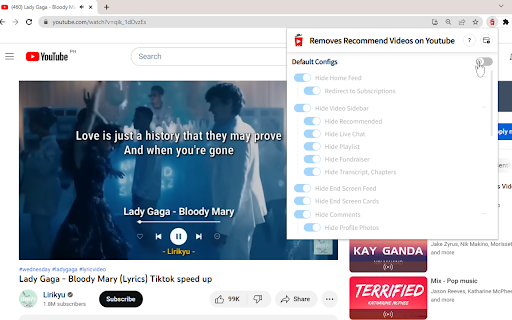
1. Install and add the extension to Chrome.
2. If you cannot see the icon, click to the right of the URL bar. Then, click 📌 to pin Unhook.
3. Click on the power button to turn on/off.
4. Choose from the menu what to disable to customize your own YouTube experience.
✨ Features ✨
1. Ability to turn off end-screen video suggestions, user comments, homepage related videos, feed, trending tab, autoplay or annotations, and more.
2. Compatible with mobile YouTube.
3. Dark mode.
Hide distractions related videos, comments, shorts tab, suggestions wall, homepage recommendations, trending, and other while watching a video 🎥 on YouTube.


Reviews
Loading reviews...
Permissions (2)
Permissions
storageℹ Can store data locally in your browser webRequestℹ Can observe and analyze network traffic
Details
| Version | 0.0.1 |
| Updated | Dec 30, 2022 |
| Size | 61.1KiB |
| First Seen | Mar 22, 2026 |
Popular in workflow

Adobe Acrobat: PDF edit, convert, sign tools
by Adobe Inc.
330M
★ 4.40
workflow
330M
★ 4.40
workflow

Chrome Remote Desktop
by Chrome Remote Desktop Release Managers
38M
★ 3.14
workflow
38M
★ 3.14
workflow

Screencastify - Screen Video Recorder
by castify-ext-dev
9M
★ 3.95
workflow
9M
★ 3.95
workflow

Mendeley Web Importer
by Mendeley
3M
★ 2.25
workflow
3M
★ 2.25
workflow

Microsoft Defender Browser Protection
by Microsoft Corporation
2M
★ 4.15
workflow
2M
★ 4.15
workflow
Popular Extensions
Adobe Acrobat: PDF edit, convert, sign tools
by Adobe Inc.
330M
★ 4.40
workflow
330M
★ 4.40
workflow
Chrome Remote Desktop
by Chrome Remote Desktop Release Managers
38M
★ 3.14
workflow
38M
★ 3.14
workflow

Cisco Webex Extension
by cisco.chromestore
24M
★ 2.34
social
24M
★ 2.34
social

Kami for Google Chrome™
by Kami
17M
★ 4.56
education
17M
★ 4.56
education

Read&Write for Google Chrome™
by Texthelp
17M
★ 3.44
accessibility
17M
★ 3.44
accessibility