Tab Master 5000 icon

Tab Master 5000

by jaszhix

v2.11.0 Updated Jun 3, 2024 6.08MiB
CWS
3K
Users
★ 3.82
51 reviews
#2721
of 49.1K
functionality
#73 of 1.5K
⚠️Not updated in over a year ⚠️Requests 2 sensitive permissions

Description

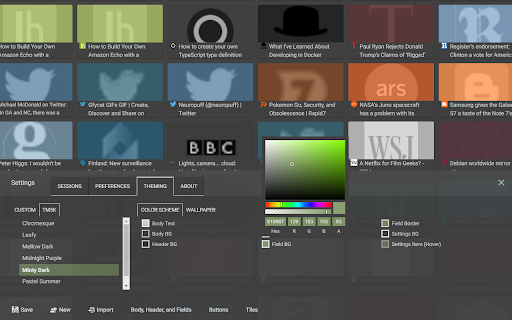
Tab Master 5K replaces your New Tab page with a full-featured tabs, history, bookmarks, apps, extensions, and sessions manager. --- Features -- Tabs - Close, pin, and mute tabs from your New Tab page. - Re-order tab tiles by dragging and dropping them. - Close all tabs from a specific website. - Close duplicate tabs, and optionally make them pulsate. - Manage tabs through icons, the right click menu, or through a table view. - Search tabs in the top search bar. - Option to sort tabs by website or alphabetical order, and apply the order to your Chrome window. - Option to view tabs across all windows. - Automatically discard tabs from memory and customize how long they have to be inactive to trigger it. -- Customization - Full control of the New Tab's appearance with a flexible theme editor. - Import any wallpaper as a background. - Adjust the size of the grid tiles. - View a screenshot of each tab in the grid. - Enable screenshots to cover the background of a New Tab page when you hover over a tab tile. You can adjust the strength of the blur and opacity of backgrounds in Preferences. -- Session Management - Session manager built in for saving and restoring your current tab sessions. - Synchronize your saved sessions, and keep them persistently updated with the current Chrome window. - Tab sessions can be exported and imported. - View, sort, and filter your session tabs as tiles in the grid view. -- Chrome Management - View, sort, and filter your bookmarks, history, apps and extensions as tiles in the grid view. You can change how apps launch, create app shortcuts, enable/disable, or uninstall them. - Quickly navigate the extension with keyboard shortcuts. - Undo tab actions by pressing CTRL+Z, or through the context menu while a New Tab page is open. - Add websites you do not want to view to a comma separated blacklist in Settings -> Preferences. Websites added to the blacklist will have their tabs closed under any circumstance. Please report any issues on this store page's Support tab. If you like this extension, or think it could be better, please rate it and leave feedback. You can also fork and pull request this extension on its public Github repository: https://github.com/jaszhix/tab-master-5000-chrome-extension
Tab Master 5000 screenshot 1Tab Master 5000 screenshot 2Tab Master 5000 screenshot 3Tab Master 5000 screenshot 4Tab Master 5000 screenshot 5

Reviews (12 cached)

★☆☆☆☆2023-07-27
Emmanuel

TOO...MANY...BUGS. The extension hasn't been updated in over 2 years. DO NOT INSTALL!!! This extension is dead.

★☆☆☆☆2022-05-17
Xalomon

Restoring a session doesn't work like Chrome's History>Recently Closed does, where all tabs are brought back suspended without problems. The extension instead will bring each tab and try to load it in memory, when there's too many tabs they can't fit in memory making the browser hang.

★★☆☆☆2022-07-17
Elienai Assis

It should be a preview of the page contents... most sites don't have a cool or high-res icon...

★★☆☆☆2020-08-16
Artemi Lebedev

High cpu usage and no window grouping

★★★☆☆2021-12-05
Daniel Mikołajczyk

Settings don't save - screenshot settings to thumbnail, resets when you close browser. Same as in earlier comments: - a slider would be useful; - ability to find duplicates; - ability to add to groups (change group colour, folder); - ability to add to favourites.

★★★☆☆2021-10-30
Jim Nidositko

This extension looks very nice, but it seems to have a huge bug. When there are many windows, it does not properly scroll down past the first page in the session manager. The scroll anchor moves, but the context does not move. It stays stuck on the first page.

★★★☆☆2021-02-14
양태호

I have many bookmarks. So It's good to use. But I'm not good to use this app.

★★★☆☆2019-06-04
Terrn Lister

The bookmarks part needs some work, since I have my bookmarks all sorted into folders, but it shows everything as a single list that cannot be collapsed or hidden. Quite annoying.

★★★☆☆2019-05-19
J K

Maybe good concpet... but I hope it can have it own page instead of taking over my new tab page

★★★☆☆2019-04-15
wa da

I don't know how to use it

★★★☆☆2019-03-15
Lesia

Am I missing something? I cannot use the extension, it only allows options where I can toggle on and off about 20 settings. But I can't get to the actual program with all the features, the program in the pic above. I cannot access it. Where is it?! I click on the extension, nothing. Click on options, nothing. Tried to find their website, nothing. Where is the program so I can do all the features in the overview?

★★★☆☆2017-04-06
Marcin Chmiel

It seemed fine until I identified this extension as a major performance drawback. This is especially apparent when scrolling pages.

Permissions (8)

Permissions

activeTab Can access the current tab when you click the extension bookmarks Can read and modify your bookmarks downloads Can manage and monitor downloads history Can read and modify your browsing history management Can manage other installed extensions storage Can store data locally in your browser tabs Can see your open tabs and their URLs unlimitedStorage

Details

Version 2.11.0
Updated Jun 3, 2024
Size 6.08MiB
First Seen Mar 22, 2026

