
⚠️Not updated in over 2 years
Description
A simple Chrome extension that displays the ratings of each NYU professor for each course on Albert! Works with professors across all NYU schools, including Tandon, Steinhardt, etc.
How this extension works:
1. Go to any of your courses page on Albert (not your home page).
2. Click on the extension on your toolbar.
3. Click "Click to Show Ratings" button.
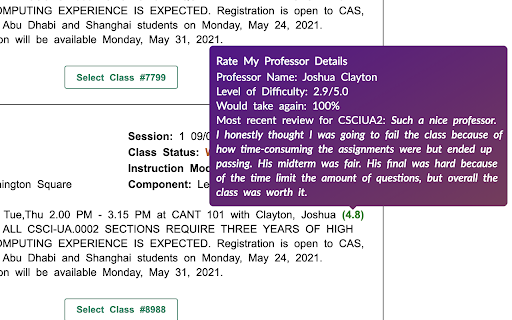
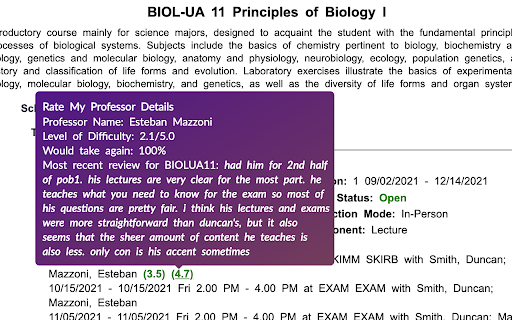
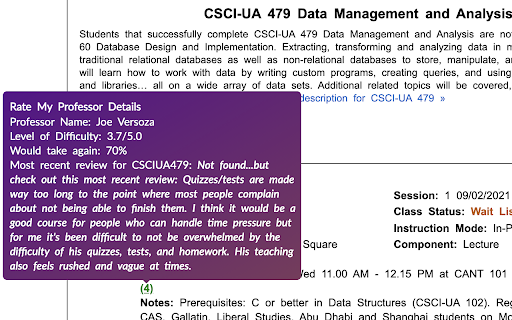
4. If there is any rating found for that professor, the number will show up next to their name. If no ratings found, it will show N/A.
5. Click on the rating to go to their rate my professor page. Click on N/A to give them the first rating.
6. Hover over their rating to see more details.
7. Enjoy selecting all your courses! ;)

Reviews
Loading reviews...
Permissions (2)
Permissions
activeTabℹ Can access the current tab when you click the extension scriptingℹ Can inject scripts into web pages
Details
| Version | 1.3.7 |
| Updated | Apr 7, 2023 |
| Size | 1.08MiB |
| First Seen | Mar 22, 2026 |
Popular in workflow

Adobe Acrobat: PDF edit, convert, sign tools
by Adobe Inc.
330M
★ 4.40
workflow
330M
★ 4.40
workflow

Chrome Remote Desktop
by Chrome Remote Desktop Release Managers
38M
★ 3.14
workflow
38M
★ 3.14
workflow

Microsoft Power Automate
by Microsoft Corporation
10M
★ 1.99
workflow
10M
★ 1.99
workflow

Screencastify - Screen Video Recorder
by castify-ext-dev
9M
★ 3.95
workflow
9M
★ 3.95
workflow

Mendeley Web Importer
by Mendeley
3M
★ 2.25
workflow
3M
★ 2.25
workflow
Popular Extensions
Adobe Acrobat: PDF edit, convert, sign tools
by Adobe Inc.
330M
★ 4.40
workflow
330M
★ 4.40
workflow
Chrome Remote Desktop
by Chrome Remote Desktop Release Managers
38M
★ 3.14
workflow
38M
★ 3.14
workflow

Cisco Webex Extension
by cisco.chromestore
24M
★ 2.34
social
24M
★ 2.34
social

Kami for Google Chrome™
by Kami
17M
★ 4.56
education
17M
★ 4.56
education

Read&Write for Google Chrome™
by Texthelp
17M
★ 3.44
accessibility
17M
★ 3.44
accessibility