
TabVault AI - Privacy-First Smart Tab Manager
v1.0.0 Updated Feb 1, 2026 550KiB
Description
**Organize your browser tabs intelligently - powered by AI, protected by privacy.**
### 🔥 The Problem
You open a few tabs for work, some for research, a couple for shopping... suddenly you have 50+ tabs across 4 windows. Finding anything takes forever. Your browser is slow. You're distracted by tabs you forgot to close.
### ✨ The Solution
TabVault AI intelligently groups your tabs into meaningful categories automatically:
- **Development** (blue) - GitHub, Stack Overflow, docs, npm packages
- **Research & Reference** (green) - Wikipedia, Medium, academic papers
- **Entertainment** (pink) - YouTube, Reddit, streaming
- **Shopping** (orange) - Amazon, Etsy, shopping carts
- **Social Media** (cyan) - Facebook, Instagram, X/Twitter
- **Work & Productivity** (yellow) - Notion, Slack, Jira
- **News** (red) - BBC, CNN, TechCrunch
- **Other** (grey) - Everything else
### 🚀 How It Works
1. **Click TabVault AI icon** in your toolbar
2. **Click "Analyze All Tabs"** (or select specific tabs)
3. **Wait 2-3 seconds** - AI analyzes and categorizes your tabs
4. **Done!** Your tabs are now organized into smart, color-coded groups
**IMPORTANT NOTE ON AI AVAILABILITY:**
TabVault AI utilizes Chrome's cutting-edge Built-in AI (Gemini Nano). Since this is a new technology, it is currently rolling out progressively to Chrome users (v130+).
- **If AI is ready on your device:** TabVault AI uses premium LLM analysis for deep semantic categorization.
- **If AI is still coming to your device:** TabVault AI automatically uses our advanced, lightning-fast **Rule-Based Smart Grouping** so you never miss a beat. All features work 100% on every version!
**Why our Local AI is better:**
- ✅ All AI processing happens on your device (100% local)
- ✅ No data is sent to cloud servers
- ✅ No account or login required
- ✅ Works offline (after initial AI model download)
- ✅ Your browsing stays private
- ✅ Zero latency - no waiting for API responses
**Privacy First:**
Unlike other AI-powered tools, TabVault AI never uploads your tabs to external servers. We don't track you, don't collect data, and don't show ads. Your tabs belong to you - not us.
### 🎯 Key Features
**Smart Tab Grouping**
- One-click AI analysis of all open tabs
- Intelligent categorization into 7+ categories
- Automatic color-coding for easy recognition
- Selective grouping (organize only what you want)
**Tab Management**
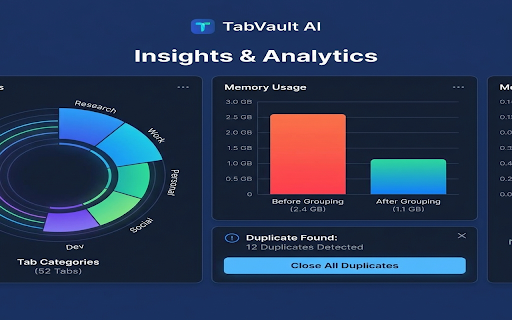
- Duplicate tab detection
- Real-time tab statistics
- Insights dashboard (usage patterns, suggestions)
- Window and group management
- Context menu integration (right-click → "Group Similar Tabs")
**Privacy & Security**
- 100% local AI processing
- No cloud uploads or external API calls
- No account required
- No tracking, analytics, or ads
- Manifest V3 compliant (modern, secure)
**Smart Insights**
- High tab count warnings
- Duplicate tab suggestions
- Top-used domains
- Window consolidation tips
- Idle state cleanup suggestions
### 📊 Use Cases
**For Developers:**
- Organize GitHub repos, Stack Overflow questions, and docs into "Development"
- Keep research papers separate from code examples
- Quick access to all project tabs
**For Researchers:**
- Group Wikipedia, academic papers, and Medium articles into "Research"
- Separate shopping distractions from serious reading
- Find relevant tabs instantly
**For Casual Users:**
- Organize YouTube, Reddit, and social media into "Entertainment"
- Keep shopping tabs together for easy price comparison
- Reduce browser memory usage
### 🔧 Technical Details
- **Chrome Extension:** Manifest V3 (modern, secure framework)
- **Chrome Version:** 130+ required for AI features (works on older versions with rule-based fallback)
- **Permissions:** tabs, tabGroups, storage, idle (minimal and necessary only)
- **Size:** ~64 KB (lightweight)
- **Dependencies:** None (pure vanilla JavaScript)
- **AI Processing:** Hybrid Engine (Chrome Built-in AI + Regex-based Smart Logic)
- **Network Requests:** None (100% air-gapped local processing)
### 🌟 What Users Say
*"I had 80 tabs open and my browser was crashing. TabVault AI organized everything into 8 clean groups in seconds. Game changer!"*
*"Finally an AI tool that doesn't send my data to cloud. The categorization is spot on."*
*"Simple, fast, and private. Exactly what I needed."*
### 🎁 Free Features
All core features are 100% free:
- ✅ Smart tab grouping (AI + rule-based)
- ✅ Tab insights and statistics
- ✅ Duplicate detection
- ✅ Real-time tab count badge
- ✅ Privacy-first local processing
- ✅ No account required
- ✅ No limits, no restrictions
### 📚 Documentation & Support
- **Quick Start Guide:** Get started in 30 seconds
- **Detailed Installation:** Step-by-step instructions
- **Privacy Policy:** Comprehensive data handling transparency
- **Troubleshooting:** Common issues and fixes
### 🛡️ Privacy Commitment
At TabVault AI, your privacy is non-negotiable:
- ❌ No account or registration
- ❌ No cloud data uploads
- ❌ No tracking or analytics
- ❌ No third-party data sharing
- ❌ No ads or sponsored content
- ✅ All AI processing is local
- ✅ Your tabs stay on your device
- ✅ Open source transparency (coming soon)
### 🔮 What's Next
**Planned Features:**
- Keyboard shortcuts for quick actions
- Custom category creation
- Category color customization
- Cross-device sync (optional, user-controlled)
- Advanced analytics and reporting
- Integration with productivity apps
### 🚀 Get Started
**Install in 30 seconds:**
1. Visit chrome://extensions/
2. Enable "Developer mode"
3. Click "Load unpacked"
4. Select TabVault AI folder
5. Click the icon and start organizing!
**Or wait for Chrome Web Store release:**
Search for "TabVault AI" in the Chrome Web Store.
### 💬 Feedback & Support
We're a small team passionate about privacy and productivity. Your feedback helps us improve:
- **GitHub:** [Submit issues and feature requests]
- **Email:** support@tabvault.ai
- **Reviews:** Rate us on Chrome Web Store
---
**Reclaim your browser. Stay productive. Keep your tabs private.**
**TabVault AI** - Smart organization, zero compromise on privacy.


Reviews
Loading reviews...
Permissions (6)
Permissions
contextMenusℹ Can add items to the right-click menu idleℹ Can detect when you're away from the computer notificationsℹ Can show desktop notifications storageℹ Can store data locally in your browser tabGroupsℹ Can organize tabs into groups tabsℹ Can see your open tabs and their URLs
Details
| Version | 1.0.0 |
| Updated | Feb 1, 2026 |
| Size | 550KiB |
| First Seen | Mar 22, 2026 |
Popular in tools

Monica: All-In-One AI Assist & Smartest AI Agent
by Monica Team
3M
★ 4.89
tools
3M
★ 4.89
tools

Ad Blocker: Stands AdBlocker
by Stands
3M
★ 4.79
tools
3M
★ 4.79
tools

Google Dictionary (by Google)
by dictionary-extension-dev
3M
★ 4.36
tools
3M
★ 4.36
tools

WPS浏览器助手:文档在线阅读编辑
by 金山PDF
2M
★ 2.90
tools
2M
★ 2.90
tools

Pie Adblock - A Powerful Free Ad Blocker
by Pie Extensions
2M
★ 4.90
tools
2M
★ 4.90
tools
Popular Extensions

Adobe Acrobat: PDF edit, convert, sign tools
by Adobe Inc.
330M
★ 4.40
workflow
330M
★ 4.40
workflow

Chrome Remote Desktop
by Chrome Remote Desktop Release Managers
38M
★ 3.14
workflow
38M
★ 3.14
workflow

Cisco Webex Extension
by cisco.chromestore
24M
★ 2.34
social
24M
★ 2.34
social

Kami for Google Chrome™
by Kami
17M
★ 4.56
education
17M
★ 4.56
education

Read&Write for Google Chrome™
by Texthelp
17M
★ 3.44
accessibility
17M
★ 3.44
accessibility