
XTag Google Analytics: Record & check UA,GA4
v9.0.0 Updated Jun 17, 2025 298KiB
⚠️Requests 1 sensitive permission
Description
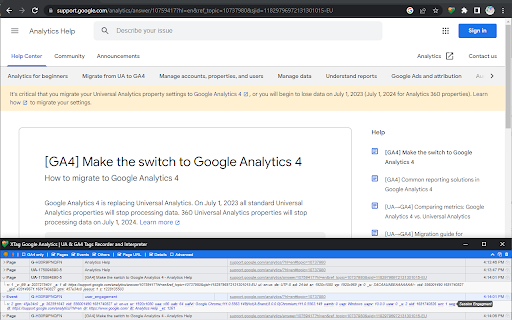
XTag for Google Analytics allows to collect, detail and categorize all Universal Analytics and GA4 tags.
Extension icon:
• Click on grayed icon to start tag recording and highlight the icon. Navigate any GA-tracked website.
• If an Adblocker prevents tag firing, it's not displayed but copied to the clipboard while you're notified.
• Click highlighted icon again to reopen the extension window.
• Closing the extension window ends recording and grays out the icon.
Extension window:
• Click Orange LED icon to pause/resume recording.
• Click Bolt icon to toggle window popup on each tag.
• Check "GA4 only" to ignore legacy UA tags.
» Note: even hidden, UA tags are still recorded, so they will be displayed when unchecked.
• Toggle "Pages" or "Events" or "Others" (Display advertising, Timing...) to show/hide them.
» Note: even hidden, tags are still recorded, so they will be displayed when checked again.
• Check "Page URL" to see the URL that triggered the tag.
• Check "Details" to see a selection of data.
• Check "Advanced" to see all data.
• Click on chevron to collapse control bar (or double click anywhere on it), click on collapsed bar to expand it.
• Double-click on tag type or click on its arrow to show/hide all its details.
• Right-click on main tag values to copy them.
• Mouse hover advanced details to see parameters meaning.
• Click Copy icon to copy tags summaries as TSV (Excel).
• Click Table icon to copy tags queries as TSV (Excel).
• Click on Copy icon on row's left to copy only this tag summary, without header.
• Click Trash icon to clear all recorded tags (after confirmation).
Reviews
Loading reviews...
Permissions (6)
Permissions
activeTabℹ Can access the current tab when you click the extension clipboardReadℹ Can read from your clipboard clipboardWriteℹ Can write to your clipboard storageℹ Can store data locally in your browser tabsℹ Can see your open tabs and their URLs webRequestℹ Can observe and analyze network traffic
Details
| Version | 9.0.0 |
| Updated | Jun 17, 2025 |
| Size | 298KiB |
| First Seen | Mar 22, 2026 |
Popular in workflow

Adobe Acrobat: PDF edit, convert, sign tools
by Adobe Inc.
330M
★ 4.40
workflow
330M
★ 4.40
workflow

Chrome Remote Desktop
by Chrome Remote Desktop Release Managers
38M
★ 3.14
workflow
38M
★ 3.14
workflow

Microsoft Power Automate
by Microsoft Corporation
10M
★ 1.99
workflow
10M
★ 1.99
workflow

Screencastify - Screen Video Recorder
by castify-ext-dev
9M
★ 3.95
workflow
9M
★ 3.95
workflow

Mendeley Web Importer
by Mendeley
3M
★ 2.25
workflow
3M
★ 2.25
workflow
Popular Extensions
Adobe Acrobat: PDF edit, convert, sign tools
by Adobe Inc.
330M
★ 4.40
workflow
330M
★ 4.40
workflow
Chrome Remote Desktop
by Chrome Remote Desktop Release Managers
38M
★ 3.14
workflow
38M
★ 3.14
workflow

Cisco Webex Extension
by cisco.chromestore
24M
★ 2.34
social
24M
★ 2.34
social

Kami for Google Chrome™
by Kami
17M
★ 4.56
education
17M
★ 4.56
education

Read&Write for Google Chrome™
by Texthelp
17M
★ 3.44
accessibility
17M
★ 3.44
accessibility