
Description
Capture What You Want, Keep What You Need, Build Your Knowledge Tree. This product REQUIRES you to run a self-hosted version of the backend or use a cloud version of the API in order to archive your data.
OSINT LIAR is an advanced digital archiving tool and archives the following facts from your digital captures:
* Screenshot
* MHTML
* HTML
* Captured on date
* Title of the webpage
* Url of the webpage
* Who did the capture
* Digital verification signature
Once the capture has been sent to the backend API for storage, advanced algorithms are applied depending upon the origination of your capture. These algorithms can be customized to meet your needs. The algorithms are referred to as Discovery Plugins. The plugins can extract images, links, specific data from elements from the your digital capture.
The plugins can also provide recommendations on "annotated" data. The annotations include the ability to identify critical keywords, phone numbers, email, addresses, etc.. and suggests websites that can provide further context to your annotated data pivots.
To learn more about the product and how it can help with your digital archival needs visit our website, https://osintliar.com/ , or learn more about what the technical aspects about the product and how it can be integrated with other services or workflow providers go to: https://github.com/osint-liar/osint-liar-docs/wiki
Other included features are:
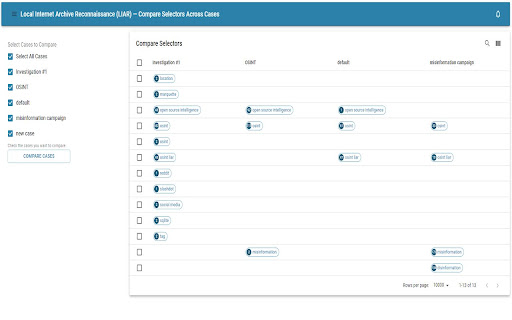
* Case Management
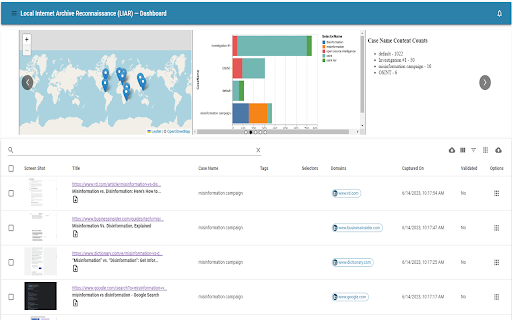
* Dashboard data visualization
* Custom reporting templates
* 3rd Party rest integration
* Full text search
* Data import and export functionality
* Imports zip files - it is a crude digital forensics tool, too
* SQL API endpoint for writing custom data queries
* Autoscroll captures
OSINT LIAR is FREE for personal use. It does not require registration to use OSINT LIAR, it just requires this extension and an associated backend API.
Change Log
[1.8.0]
- Added package manager support. Dynamically add web scrapers and OSINT guides as you go. Learn More here, https://github.com/osint-liar/osint-liar-docs/wiki/Package-Manager
- Added map, datetime, and recipient icons to dashboard
- Added larger tooltip to dashboard icons
- Fixed persisting authorization bearer token
[1.7.3]
- Improved Market place and Classified scraper algorithms
[1.7.1]
- Fixed SearchText bug
- Added Updated By field in the data integrity dialog
- Fixed jumping UI bug
- Turned Download and Open Live Page off when opening all plugins
[1.7.0]
- Optimized frontend refreshes
- Updated Dashboard icons for consistency
- Added Data Integrity table that shows the content's sha hash and file size
[1.6.6]
- Use Monaco editor for scripting
- Easy selector delete on dashboard was added
- View audit log for a record
- Improved consistency of the UI
[1.6.5]
- ctrl+shift+s saves a single page
- ctrl+shift+z starts autoscroll capture
- ctrl+shift+x stops autoscroll capture
- disabled highlight selectors
Reviews
Loading reviews...
Permissions (5)
Permissions
activeTabℹ Can access the current tab when you click the extension contextMenusℹ Can add items to the right-click menu downloadsℹ Can manage and monitor downloads pageCaptureℹ Can save web pages as MHTML storageℹ Can store data locally in your browser
Details
| Version | 1.8.1 |
| Updated | Apr 3, 2025 |
| Size | 6.57MiB |
| First Seen | Mar 22, 2026 |
Popular in tools

Monica: All-In-One AI Assist & Smartest AI Agent
by Monica Team
3M
★ 4.89
tools
3M
★ 4.89
tools

Ad Blocker: Stands AdBlocker
by Stands
3M
★ 4.79
tools
3M
★ 4.79
tools

Google Dictionary (by Google)
by dictionary-extension-dev
3M
★ 4.36
tools
3M
★ 4.36
tools

WPS浏览器助手:文档在线阅读编辑
by 金山PDF
2M
★ 2.90
tools
2M
★ 2.90
tools

Pie Adblock - A Powerful Free Ad Blocker
by Pie Extensions
2M
★ 4.90
tools
2M
★ 4.90
tools
Popular Extensions

Adobe Acrobat: PDF edit, convert, sign tools
by Adobe Inc.
330M
★ 4.40
workflow
330M
★ 4.40
workflow

Chrome Remote Desktop
by Chrome Remote Desktop Release Managers
38M
★ 3.14
workflow
38M
★ 3.14
workflow

Cisco Webex Extension
by cisco.chromestore
24M
★ 2.34
social
24M
★ 2.34
social

Kami for Google Chrome™
by Kami
17M
★ 4.56
education
17M
★ 4.56
education

Read&Write for Google Chrome™
by Texthelp
17M
★ 3.44
accessibility
17M
★ 3.44
accessibility