
⚠️Requests 1 sensitive permission
Description
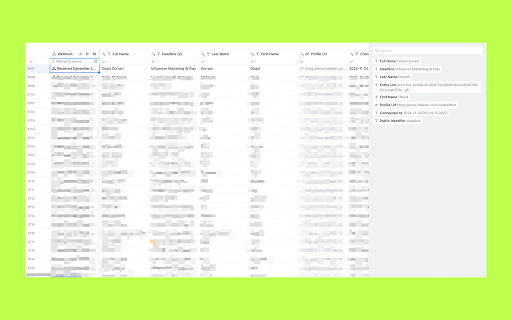
Sync your LinkedIn connections directly to Clay with one click.
What it does:
Exports your LinkedIn connections to any Clay webhook
Delta sync - only sends new connections after the first sync
Runs in the background - start a sync and close the popup
Your data stays yours - everything runs in your browser, no external servers
Data exported:
Full name
LinkedIn headline
Profile URL
Connection date
How to use:
Log into LinkedIn in Chrome
Click the extension icon
Paste your Clay webhook URL
Click "Sync Connections"
How to get your Clay webhook URL:
Open the Clay table where you want to import contacts
Click "Sources" in the top menu
Select "Webhook"
Copy the webhook URL
Perfect for:
Sales teams building prospect lists
Recruiters managing talent pipelines
Anyone who wants their network in Clay


Reviews
Loading reviews...
Permissions (2)
Permissions
cookiesℹ Can read and modify browser cookies storageℹ Can store data locally in your browser
Details
| Version | 2.0.0 |
| Updated | Dec 23, 2025 |
| Size | 21.4KiB |
| First Seen | Mar 22, 2026 |
Popular in workflow

Adobe Acrobat: PDF edit, convert, sign tools
by Adobe Inc.
330M
★ 4.40
workflow
330M
★ 4.40
workflow

Chrome Remote Desktop
by Chrome Remote Desktop Release Managers
38M
★ 3.14
workflow
38M
★ 3.14
workflow

Microsoft Power Automate
by Microsoft Corporation
10M
★ 1.99
workflow
10M
★ 1.99
workflow

Screencastify - Screen Video Recorder
by castify-ext-dev
9M
★ 3.95
workflow
9M
★ 3.95
workflow

Mendeley Web Importer
by Mendeley
3M
★ 2.25
workflow
3M
★ 2.25
workflow
Popular Extensions
Adobe Acrobat: PDF edit, convert, sign tools
by Adobe Inc.
330M
★ 4.40
workflow
330M
★ 4.40
workflow
Chrome Remote Desktop
by Chrome Remote Desktop Release Managers
38M
★ 3.14
workflow
38M
★ 3.14
workflow

Cisco Webex Extension
by cisco.chromestore
24M
★ 2.34
social
24M
★ 2.34
social

Kami for Google Chrome™
by Kami
17M
★ 4.56
education
17M
★ 4.56
education

Read&Write for Google Chrome™
by Texthelp
17M
★ 3.44
accessibility
17M
★ 3.44
accessibility