
Description
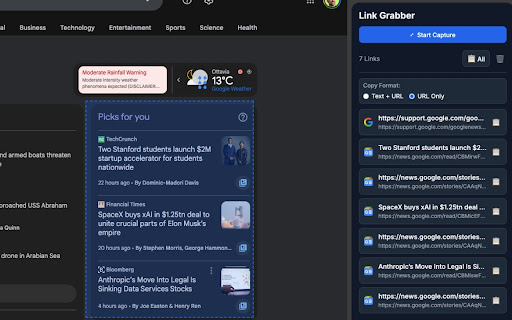
**Link Grabber & Dashboard** is a productivity tool that lets you visually select any area of a webpage and instantly collect every hyperlink found within that area into an organized side panel dashboard.
### How to use
1. Click the **Link Grabber** icon in the Chrome toolbar — the side panel dashboard opens on the right.
2. Press the **"Start Capture"** button in the side panel — a blue information banner appears at the top of the current webpage confirming selection mode is active.
3. On the webpage, **click and drag** to draw a rectangle over the area containing the links you want to capture — a blue dashed outline follows your selection.
4. **Release the mouse** — all hyperlinks found inside the selected area are automatically captured and displayed in the side panel dashboard. Each link shows the page title, full URL, and the website favicon.
5. Use the **📋 copy button** next to any link to copy it individually, or click **"📋 All"** to copy every captured link at once.
6. Switch between **"Text + URL"** (tab-separated format, ideal for spreadsheets) and **"URL Only"** using the copy format toggle.
7. Press **🗑️** to clear all captured links and start fresh.
8. Press **ESC** at any time during selection to cancel without capturing.
### Features
- Visual area selection with drag-to-select rectangle
- Side panel dashboard that stays open while you browse
- Website favicon displayed for each captured link
- Flexible copy formats: Text + URL (TSV) or URL Only
- Copy individual links or all links at once
- Automatic deduplication of captured URLs
- Dark mode support (adapts to system theme)
- Keyboard shortcut: ESC to cancel selection
- Works on all standard web pages (http and https)
Reviews
Loading reviews...
Permissions (3)
Permissions
activeTabℹ Can access the current tab when you click the extension sidePanel storageℹ Can store data locally in your browser
Details
| Version | 1.0 |
| Updated | Feb 10, 2026 |
| Size | 46.55KiB |
| First Seen | Mar 22, 2026 |
Popular in tools

Microsoft Bing Homepage & Search for Chrome
by Microsoft Corporation
4M
★ 3.72
tools
4M
★ 3.72
tools

Monica: All-In-One AI Assist & Smartest AI Agent
by Monica Team
3M
★ 4.89
tools
3M
★ 4.89
tools

Ad Blocker: Stands AdBlocker
by Stands
3M
★ 4.79
tools
3M
★ 4.79
tools

Google Dictionary (by Google)
by dictionary-extension-dev
3M
★ 4.36
tools
3M
★ 4.36
tools

WPS浏览器助手:文档在线阅读编辑
by 金山PDF
2M
★ 2.90
tools
2M
★ 2.90
tools
Popular Extensions

Adobe Acrobat: PDF edit, convert, sign tools
by Adobe Inc.
330M
★ 4.40
workflow
330M
★ 4.40
workflow

Chrome Remote Desktop
by Chrome Remote Desktop Release Managers
38M
★ 3.14
workflow
38M
★ 3.14
workflow

Cisco Webex Extension
by cisco.chromestore
24M
★ 2.34
social
24M
★ 2.34
social

Kami for Google Chrome™
by Kami
17M
★ 4.56
education
17M
★ 4.56
education

Read&Write for Google Chrome™
by Texthelp
17M
★ 3.44
accessibility
17M
★ 3.44
accessibility