
⚠️Not updated in over a year ⚠️Requests 1 sensitive permission
Description
Nowadays, businesses are commonly using phone numbers for Two-Factor authentication for their services.
There are a variety of ways to verify phone numbers, but a randomly generated one-time password (OTP) sent by SMS is one of the most common. Sending this code back to the service server demonstrates control of the phone number.
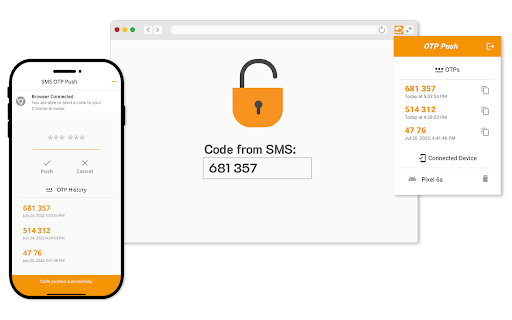
The current process disappoints users. Finding an OTP within an SMS message, then copying and pasting it to the form is bulky. The OTP Push lets receive code from a message and transfer it to the connected desktop browser. Chrome extension pastes received code to the input field.
The OTP Push helps you to transfer code from SMS to your desktop Chrome browser in an easy way. Just install the mobile app and Chrome extension from the official app stores. Scan the browser extension's QR code by the mobile app to connect your phone to desktop Chrome. Push the code from SMS to the connected browser.
It works with a lot of services supporting the SMS Two-Factor Authentication.


Reviews (1 cached)
★★☆☆☆2025-04-23
Miguel Rangel
Only copies and pastes the OTP to the app which then sends it to the Browser Extension but, no automation is incorporated. You still have to open the phone, be logged into the app and actually press PUSH in order for it to populate on the extension. I need to find a different solution.
Permissions (4)
Permissions
background identityℹ Can use your Google account identity managementℹ Can manage other installed extensions storageℹ Can store data locally in your browser
Details
| Version | 1.1.7 |
| Updated | Sep 18, 2024 |
| Size | 1.81MiB |
| First Seen | Mar 22, 2026 |
Popular in workflow

Adobe Acrobat: PDF edit, convert, sign tools
by Adobe Inc.
330M
★ 4.40
workflow
330M
★ 4.40
workflow

Chrome Remote Desktop
by Chrome Remote Desktop Release Managers
38M
★ 3.14
workflow
38M
★ 3.14
workflow

Screencastify - Screen Video Recorder
by castify-ext-dev
9M
★ 3.95
workflow
9M
★ 3.95
workflow

Mendeley Web Importer
by Mendeley
3M
★ 2.25
workflow
3M
★ 2.25
workflow

Microsoft Defender Browser Protection
by Microsoft Corporation
2M
★ 4.15
workflow
2M
★ 4.15
workflow
Popular Extensions
Adobe Acrobat: PDF edit, convert, sign tools
by Adobe Inc.
330M
★ 4.40
workflow
330M
★ 4.40
workflow
Chrome Remote Desktop
by Chrome Remote Desktop Release Managers
38M
★ 3.14
workflow
38M
★ 3.14
workflow

Cisco Webex Extension
by cisco.chromestore
24M
★ 2.34
social
24M
★ 2.34
social

Kami for Google Chrome™
by Kami
17M
★ 4.56
education
17M
★ 4.56
education

Read&Write for Google Chrome™
by Texthelp
17M
★ 3.44
accessibility
17M
★ 3.44
accessibility