YouTube Inline Fullscreen icon

YouTube Inline Fullscreen

by doubleyoustew

v1.3.8 Updated Feb 27, 2026 34.59KiB
CWS
8K
Users
★ 4.42
80 reviews
#1541
of 41.8K
tools
#295 of 10.4K
Recently updated

Description

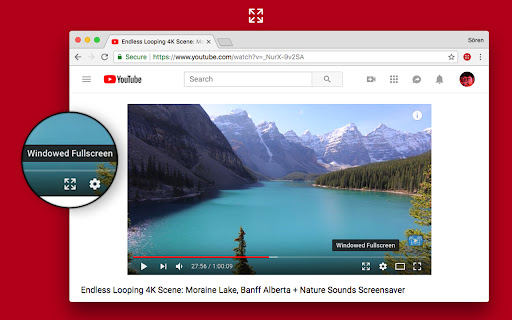
This extension gives you a true fullscreen YouTube experience without forcing your browser into fullscreen mode. Enjoy videos that fully use your screen real estate, while still keeping comments, suggestions, and other features accessible. Features: - Inline Fullscreen: Expand the video to fill your browser window, no borders or sidebars. - Responsive Layout: Keep comments, recommendations, and other elements within reach. - Fast Toggle: Instantly switch modes with a custom button in the player or a quick keyboard shortcut. - Customizable Settings: Click the extension icon to fine-tune the behavior to your liking. Keyboard Shortcut: - Press "d" to toggle inline fullscreen mode. *Note*: After installing, please reload YouTube for the new player button to appear. - Changelog 1.3.8 - Pressing escape now exits fullscreen mode 1.3.7 - Updated searchbar hide logic to mirror new design 1.3.6 - Auto fullscreen bugfix 1.3.5 - Searchbar hide bugfix - Made auto fullscreen more reliable - Fixed a case where the button would not be added 1.3.4 - Player button tooltip now shows correct shortcut 1.3.3 - Now ignoring modifier keys for shortcuts - Made shortcut editable 1.3.2 - Changed fullscreen shortcut from w to d to avoid conflicts with YouTube’s default shortcuts 1.3.1 - Added "Show Player Button" preference - Settings now take effect immediately after changing them - Now checking if content scripts are installed when opening the settings popup - Fixed a bug where autoEnable would fail if player is in default mode - Fixed theater mode preference not being properly restored 1.3.0 - Added Settings screen when clicking extension icon - Added Automatic Fullscreen option - Searchbar automatically shows/hides when in fullscreen. Similar to the seekbar.
YouTube Inline Fullscreen screenshot 1YouTube Inline Fullscreen screenshot 2

Reviews (9 cached)

★☆☆☆☆2017-03-18
Christian Walde (Mithaldu)

Edit: After the september 2017 youtube design update it doesn't work anymore. Old review: Actually works, and doesn't interrupt playback. (Does require a page reload on first install though.)

★★☆☆☆2024-06-08
Hoàng Quốc Khánh Nguyễn

Used to work but now broken by youtube's new design

★★☆☆☆2023-12-27
blue

Default shortcut for "w" is to change the transparency of subtitles backgrounds.

★★☆☆☆2023-09-08
Cyril C

Cool idea but has one very annoying bug. Works fine in standard mode, but when activated in cinema mode, the screen goes black and when I scroll down I can see it switched me back to standard mode, so I have to click on windowed fullscreen again to make it work.

★★★☆☆2024-11-12
Zero M

add auto enable for crying out load is that too much to ask?

★★★☆☆2023-07-16
Sam S.

This one actually allows me to scroll down to the description, comments, etc. while it is toggled. It also didn't mess up Youtube's fullscreen mode, so I can still do the aforementioned scrolling. It's buttery smooth, and I love that the developer is communicating with users that have reviewed the extension. Excellent work! August 19th, 2023: As of now it has stopped working. Using this extension only toggle's Youtube's theatre mode.

★★★☆☆2022-04-05
Andrea Jones

This extension stopped working today. Hope they fix it :(

★★★☆☆2021-09-19
Khang Hoàng

5 stars if it has a hotkey

★★★☆☆2016-10-17
Warmuser

Works, but need a fix!!

Permissions (2)

Permissions

scripting Can inject scripts into web pages storage Can store data locally in your browser

Details

Version 1.3.8
Updated Feb 27, 2026
Size 34.59KiB
First Seen Mar 22, 2026