
Sophos Chrome Security
v2.0.2218 Updated Feb 26, 2025 2.24MiB
⚠️Not updated in over a year ⚠️Requests 2 sensitive permissions
Description
NOTE: Use of this extension is subject to the Sophos End User License Agreement (License Agreement) accessible at https://www.sophos.com/en-us/legal/sophos-end-user-license-agreement.aspx.
By installing or using this extension, you agree to the terms and conditions of the License Agreement. You also acknowledge that Sophos processes personal data in accordance with the Sophos Privacy Policy accessible at https://www.sophos.com/en-us/legal/sophos-group-privacy-policy.aspx.
Sophos Mobile is a Unified Endpoint Management (UEM) solution that allows companies to easily manage, control and secure Android, iOS, macOS, Windows 10 and Chrome devices (like Chromebooks) from a single web console. The Sophos Chrome Security extension allows you to enroll your Chrome device with Sophos Mobile.
FEATURES
Your organization can do the following:
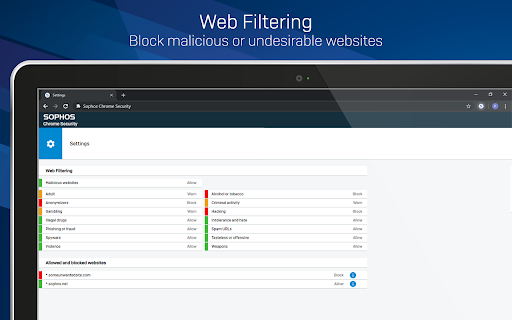
• Use Web Filtering to block web pages with malicious, undesirable or illegal content.
• Find the device.
• Send a message to the device.
Web Filtering uses up-to-the-minute intelligence from SophosLabs. Your device is secured even when you’re not connected to your organization’s network.
Sophos Chrome Security requires a Mobile Advanced or an Intercept X for Mobile license.
For more information, visit https://www.sophos.com/mobile
MANUAL ENROLLMENT
1. Sign in to Chrome with your corporate Google account.
2. Open Sophos Chrome Security in the Chrome Web Store and add it to Chrome.
3. Select the Sophos button in the Chrome toolbar.
4. Select “Enroll” and then enter the enrollment token.
AUTO-ENROLLMENT
If your organization uses G Suite, they can configure Sophos Chrome Security to automatically enroll with Sophos Mobile.



Reviews
Loading reviews...
Permissions (14)
Permissions
alarmsℹ Can schedule periodic background tasks contextMenusℹ Can add items to the right-click menu enterprise.deviceAttributesgcm geolocationℹ Can access your geographic location identityℹ Can use your Google account identity identity.email managementℹ Can manage other installed extensions notificationsℹ Can show desktop notifications offscreen storageℹ Can store data locally in your browser tabsℹ Can see your open tabs and their URLs webNavigationℹ Can monitor navigation events webRequestℹ Can observe and analyze network traffic
Details
| Version | 2.0.2218 |
| Updated | Feb 26, 2025 |
| Size | 2.24MiB |
| First Seen | Mar 22, 2026 |
Popular in workflow

Adobe Acrobat: PDF edit, convert, sign tools
by Adobe Inc.
330M
★ 4.40
workflow
330M
★ 4.40
workflow

Chrome Remote Desktop
by Chrome Remote Desktop Release Managers
38M
★ 3.14
workflow
38M
★ 3.14
workflow

Microsoft Power Automate
by Microsoft Corporation
10M
★ 1.99
workflow
10M
★ 1.99
workflow

Screencastify - Screen Video Recorder
by castify-ext-dev
9M
★ 3.95
workflow
9M
★ 3.95
workflow

Mendeley Web Importer
by Mendeley
3M
★ 2.25
workflow
3M
★ 2.25
workflow
Popular Extensions
Adobe Acrobat: PDF edit, convert, sign tools
by Adobe Inc.
330M
★ 4.40
workflow
330M
★ 4.40
workflow
Chrome Remote Desktop
by Chrome Remote Desktop Release Managers
38M
★ 3.14
workflow
38M
★ 3.14
workflow

Cisco Webex Extension
by cisco.chromestore
24M
★ 2.34
social
24M
★ 2.34
social

Kami for Google Chrome™
by Kami
17M
★ 4.56
education
17M
★ 4.56
education

Read&Write for Google Chrome™
by Texthelp
17M
★ 3.44
accessibility
17M
★ 3.44
accessibility