*** NOTE: Google Calendar's own ICS import functionality has been improved and may replace ICS to GCal for you: https://calendar.google.com/calendar/r/settings/export ***
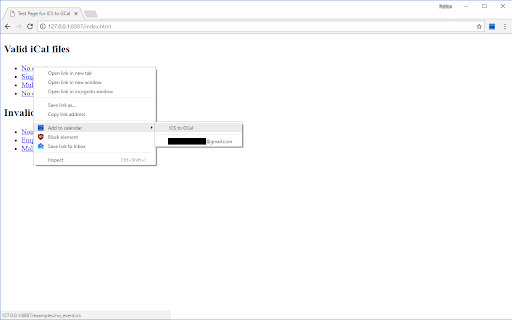
Found an interesting event online that comes as an iCal file (*.ics) and want to import it into one of your Google calendars? With ICS to GCal this will take just two clicks - no need to open the Google Calendar settings and pollute your list of calendars.
ICS to GCal correctly imports recurrent events (to the extent they are supported by Google Calendar) and automatically fixes some deviations from the iCalendar specification that are rather common (such as trailing commas in date lists, exceptional dates not specified with the correct time,...).
How to use:
0. Before the first use, click on the extension symbol in the browser toolbar to allow access to you calendars.
1. Right-click on a link to an iCal file (*.ics).
2. Select a calendar under "Add to calendar".
A popup notification will inform you about the number of events added and allow you to view the event or undo the changes while they have not been committed.
Source code: <https://github.com/FabianHenneke/ics2gcal> (MIT License)
Please see below for libraries used and their associated license:
ical.js <https://github.com/mozilla-comm/ical.js>
Mozilla Public License Version 2.0 <https://www.mozilla.org/en-US/MPL/2.0>
chrome-promise <https://github.com/tfoxy/chrome-promise>
The MIT License (MIT)
Copyright (c) 2015 Tomás Fox
Permission is hereby granted, free of charge, to any person obtaining a copy
of this software and associated documentation files (the "Software"), to deal
in the Software without restriction, including without limitation the rights
to use, copy, modify, merge, publish, distribute, sublicense, and/or sell
copies of the Software, and to permit persons to whom the Software is
furnished to do so, subject to the following conditions:
The above copyright notice and this permission notice shall be included in all
copies or substantial portions of the Software.
THE SOFTWARE IS PROVIDED "AS IS", WITHOUT WARRANTY OF ANY KIND, EXPRESS OR
IMPLIED, INCLUDING BUT NOT LIMITED TO THE WARRANTIES OF MERCHANTABILITY,
FITNESS FOR A PARTICULAR PURPOSE AND NONINFRINGEMENT. IN NO EVENT SHALL THE
AUTHORS OR COPYRIGHT HOLDERS BE LIABLE FOR ANY CLAIM, DAMAGES OR OTHER
LIABILITY, WHETHER IN AN ACTION OF CONTRACT, TORT OR OTHERWISE, ARISING FROM,
OUT OF OR IN CONNECTION WITH THE SOFTWARE OR THE USE OR OTHER DEALINGS IN THE
SOFTWARE.