
⚠️Not updated in over 2 years
Description
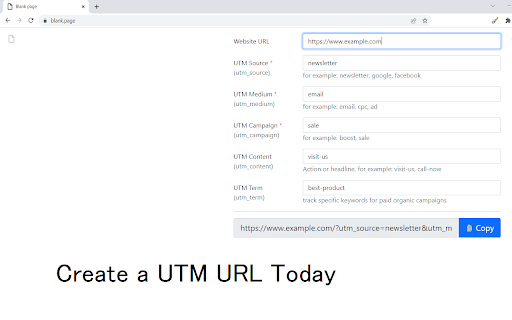
Create a URL with all the UTM variables.
Not sure how to use Google Analytics to build a URL which uses the UTM parameters?
Use our software today and you can ensure your tracking URLs are built correctly.
Here is what you need to use to begin using the software.
Put in the landing page URL
Put in the correct values for the different parameters such as
utm_source
utm_medium
utm_term
and other custom UTM parameters you may wish to add.
Press the generate button and the tracking URL will be built out
Reviews
Loading reviews...
Details
| Version | 3.0.0 |
| Updated | Aug 18, 2022 |
| Size | 205KiB |
| First Seen | Mar 22, 2026 |
More by Stacey



Popular in workflow

Adobe Acrobat: PDF edit, convert, sign tools
by Adobe Inc.
330M
★ 4.40
workflow
330M
★ 4.40
workflow

Chrome Remote Desktop
by Chrome Remote Desktop Release Managers
38M
★ 3.14
workflow
38M
★ 3.14
workflow

Microsoft Power Automate
by Microsoft Corporation
10M
★ 1.99
workflow
10M
★ 1.99
workflow

Screencastify - Screen Video Recorder
by castify-ext-dev
9M
★ 3.95
workflow
9M
★ 3.95
workflow

Mendeley Web Importer
by Mendeley
3M
★ 2.25
workflow
3M
★ 2.25
workflow
Popular Extensions
Adobe Acrobat: PDF edit, convert, sign tools
by Adobe Inc.
330M
★ 4.40
workflow
330M
★ 4.40
workflow
Chrome Remote Desktop
by Chrome Remote Desktop Release Managers
38M
★ 3.14
workflow
38M
★ 3.14
workflow

Cisco Webex Extension
by cisco.chromestore
24M
★ 2.34
social
24M
★ 2.34
social

Kami for Google Chrome™
by Kami
17M
★ 4.56
education
17M
★ 4.56
education

Read&Write for Google Chrome™
by Texthelp
17M
★ 3.44
accessibility
17M
★ 3.44
accessibility