
⚠️Not updated in over a year
Description
Enhance your ChatGPT experience with this flexible Chrome extension. Follow these simple steps to get started:
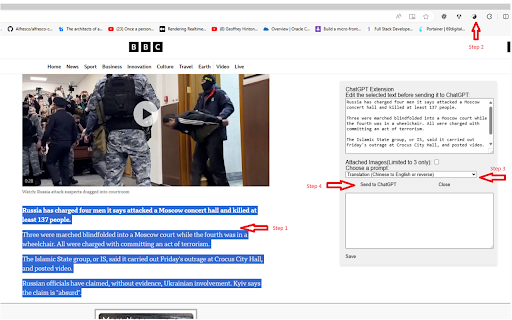
On any Chrome/Edge webpage, highlight the text you want to process with ChatGPT. Click the Taichi (black/white) logo located to the right of the browser's address bar, choose a Prompt, and click 'Submit.'
Configure your API key:
In the extension options, enter your email address.
You'll receive an email from trftester@gmail.com with the subject "Your Bearer Token" containing your API key.
Enter your API key in the extension options.
Customize your prompts:
Add custom prompts in the extension options, with one prompt per line, such as:
Translation: Chinese to English or reverse
Summary: Shorten the content
Extension: Give more detail
Reply: help to write response email
QA: simple answer question
Code: provide python code only for given message. No extra message needed
And more(You can add more prompt yourself)!
Please note that this extension interface is available only in the English language, but it allow you to write prompts in other languages, but symbol ":" would be English charactor.

Reviews
Loading reviews...
Permissions (3)
Permissions
activeTabℹ Can access the current tab when you click the extension contextMenusℹ Can add items to the right-click menu storageℹ Can store data locally in your browser
Details
| Version | 1.6.1 |
| Updated | Aug 3, 2024 |
| Size | 705KiB |
| First Seen | Mar 22, 2026 |
Popular in tools

Browsec VPN - Free VPN for Chrome
by Browsec
7M
★ 4.44
tools
7M
★ 4.44
tools

Microsoft Bing Homepage & Search for Chrome
by Microsoft Corporation
4M
★ 3.72
tools
4M
★ 3.72
tools

Monica: All-In-One AI Assist & Smartest AI Agent
by Monica Team
3M
★ 4.89
tools
3M
★ 4.89
tools

Ad Blocker: Stands AdBlocker
by Stands
3M
★ 4.79
tools
3M
★ 4.79
tools

Google Dictionary (by Google)
by dictionary-extension-dev
3M
★ 4.36
tools
3M
★ 4.36
tools
Popular Extensions

Adobe Acrobat: PDF edit, convert, sign tools
by Adobe Inc.
330M
★ 4.40
workflow
330M
★ 4.40
workflow

Chrome Remote Desktop
by Chrome Remote Desktop Release Managers
38M
★ 3.14
workflow
38M
★ 3.14
workflow

Cisco Webex Extension
by cisco.chromestore
24M
★ 2.34
social
24M
★ 2.34
social

Kami for Google Chrome™
by Kami
17M
★ 4.56
education
17M
★ 4.56
education

Read&Write for Google Chrome™
by Texthelp
17M
★ 3.44
accessibility
17M
★ 3.44
accessibility