Advanced Notepad icon

Advanced Notepad

by Mr. Alien

v2.2 Updated Apr 19, 2024 103KiB
CWS
10K
Users
★ 4.28
106 reviews
#1027
of 43.8K
workflow
#307 of 5.5K
⚠️Not updated in over a year

Description

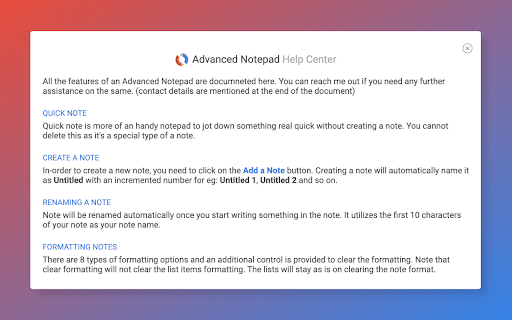
Chrome Advanced Notepad is a simple yet powerful notepad filled with rich features. 1) Quick Notes Don't want to create a note to store temporary text? No worries, you can store the notes in Quick notes and erase them whenever you want to. 2) Multiple Notes You can create multiple notes. No need to worry about storage. 3) Auto Save No need of a Save button, Advanced Notepad stores the notes without you doing anything. It will store as and when you create a note or you start editing it. 4) Format Notes You can format your notes. Create unordered/ordered lists, make the text bold, underline, italic or strike it out. 5) Remote Backup Backup your notes on cloud and restore it on any computer. Powered by JSONbin.io You could read more around privacy policy at https://8bit.codes/privacy --------- Change Log v2.2 - Increased base font size of notes - Increased size of the Notepad - Fixed Date/Time format issue on creating notes vs updating. - Delete now will request for confirmation before you delete a note. - Editor will now show the last active note as default opened when closed and opened next which will help you continue with your workflow with ease. - Fixed JSONbin.io Cloud Backup feature for notes. - Highlight / Remove Highlight for text v2.1 - Fix backup v2.0 - Fixed a few bugs - Resized the window, now it's more bigger than earlier. - Longer file names, use a line break to decide the file name once you start typing in the notes. - Notepad will now show Created At & Updated At timestamps for the new notes created (Updated will show up for the older notes too). - Fonts are darker and more clearer. v1.5 - Backup Fix v1.3, v1.4 - Minor Fixes - Backup Fix v1.2 - Added formatting options [Increase font size, decrease font size, clear formatting] - Added Help info v1.1 - Set the note file name to default if no text found in the note. v1 - Initial Release
Advanced Notepad screenshot 1Advanced Notepad screenshot 2Advanced Notepad screenshot 3Advanced Notepad screenshot 4

Reviews (7 cached)

★☆☆☆☆2025-03-13
Ozair Khan

NO SEARCH FUNCTION. PUT A SEARCH FUNCTION IN!!!!

★★☆☆☆2025-03-17
Igor Babin

I used to rely on the old Notepad extension, which was great, but it got removed from Chrome. Advanced Notepad is the closest alternative in terms of features and ease of use. However, there are some missing features and issues: No search function, which is essential. No sync between devices, and the restore backup feature doesn’t work for me. No drag-and-drop option to rearrange notes. Since the old Notepad had 200K users, many are looking for a good replacement. If the developers fix these three issues, this extension has a big chance to go viral! For now, I’m giving it 2 stars, but if these are fixed, I’ll gladly update my rating to 5 stars.

★★☆☆☆2018-01-20
Adrian Fox

It needs to be fixed. After making three or four notes, whenever it pops up I can do nothing and no keypress makes any difference, other than leaving the extension by clicking away from it. i.e. it is 'frozen'. I have tried switching it 'off' and 'on' again in the extensions list, but sadly I may have to uninstall it.

★★★☆☆2024-07-31
Vikas

I tried this notepad extension, and couldn't resist to switch over https://chromewebstore.google.com/detail/browser-notepad/nnipoonecjaegdmdlkbnajjejcammiel?authuser=0&hl=en-GB although I am using advanced notepad since 5 months, there is no dark mode and local backup option, and this extension solved it for me

★★★☆☆2024-05-08
NightriderXP1

Ok, I can't really rate this since I can't find the Notepad after I installed it. Where's it hidden? It's not in the sidebar where a notepad would be most helpful. None of the icons along the top appear to go to the new notepad either. I don't see it in the Chrome menu. How in the world do you find it???

★★★☆☆2019-11-07
Тоха Семёнов

Not responsive and tiny, default formatting too pale, formating buttons not really helpful not needed. Deletes tab without prompt, can't undelete tab...

★★★☆☆2019-02-26

I may not be seeing this feature, but is there a way to add titles to notes?

Permissions (2)

Permissions

storage Can store data locally in your browser unlimitedStorage

Details

Version 2.2
Updated Apr 19, 2024
Size 103KiB
First Seen Mar 22, 2026


