
⚠️Not updated in over 2 years
Description
* Bookmark Nickname: Open bookmarks with hashtags at once
* search to only titles of bookmarks at the address bar
* fuzzy match = All you have to do is type a few characters
Usage
Bookmark Nickname
0. Add hashtag to the title of bookmark
1. Enter key bindings(default Ctrl + Shift + Y)
2. Enter hashtags on the popup screen
3. Press Enter key or Enter button on the screen
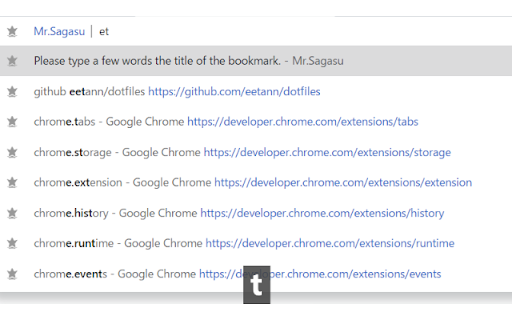
Search titles of bookmarks at the address bar
1. Move at the address bar
2. Type "b" and space key
3. Type a few characters
4. Choice a suggest by using arrow keys and enter key

Reviews
Loading reviews...
Permissions (1)
Permissions
bookmarksℹ Can read and modify your bookmarks
Details
| Version | 22.10.30 |
| Updated | Oct 30, 2022 |
| Size | 63.06KiB |
| First Seen | Mar 24, 2026 |
More by eetann

Popular in workflow

Adobe Acrobat: PDF edit, convert, sign tools
by Adobe Inc.
330M
★ 4.40
workflow
330M
★ 4.40
workflow

Chrome Remote Desktop
by Chrome Remote Desktop Release Managers
38M
★ 3.14
workflow
38M
★ 3.14
workflow

Microsoft Power Automate
by Microsoft Corporation
10M
★ 1.99
workflow
10M
★ 1.99
workflow

Screencastify - Screen Video Recorder
by castify-ext-dev
9M
★ 3.95
workflow
9M
★ 3.95
workflow

iCloud Bookmarks
by Apple Inc.
7M
★ 3.38
workflow
7M
★ 3.38
workflow
Popular Extensions
Adobe Acrobat: PDF edit, convert, sign tools
by Adobe Inc.
330M
★ 4.40
workflow
330M
★ 4.40
workflow
Chrome Remote Desktop
by Chrome Remote Desktop Release Managers
38M
★ 3.14
workflow
38M
★ 3.14
workflow

Cisco Webex Extension
by cisco.chromestore
24M
★ 2.34
social
24M
★ 2.34
social

Kami for Google Chrome™
by Kami
17M
★ 4.56
education
17M
★ 4.56
education

Read&Write for Google Chrome™
by Texthelp
17M
★ 3.44
accessibility
17M
★ 3.44
accessibility