Hide That! icon

Hide That!

by Dao Seeker

v3.7.0 Updated Apr 15, 2024 79.91KiB
CWS
10K
Users
★ 4.43
53 reviews
#1275
of 56.3K
functionality
#28 of 1.7K
⚠️Not updated in over a year

Description

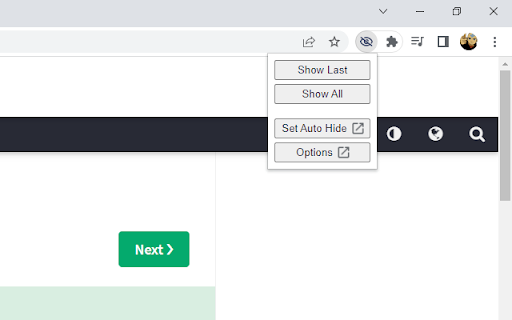
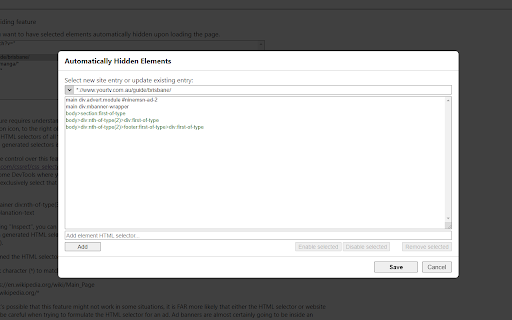
The primary feature of this extension allows users to hide any element on the page with a simple right-click menu action. Advanced features on the Options page also allows the user to automatically close invasive popup windows, as well as automatically hide selected elements when the page is loading. Several other customizable settings are also available on the Options page. NOTE: - The primary right-click functionality of this extension does not permanently hide the element. Any page refresh will bring back the full page as intended. To automatically hide elements when loading a page please try the ‘Automatic Hiding’ feature on the Options page. - Once the extension is added to Chrome, any pages you already have open will need to be refreshed for the extension to start working. - The icon menu for chrome extensions should display to the right of the address bar (a puzzle piece). -- UPDATE NOTES -- 3.7.0 (13th April 2024): - Added ability to close “about:blank” popups when opened from a specified website. - Displays “unsaved changes” warning message on the Options page. 3.6.0 (14th April 2023): - Migrated to new Chrome extension manifest version 3. 3.5.0 (18th November 2022): - Added "Show Auto Hidden" button in the icon menu to redisplay automatically hidden elements. - Added "Rerun Auto Hide" button in the icon menu to rerun automatic hiding. 3.4.0 (8th September 2022): - Added a user-friend option for the Automatic Hiding feature in the icon menu (“Set Auto Hide”) which will automatically generate the necessary element selectors for all your hidden elements on the current page. - Set newly added items as green, to indicate they are unsaved. 3.3 (21st March 2021): - Switched to using Chrome's local storage for storing the settings data (instead of syncing the data to your Google account). This allows for a higher data storage limit. 3.2 (31st December 2020): - Allow user to disable/enable individual automatically hidden sites or elements. 3.1 (22nd December 2020): - General improvements and bug fixes - Added option to show/hide help text on the Options page. 3.0 (29th November 2020): - Added new ‘Automatic Hiding’ feature on the Options page. - Split the ‘Advanced Features’ section on the Options page into the ‘Automatic Closing’ section and the new ‘Automatic Hiding’ section. - Improved help text and advanced feature explanations. - I apologise if any of your Option settings for this extension were reset upon upgrading to version 3.0. 2.2 (6th September 2020): - Added new 'Export Settings' section to the Options page. This will allow a user to import/export their settings. 2.1 (9th January 2020): - Enhanced the 'Advanced Features' option that closes listed popup sites. There is now a dropdown list that displays the address of recent new tabs or popups. This means the user doesn't have to manually capture the initial address of the popup site. 2.0 (December 2019): - Added new 'Advanced Features' section to the Options page. - Added 'Advanced Features' option that can immediately close listed popup sites.
Hide That! screenshot 1Hide That! screenshot 2Hide That! screenshot 3Hide That! screenshot 4Hide That! screenshot 5Hide That! screenshot 6

Reviews (8 cached)

★☆☆☆☆2025-10-19
Gabe New

fake, a reload is unhide on images!!!!!!!!!!!!!!!!!!!!!!!!!!!!!!!!!!!!!!!!!!!!!!!!!!!!!!!!!!!!!!!!!!

★☆☆☆☆2024-11-21
MBC2404

NOT WORKING ON THIS WEBSITE https://www.kidpaw.net/names/inspiration/99-names-of-prophet I RIGHT CLICKED BUUUT NO OPTION TO HIDE. BAD EXPERIEENCE

★☆☆☆☆2023-07-12
BeHappyBeVegan

doesn't work

★★☆☆☆2024-08-19
AsGood AsItGets

Although I can see how some people might need the default use with the right-click menu, for me the most important functionality is the automatic hiding by selector. So after I realized that it doesn't support the non-standard :contains() selector (ok, fair enough, as I wrote, non-standard), I managed to write a selector that correctly identifies the items I want to hide in a list (tested with document.querySelectorAll() in the console), but it still doesn't hide them. And I'm guessing it's because the website uses Next/React, and it runs too fast, probably on the initially served HTML which is probably empty, so it doesn't "see them". Maybe a run delay option in milliseconds would solve this, otherwise it will not work on most modern SPA apps.

★★☆☆☆2020-08-20
Ginny Di

I really wanted this to work, but after I used the "hide that" option, I refreshed the page and everything was back. The creator says you have to refresh for it to apply, but refreshing just undid the hiding for me. I'm using Chrome version 84.0.4147.125. This would be really helpful for me if it worked, so I hope I'm just doing something wrong.

★★★☆☆2026-01-29
Vicky Dev

Nice extension but I found 'Mask It' extension much better. It persists hidden items and has lots of customization options as well.

★★★☆☆2025-12-23
AbdulHyee Waqas

On some websites it's menu item doesn't show up at all or doesn't show up for ads. It's frustrating that it shows up for the content you want to read but for ads menu item doesn't show up. Example: https://www.kidpaw.net/names/inspiration/99-names-of-allah

★★★☆☆2025-09-24
N N

I tried only on one website, but got this to work only temporarily, after refreshing with F5 no longer works. Yes I tried to add both the webpage and the website to always-hide. This was the site and page I was trying to clean: https://www.foreca.fi/Finland/Helsinki/Malmi

Permissions (4)

Permissions

contextMenus Can add items to the right-click menu storage Can store data locally in your browser tabs Can see your open tabs and their URLs webNavigation Can monitor navigation events

Details

Version 3.7.0
Updated Apr 15, 2024
Size 79.91KiB
First Seen Mar 24, 2026

