
Quick Tabs icon

Quick Tabs

by bAbymAn

v2024.11.26 Updated Nov 27, 2024 136KiB
CWS
30K
Users
★ 4.54
549 reviews
#468
of 31.8K
functionality
#8 of 958
⚠️Not updated in over a year ⚠️Requests 1 sensitive permission Highly rated

Description

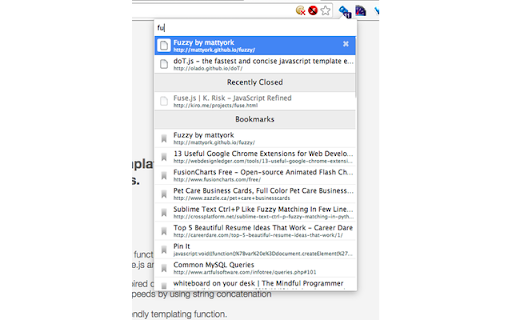
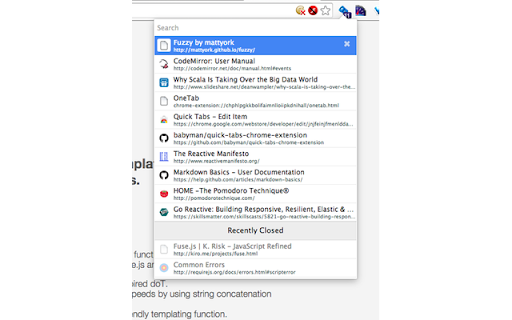
[![Version][version-badge]][qt-store] [![Rating][rating-badge]][qt-store] [![Users][users-badge]][qt-store] # INTRODUCTION Quick Tabs is a tab management browser extension for the Google Chrome web browser based on the "Recent Files" quick selector built into the excellent IntelliJ IDEA by Jetbrains. Quick Tabs allows you to move quickly between recently used tabs without requiring the use of your mouse, locate and switch to tabs as you need them with minimal keystrokes even when you have large numbers of open tabs. Visit the [Quick Tabs](https://chrome.google.com/extensions/detail/jnjfeinjfmenlddahdjdmgpbokiacbbb) google extensions page to install and try it out ... # FEATURES * Lists all the open tabs in Chrome across all of your open windows * Tabs are listed in most recently used (MRU) order and excludes the current tab (since you're switching tabs) * Fuzzy search your bookmarks: * Bookmarks are automatically searched when only a few tabs match your search string * Add a space at the start or end of your search string to search bookmarks along with tabs * Start your search with `/b` or add **two spaces** at the start or end of your search string to search only bookmarks * delete bookmarks directly from the search results by clicking the 'x' * Fuzzy search your browser history: * Start your search with `/h` or add **three spaces** at the start or end of your search string to search browser history * Find noisy tabs by searching for `<))` * Chrome keyboard shortcuts (configured using the keyboard shortcuts dialog at the bottom of the Chrome Extensions page): * Shortcut key to launch popup window from most tabs (default ctrl+e, cmd+e on Mac, ctrl+q on Linux). * Select previous tab without loading the popup window (unmapped by default) * Select next tab without loading the popup window (unmapped by default) * IMPORTANT the 'next tab' shortcut is only available for a second or so (while the badge text is orange) before the current tab is moved to the top of the MRU list. * Duplicate the current tab without (unmapped by default) * Tab list popup shortcut keys: * Select previous tab (same as Chrome keyboard shortcut or up arrow) * Select next tab (same as Chrome keyboard shortcut or down arrow) * Switch to selected Item (enter) * Duplicate the selected item and switch to it (same as Chrome keyboard shortcut, unmapped by default) * To close selected tab (default ctrl+d, see extension options or middle mouseclick). * Displays the number of tabs you currently have open in all your Chrome windows * Quickly search and select tabs by typing letters in the page title or url * Track recently closed tabs and allow them to be searched and restored * Popup customization using css # COMMANDS Commands start with a `/` and can be typed in the popup window search box to tweak the search behaviour or perform actions on tabs; ### Query Commands * `/b <query>` - search bookmarks * `/h <query>` - search browser history * `/w <query>` - search the tabs in the current window only * `/p <query>` - search pinned tabs only * `/g <query>` - search tabs that belong to the same tab group as the current tab (or no tab group if it's not in a group) ### Search Types You can now change the search type for a single search, this can help if you have a specific search string in engine combo in mind. * `/fuzzy <query>` - use the fuzzy search engine for this query only * `/fuse <query>` - use the fuse search engine for this query only * `/regex <query>` - use the regex search engine for this query only * `/subs <query>` - use the subs search engine for this query only ### Tab Management Tab management commands all accept RegExp search queries. * `/close <query>` - search for and close tabs * `/merge <query>` - merge tabs into the current window * `/split <query>` - split tabs and move them into a new window * `/reload <query>` - reload all the tabs in the search result * `/mute <query>` - mute the tabs in the search result * `/unmute <query>` - unmute the tabs in the search result * `/group <query>` - create new tab groups or move tabs into groups using the search results # PERMISSIONS Quick Tabs requires the following: * **Read and change your browsing history**: _read only_ access is required to record your open tabs and search browser history. * **Read and change your bookmarks**: _read/write_ access is required to search, display and remove (by clicking the 'x' in the results list) bookmarks. # SCREENSHOTS #### Quick Tabs ready for action. ![Popup Screenshot](screenshots/in_action.png?raw=true) #### Tab and bookmark search. ![Search Screenshot](screenshots/searching_tabs.png?raw=true) #### History search. ![Search History](screenshots/searching_history.png?raw=true) Search your browser history by starting your search with '/h ' or adding 3 spaces to the end of your search query. #### Decide what to show. ![Search History](screenshots/go_minimal.png?raw=true) #### Custom CSS styling. ![Search Screenshot](screenshots/custom_css.png?raw=true) In this case https://userstyles.org/styles/99938/better-styling-for-chrome-extension-quick-tabs by @Bunnyslippers. See the [./3rdParty/css](./3rdParty/css) directory. # SOURCE The source code for this extension is available on [github](http://github.com/babyman/quick-tabs-chrome-extension), please feel free to inspect it before you install this extension, especially as I am asking permission to interact with your computer and its private data. You can also install it manually if you want to be certain that the source code on github is directly what you install. Note, this will NOT automatically update the extension when bugs are fixed and features are added. In your terminal, `cd` to the folder you want to clone it to, and run `git clone https://github.com/babyman/quick-tabs-chrome-extension`. Then in Google Chrome, click `Window - Extensions`, click the checkbox called "Developer Mode", and click the "Load unpacked extension" button. Navigate to the cloned project, and select the "quick-tabs" folder. You now have the plugin loaded as a developer. Again, this will NOT automatically update the extension when bugs are fixed and features are added. # FEEDBACK AND BUGS Please report all your valuable feedback, feature requests and bug reports on the github [issues page](http://github.com/babyman/quick-tabs-chrome-extension/issues) for this extension. # AND FINALLY If you find Quick Tabs useful and want to buy me a coffee, I really like coffee :D ... [![ko-fi](https://www.ko-fi.com/img/githubbutton_sm.svg)](https://ko-fi.com/V7V71963F) # RELEASE NOTES 2024.11.26 - merged PR #377 to resolve Quick-Tabs no longer works for "installed" pages, thank you @Wizek (and @rb-109). PR #379 add middle click to close tab, thanks @va9iff. 2024.11.24 - merged PR #383, fix history rendering issue introduced in the manifest 3 migration, thank you again @hababr! 2024.11.19 - close #382, ctrl+e conflicts with Chrome shortcut keys 2024.11.9 - merged PR #381, upgrade to use manifest version 3, a HUGE thank you to @hababr for making this happen! 2021.6.29 - merged PR #349, support deleting bookmarks from the results list, thanks @shihshen. PR #351, assign a window specific class to result list items, thanks @kjelly. 2021.6.16 - merged PR #344, added support to order tabs by URL, thanks @armstrongli. PR #347 added new native chrome css, thanks @piyush1104. 2021.3.21 - merged PR #341, Tab order update delay of 0 ms is not respected, thanks @legate. Fix an issue loading saved shortcut keys and set the badge background color to red when debug == true, fix a 10-year-old Yellow Argon Web Store keyword violation because Quick Tabs has nothing to do with `search` or `tab` ![VIOLATION!](screenshots/keyword_violation.png?raw=true) 2021.1.31 - merged PR #333, option to enter custom debounce delay value, thanks @goran-zdjelar, add duplicate tab keyboard shortcut, add 2 new group commands `/g` to search current tabs group only and `/group` to create groups and move tabs into groups 2020.9.8 - merged pull request #330, fix for issue that some undefined elements, thanks @jaekyeom (refs #326). 2020.6.30 - upgrade jQuery (fixes #318) 2020.6.3 - fix bug #315 adding spaces to search bookmarks and histories no longer working 2020.5.31 - merge pull request #314 to fix undefined tabs, thanks @NicoWeio (refs #251, #310, #275, #313). Added back the space prefix to search bookmarks and history, fixes #311, support searching pinned tabs only `/p `, fixes #290 2020.3.10 - combined the code that handles the `no tabs match` keyboard and empty tab list triggers to behave more consistently, fixes #302 2020.1.26 - bug fix, "Can't switch to "discarded" tabs" fixes #300 2020.1.25 - merge pull request #211, "add option to order tabs in window order" thanks @gregsadetsky and request #301, "Fix command key combination issue in popup" thanks @powpowshen also switch search type used by commands from substr to regexp, see #299. 2020.1.18 - bug fix, "when no tabs match" stopped working, fixes #298 2020.1.13 - call .stopPropagation() in click event handlers, refs #295, add debouncing to improve the responsiveness of the UI when entering queries, refs #297 2020.1.8 - refined tab moving options, see 'Only move tabs when switched via the extension popup', fixes #296 2020.1.5 - add support to keep window tabs in MRU order with the 'Move tab to leftmost position on switch' option see #174 2019.12.29 - **Quick Tabs turns 10!**, added new commands '/close', '/merge', '/mute', '/unmute', '/split' and '/reload', '/w' to search tabs in the current window only, also allow specifying the search engine as part of the query (/fuzzy, /fuse, /regex, /subs). Merged code for option to hide pinned tabs, thanks @hbj. 2019.12.2 - fix #277 and #291 for real this time! 2019.11.30 - Updated the bookmark and history searches to use '/b ' and '/h ' as query prefixes, still use ' ' and ' ' as query postfixes. Fixed a bug with the pg up/down list scrolling. Fixed issue that prevented prev-tab key working in popup windows (issue #277). 2019.11.27 - fix tab focus issue #273, thanks @fwextensions for the pointer 2019.11.23 - merged pull request to allow configuration of the "tab order update delay", see ticket #90 (thanks @AlexeyKabelitskiy) 2019.4.22 - merged pull requests to ensure https:// is used for default google search (thanks #ericlaw1979), apply {{urlStyle}} to recently closed tabs (thanks @boika), improve tab switching (thanks @MartinLichtblau) 2019.2.27 - merged pull request that fixes #229 #245 #246 (and perhaps #232), also changes that improve switching tabs behaviour, thanks @MartinLichtblau. Added 'theRealPadster.css' large icon theme, thanks @theRealPadster. 2019.1.30 - merged pull request to prevent tabs opened in the background jumping to the head of the recently used list (#219, thanks @MartinLichtblau) 2019.1.20 - merged pull request to fix result highlighting issues that included curly braces (#242, thanks @DoctorGester) 2019.1.10 - merged pull request to improve fuzzy search results (#241, thanks @MartinLichtblau) 2018.11.26 - fixed invalid css (#200, thanks @boika), added license file (#212), updated shortcut config documentation (thanks @Kevin-Prichard) and added support to retain the popup search string (thanks @MeetM) 2017.10.8 - fixed scrolling issue (fixes #195) 2017.10.7 - merge title tooltip fix, thanks @Rohaq. Also merged in jQuery update and some code cleanup, thanks @toanju. Changed the scrolling code to use noobscroll.js 2017.5.10 - fix issue where current tab is displayed on initial popup rendering (fixes #170) 2017.5.3.1 - bookmark search bug fix 2017.5.3 - substring bug fix 2017.5.2 - change the search implementation to allow users to select between fuzzy, fuze, regex or substring tab searching (fixes #167, #97) 2017.4.25 - possible workaround for existing Chrome bug (refs #91, #168), thanks @TimNZ 2016.9.20 - switched the tab search library to fuse.js (thanks to @rajington), fix window focus problem when using keyboard only (#101, #145 thanks @pearj) 2016.7.16 - change default extension key to ctrl+q on Linux since ctrl+e does not work, thanks @zweicoder (fixed #138), open a website address from the search box in the popup (#108), it takes a second to reorder tabs in a list after switching between tabs (fixed #103) 2016.3.20 - fix data: favicon handling bug (#124) 2016.3.15.1 - fix URL encoding bug 2016.3.15 - switch template engine to mustache.js to simplify render code (remove iframe/sandbox and speed up overall popup render), fix option key save bug (#119), add option to prevent auto searching bookmarks (#115). 2016.3.12 - fix issue where popup window height would increase on window redraw css fixes, thanks @easyfuckingpeasy. Typo fix, thanks @elimisteve 2016.3.10 - fixes 2015.10.13 - removed default key mappings for next/previous to prevent unexpected chrome behaviours (#99) 2015.10.9 - update the next/prev popup window shortcut keys to use the same mappings as the command keys 2015.10.7 - work around Window list positioned oddly (#91), thanks @todoakaio. Added media indicator favicon, search for "<))" to show only noisy tabs (#59). Added shortcut keys to switch between tabs in the tab list without displaying the popup (#93). Added delay before moving tabs to the top of the tab list (#90) 2015.6.14 - merged option to move the tab to the last tab when switching, thanks @phorust 2015.4.30 - fixed issue when rendering bookmarklet code in search results, thanks @benbarth. Added history filter option, allows history search results to be filtered through a regular expression and exclude matches (for example this can be used to exclude past google searches) 2015.4.18 - optimize secondary history searches 2015.4.17 - fixed issue opening urls when they contain search character matches. Added support to fuzzy history search by starting or ending the search string with 3 spaces 2015.4.8 - underline search string hits, add option to include URLs when searching even if they are not being displayed in the tab list 2015.3.31 - added show/hide badge tab count option, removed the css rules that forced the popup window to a specific size (allowing chrome to manage that) 2015.3.12 - added css option placeholder to avoid confusion over expected textarea content 2015.3.8 - popup window timers, separate mouse hover style from keyboard navigation focus to prevent focus jumps when the popup opens under the mouse pointer 2015.3.3 - popup window cleanup, search urls only if displayed 2015.2.28 - library updates, better scrolling, search bookmarks by starting or ending your search string with spaces 2015.2.26 - performance improvements, fuzzy searching and tighter UI 2015.2.25 - added support for bookmarks search ( **IMPORTANT adding bookmark search required adding bookmark permissions, READ ONLY access only** ) and UI style updates, huge thanks to @oarrabi for this 2015.1.2 - delay script execution till window.onload fires (closes #70), thanks @aakash-shah 2014.12.27 - re-enable mouseover events (close #69), thanks @KayNoSpam 2014.12.23 - quick fixes for the two reoccurring errors, thanks @heavyk. Moved the template rendering code into a sandbox as per https://developer.chrome.com/extensions/sandboxingEval 2014.9.27 - support custom css through the extensions option page, this supports custom styling of the popup window (for example https://userstyles.org/styles/99938/better-styling-for-chrome-extension-quick-tabs by @Bunnyslippers) 2014.9.13 - permissions fix, thanks @jtanner 2014.7.8 - More stability improvements 2014.7.6.1 - NPE bug fix 2014.7.6 - bug fixes and allow cycling through with TAB and SHIFT+TAB (close #28), allow PageUp/PageDown navigation (close #53), thanks @eush77 2014.7.1 - merged fix to html encoding bug, thanks @eush77 2014.5.6 - add vim style next/prev keys to popup, thanks @roblund 2014.
Quick Tabs screenshot 1Quick Tabs screenshot 2Quick Tabs screenshot 3Quick Tabs screenshot 4Quick Tabs screenshot 5

Reviews (45 cached)

★☆☆☆☆2024-01-09
John Llewellyn

This used to be a must have (a full five stars). I have used it with more than 3,000 tabs open at once. It suddenly stopped working - from the last quarter of 2023, it is mow giving apparently random results.

★☆☆☆☆2020-06-30
Jane Kovalska

it is the worst

★☆☆☆☆2019-09-05
Sam Yankee

useless one

★☆☆☆☆2019-05-13
Cyrille Vancoille

DOESN'T WORK ! ....and when in french version ?

★☆☆☆☆2017-02-16
123 456

not intuitive, what the heck?

★☆☆☆☆2016-07-26
Anthony R

This has potential, it actually separates active tabs from history and bookmarks. On the down side you search David and it will show you ALL bookmarks with the letter D on its title. To make matters worse, it does not search all tabs contents, so if you're looking for a word inside a tab then this isn't the extension for you. What it does do is search the titles only.

★☆☆☆☆2016-06-07
P W

No shortcut keys to open the list of tabs and have the search box focused on immediately so that I can start typing?

★☆☆☆☆2016-05-28
jack rj

I hate this is there anyway to get rid of it?

★☆☆☆☆2016-04-30
Reinis Ivanovs

Has a significant delay before updating the switching order, making this very unlike any other implementation of MRU switching and the opposite of "quick". This isn't even properly stated anywhere, so figuring it out was confusing.

★☆☆☆☆2015-03-10
takuya

Ctrl+E is over written. No way to prevent not to be over written Thats very annoying for OSX user I hate this extension.

★☆☆☆☆2014-02-09
Austin Lee

ctrl+n and ctrl+p do not go to the next or previous tab as listed in the instructions. instead, ctrl+n still opens a new window, and ctrl+p launches the print window. additionally, can't search INSIDE the pages of all tabs, only the TITLES or URLS of open tabs, drastically reducing the usefulness of the tab search function.

★☆☆☆☆2013-08-20
Heinrich Damm

Win7 Pro 64bit: Doesn't work at all with keyboard only

★★☆☆☆2023-10-15
Dan H

Doesn't work. Keeps switching me to random tabs in other windows. NOT the MRU tab.

★★☆☆☆2022-06-12
Jack Z

Used to be awesome but now you can't see the number in dark mode on your browser. There's just a dark blue box when Chrome is in dark mode itself.

★★☆☆☆2020-09-10
For Funny

Although my rating I LOVE THIS EXTENSION!!!! It is great but, from yesterday, it makes Chrome stuck/hang. The extensions get until 6GB in my laptop and a lot of CPU doing no browsing because chrome get completely stuck. Please, solve the problems (maybe related with last version released)!! It is a great work and I would love get it running again (currently disabled in my installation until next release).

★★☆☆☆2020-02-11
John Hossbach

This extension has an interoperability issue with TeamSync Bookmarks. Every time I save a new bookmark, Chrome locks up for 5-10 seconds. The high CPU PID according to Chrome Task Manager is Quick Tabs. TeamSync Bookmarks: https://chrome.google.com/webstore/detail/teamsync-bookmarks/bcopfejjlalhckdkmofjciemgnjkffhj

★★☆☆☆2019-07-03
Ondřej Kvapil

Worked great until very recently. Now the search results don't show up. With "Collect Errors" enabled, Settings/Extensions shows "Uncaught TypeError: Cannot read property 'title' of undefined"

★★☆☆☆2019-06-24
Ben Blount

Requires near constant enabling/disabling to remain functional. Loved this extension until this bug.

★★☆☆☆2019-06-01
W. Apnj

I would give this a 5 star rating but it recently stopped working with the mouse wheel. I used to be able to scroll wheel through the list but not anymore......what gives???

★★☆☆☆2019-04-07
Dean Scarff

This worked really well to start with (switching functionality is exactly what I want), but: 1. it froze (text in search box became uneditable) 2. people have recommended cycling the extension via disable/enable - this shouldn't be necessary 3. tabs from other windows stopped appearing in the search 4. the options page is crude - you can't completely disable the extra key bindings for closing / creating tabs - the best you can do is put them on a binding you're unlikely to want for anything else or accidentally hit

★★☆☆☆2018-09-05
Tibor Szász

The keyboard shortcut doesn't work (CTRL-E). It just focuses on the location bar.

★★☆☆☆2018-01-25
Chris Lee

Can't live without it now.

★★☆☆☆2017-10-11
Jean Desjardins

I love Quicktabs, but a major bug in October 7th 2017 version had me lose all my tabs! In search, the spacebar force exit Chrome instead of its usual functions (recently closed and bookmarks search). I wish I had been warned about the update! Bookmark your stuff before using the extension! Babyman, please fix that! desjardinsj@sainteanne.ca

★★☆☆☆2017-02-16
Gregory Propf

Unfortunately, a recent upgrade of Chrome broke this for me. Clicking the icon now does nothing. I would have given it 1 star but it's a good extension, at least it was until it stopped working. Here's my version info. This is the Linux version: Google Chrome 56.0.2924.87 (Official Build) unknown (64-bit) Revision 0e9a9a6f3676ae439b78cd9b3f62b4193c3ac7d5-refs/branch-heads/2924@{#895}

★★☆☆☆2016-09-23
Chris Fleeman

Not good. Yes, it can find your tabs, but it also finds many things you're not looking for. The results make little sense. For example, if I search for amazon with this tool, I also get results for amsoil, futurama, kenrockwell, and many other completely unrelated things. Its one high point is that it searches bookmarks too.

★★☆☆☆2016-03-11
Junaid tanoli

It is enlisting tabs in descending order instead of ascending order. Left most tab should be enlisted on top in view mode and vice versa.Thanks for the extension its really nice.

★★☆☆☆2012-11-03
Jackson Williams

I installed this for the keyboard tab search ("<ctrl-M> gma <enter>" should bring me to my GMail tab). But the search is waaay too slow to work. I have to wait almost a second after typing my search term for the result to appear. If I press enter without waiting, it does nothing and the search dialog vanishes. Using Chromium on Ubuntu; maybe this works better on Windows?

★★☆☆☆2012-01-07
Sam Peterson (peabody)

Doesn't seem to be working in the dev channel.

★★★☆☆2025-06-07
Omid K. Rad

Tab search is already included in Chrome (Ctrl+Alt +A), so there's likely no use for this extension anymore.

★★★☆☆2021-02-28
Pavel Senatorov

've got yet don't see a way to 0. see tabs of current window 1. see all tabs of all windows. I see the start after clicking on pinned icon yet want to see all at once with the way to search+go to. Is there a manual to read?

★★★☆☆2019-07-31
Olavi Murto

I wish you could choose to have the tabs be always in the same order as they are in the regular tab bar. For some reason the extension moves the open tab to the top of the list. This is useless imo and should be a choice.

★★★☆☆2019-06-18
SetupEditor

BEST

★★★☆☆2019-02-10
Heck Fy

The extension looks promising, but for me it does history search very very slowly - almost unusable. I press 't' and it is necessary to wait for several seconds before results appear..

★★★☆☆2019-01-30
Cenny Wenner

Life saver as others mention but unreliable. It's a common occurrence that the extension stops producing matches and has to be reloaded manually.

★★★☆☆2019-01-21
A Jolly

Used to love it, esp the ability to rapidly search through all my open tabs with a hotkey. Sadly, its gotten buggy for me lately. Wont find open tabs. Has an incorrect number of tabs it thinks are open.

★★★☆☆2018-11-21
Александр Савиных

The tabs change order all the time and it sucks imo. The order of tabs should not change, the first tab should be always first, the second should be the second and so on. Would be best if the order was exactly the same as the order in the title bar. When tabs get reordered, I get lost

★★★☆☆2017-08-22
R S

I was looking for one that would mark with a colour the last used 2 tabs something like this. But this one is good. However I see that it lists the oldest one on top. And I cannot change this. Would be good to be able to change the sort order in options.

★★★☆☆2016-11-15
Tadho Muhammad

Your fuzzy algorithm is too wide. Find lots of pages that I don't really want to open. Here is the screenshot: http://prntscr.com/d7npbq How can I say this? because I've tried another extension, and compare it with this. Indeed Quick Tabs has better option, interface, and customizability. But that fuzzy just a big turn down. Please fix it

★★★☆☆2016-02-14
Vincent Tuminello

I like the idea but I have more tabs open than are listed (i.e. twenty or so). There is an option to increase and decrease the closed tab display count but not open tabs? Please let us display as many tabs as we actually have open. Thanks.

★★★☆☆2015-02-20
Bram

At first I mistakenly thought this displayed "recently CLOSED tabs", but instead it just shows which tabs you've last visited in order, even if they're still open and active. I don't really see the point. I don't need to remember which open tabs I've visited.

★★★☆☆2013-03-16
Cyril Bouthors

Not working in fullscreen

★★★☆☆2013-02-07
Sam D

Chrome dev. tools not showing up in list after reload. Disabled and enabled plugin, restarted. None worked

★★★☆☆2012-12-07

I like the interface, simple and easy but its very slow and always shows some reload error

★★★☆☆2012-01-24
Andrey Titov

You know quick tabs is so far closest to what i'm looking for but i'm web developer so 25 closed tabs doesn't make it. Is it possible to search whole today's history? ))

★★★☆☆2012-01-17
Victor Lelyveld

Doesn't bring tabs to front that are in different Chrome windows, even though it lists them. Why?

Permissions (4)

Permissions

bookmarks Can read and modify your bookmarks history Can read and modify your browsing history storage Can store data locally in your browser tabs Can see your open tabs and their URLs

Details

Version 2024.11.26
Updated Nov 27, 2024
Size 136KiB
First Seen Mar 21, 2026

