
⚠️Not updated in over 2 years
Description
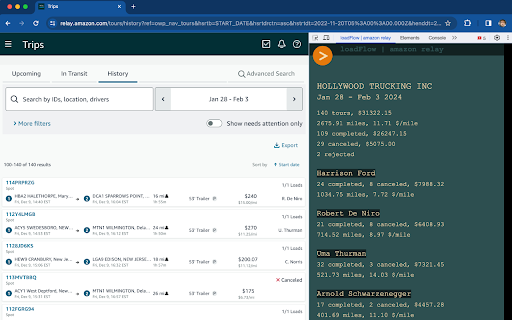
To use the extention after adding in Google Chrome open Developer Tools from top right menu or simply use keyboard shortcut - Command + Option + I (macOS) or F12 or Control + Shift + I (Windows and Linux). Then choose tab - loadFlof | amazon relay (see video in description).
THE EXTENSION collects and analyzes data from Amazon Relay Tours History page. It effectively captures information such as number of tours, paid amount, distances traveled, and overall performance metrics.
Once the data is collected, the extension generates a concise and user-friendly summary for drivers. This summary includes key insights and important statistics.
The extension not only simplifies data collection but also enhances productivity by presenting the information in a clear and organized manner.
Reviews
Loading reviews...
Permissions (1)
Permissions
tabsℹ Can see your open tabs and their URLs
Details
| Version | 0.6.0 |
| Updated | Feb 13, 2024 |
| Size | 12.07KiB |
| First Seen | Mar 21, 2026 |
Popular in tools

Monica: All-In-One AI Assist & Smartest AI Agent
by Monica Team
3M
★ 4.89
tools
3M
★ 4.89
tools

Ad Blocker: Stands AdBlocker
by Stands
3M
★ 4.79
tools
3M
★ 4.79
tools

Google Dictionary (by Google)
by dictionary-extension-dev
3M
★ 4.36
tools
3M
★ 4.36
tools

WPS浏览器助手:文档在线阅读编辑
by 金山PDF
2M
★ 2.90
tools
2M
★ 2.90
tools

Pie Adblock - A Powerful Free Ad Blocker
by Pie Extensions
2M
★ 4.90
tools
2M
★ 4.90
tools
Popular Extensions

Adobe Acrobat: PDF edit, convert, sign tools
by Adobe Inc.
330M
★ 4.40
workflow
330M
★ 4.40
workflow

Chrome Remote Desktop
by Chrome Remote Desktop Release Managers
38M
★ 3.14
workflow
38M
★ 3.14
workflow

Cisco Webex Extension
by cisco.chromestore
24M
★ 2.34
social
24M
★ 2.34
social

Kami for Google Chrome™
by Kami
17M
★ 4.56
education
17M
★ 4.56
education

Read&Write for Google Chrome™
by Texthelp
17M
★ 3.44
accessibility
17M
★ 3.44
accessibility