ElementHider icon

ElementHider

by Valtteri Hietala

v1.0.1 Updated Sep 22, 2025 69.14KiB
CWS
6K
Users
★ 4.42
86 reviews
#1953
of 46.8K
tools
#380 of 11.6K

Description

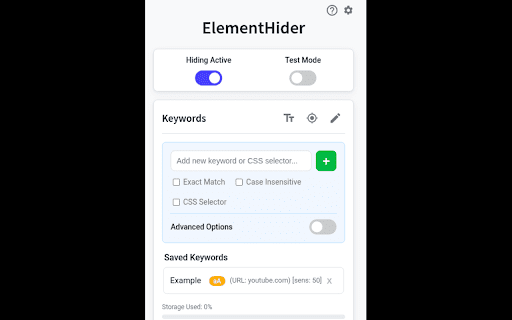
ElementHider: Hide content based on keywords ElementHider is a browser extension I built to help you hide or blur any part of a web page as easily as possible. I got tired of constant distractions from ads, spoilers, and irrelevant content, so I made this to create a cleaner, more focused browsing experience. Just type in the keywords you don't want yo see and ElementHider takes care of the rest. Features * Hide by Keyword: This is the main feature. You can automatically hide any content that contains specific words or phrases you define. It's a powerful way to filter out spoilers or topics you aren't interested in. * Hide Anything Else: If a keyword isn't enough, you can also use a point and click method to hide any individual element on the page, like a sidebar, an ad, or a "suggested for you" box. * Blur Instead of Hide: If you don't want to completely remove content, blur it instead. Just hover over the blurred area to reveal it when you're ready. * Extension is built to hide unwanted content, even on dynamic sites like social media feeds where new content loads as you scroll. * Customizable Site-Specific Rules: For more control, you can apply rules to specific websites only. Use a safe test mode to highlight what will be hidden before it disappears. You can also adjust hiding sensitivity and set keywords to be case-insensitive or exact match. ElementHider was designed to work on any website, including YouTube, X (Twitter), Facebook, news sites, and shopping sites. Extension permissions are required to read the sites to detect the elements and keywords on the site but no data is collected or sent to the developer or any 3rd party. All the data (keywords, settings) are saved into your Chrome sync storage so everything stays within Chrome and your Google account.
ElementHider screenshot 1ElementHider screenshot 2ElementHider screenshot 3

Reviews (12 cached)

★☆☆☆☆2022-03-15
Eoin W

have no idea how to use it. How exactly do i hide elements? all it seems to do is highlight a green box around the images

★☆☆☆☆2021-07-21
WM AB

Not working anymore. Needs a huge update.

★★☆☆☆2025-10-24
권현호

Does not support keyboard shortcut, and loses focus when scrolled. Functionally it's pretty good but such a bad UX.

★★☆☆☆2025-06-15
CRISTAL SENSATA

I use this to softblock some people from an online forum, but since this last update it is not hiding the keywords I add that are usernames (starting with the @ character). I want to hide only comments by "@user" but not block the word "user" because the usernames usually are casual words that other posts may use, like @love, @champion etc.

★★☆☆☆2024-08-19
AsGood AsItGets

Although I managed to write a selector that correctly identifies the items I want to hide from a listing, using the non-standard :contains() selector, unfortunately it doesn't hide them because I assume it runs before the page is refreshed by Next/React, and as a result the extension "sees" only the initial mostly empty page. It would be nice if it could have an option for milliseconds to run after page load, maybe it would solve the issue for most modern SPA apps.

★★☆☆☆2023-12-14
nox player74

-does not detect words in all elements on the page -no examples of blocking specific elements, not everyone understands what is {.class} {#id-element}

★★★☆☆2024-11-26
r.e.m

frustrating that it hides every first 5 images on google for any search, with option to exclude google.com not working.

★★★☆☆2024-11-18
ThatsMyKulture

Great App but Delay feature is required as Elements Reappear when page finish loading.

★★★☆☆2022-10-05
Laurence gr

It works but it should be better if it has an exclusion list.

★★★☆☆2022-07-25
James Rush

This doesnt work anymore. Latest update July 25 broke it.

★★★☆☆2021-10-24
John Doe

This could be better if it had not shown the text for the first few frames.

★★★☆☆2019-01-06
Max P

on news.google.com sometimes fails to filter by keywords

Permissions (2)

Permissions

storage Can store data locally in your browser tabs Can see your open tabs and their URLs

Details

Version 1.0.1
Updated Sep 22, 2025
Size 69.14KiB
First Seen Mar 21, 2026



