
⚠️Not updated in over 2 years ⚠️Requests 1 sensitive permission ⚠️Below average rating
Description
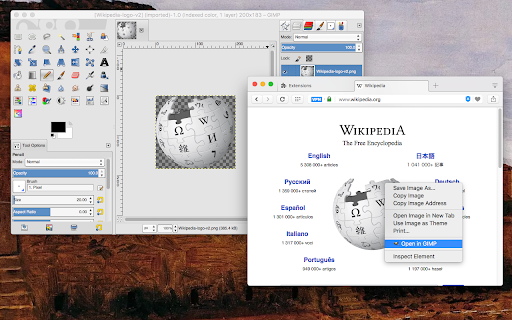
This extension streamlines sending images to GIMP, eliminating the need for manual saving. If the image has a valid URL, it is transmitted directly to GIMP. In the case of an image in DATA URL format, it is temporarily stored in your system's temporary directory, after which GIMP is invoked to open this image (you can modify this behavior via the options page).
Important notes:
1. To use this extension, you must have the GIMP photo editor installed, which can be obtained from https://www.gimp.org/downloads/.
2. If the extension cannot automatically locate GIMP, you can specify its location on the options page.
3. For this extension to function and open images in the GIMP photo editor, a native connector must be installed. Instructions for installing the native client will be provided when attempting to open an image link with this extension.
4. This extension operates as an open-source project, and you are welcome to visit and contribute code.
Features:
1. The ability to download images and transmit local file paths to GIMP.
2. Directly send image links to GIMP (though not recommended).
-- Legal Disclaimer:
This extension offers a convenient means of facilitating access to GIMP but is not affiliated with or a part of the GIMP photo editor. It is an independent, open-source project.
Reviews (6 cached)
★☆☆☆☆2021-08-10
Taoufik lahjouji
Waste of time.
★☆☆☆☆2020-09-08
j smith
GARBAGE. dont waste your time.
★☆☆☆☆2017-08-23
Cieran Therrien
It did not work and i hate it.
★☆☆☆☆2017-02-16
Savanah Jackson
How does this work? i tried to go on the website but i could not get on it
★☆☆☆☆2017-01-03
Noah R
poor
★★☆☆☆2017-05-06
Elizabeth Dubinsky
I don't want to give this two stars. I'm sure it works but it's really confusing since I'm not a computer programmer. I'm sure if I had someone to step me through this, in person, I could use it or if I had the time to read through the instructions to finish the 'puzzle'. I was hoping to just download it and "ta da! You can edit your photos now." But that's not what it looked it. Plus, I couldn't find anything that allowed me to edit photos. It looked like you needed this extension and download another thing to do the photo editing... maybe I'm wrong??
Permissions (4)
Permissions
contextMenusℹ Can add items to the right-click menu downloadsℹ Can manage and monitor downloads nativeMessagingℹ Can communicate with programs on your computer storageℹ Can store data locally in your browser
Details
| Version | 0.2.1 |
| Updated | Oct 9, 2023 |
| Size | 192KiB |
| First Seen | Mar 24, 2026 |
More by yokris.dev


Popular in developer

Lighthouse
by lighthouse-extension-owners
1M
★ 4.42
developer
1M
★ 4.42
developer

Контур.Плагин
by kontur.extension
1M
★ 3.11
developer
1M
★ 3.11
developer

Similarweb - Website Traffic & SEO Checker
by Similarweb
1M
★ 4.66
developer
1M
★ 4.66
developer

Clear Cache
by Little Void LLC (Ben Bojko)
1M
★ 4.45
developer
1M
★ 4.45
developer

SEO META in 1 CLICK
by Bilal Hadri
900K
★ 4.87
developer
900K
★ 4.87
developer
Popular Extensions

Adobe Acrobat: PDF edit, convert, sign tools
by Adobe Inc.
330M
★ 4.40
workflow
330M
★ 4.40
workflow

Chrome Remote Desktop
by Chrome Remote Desktop Release Managers
38M
★ 3.14
workflow
38M
★ 3.14
workflow

Cisco Webex Extension
by cisco.chromestore
24M
★ 2.34
social
24M
★ 2.34
social

Kami for Google Chrome™
by Kami
17M
★ 4.56
education
17M
★ 4.56
education

Read&Write for Google Chrome™
by Texthelp
17M
★ 3.44
accessibility
17M
★ 3.44
accessibility