
Description


Reviews (48 cached)
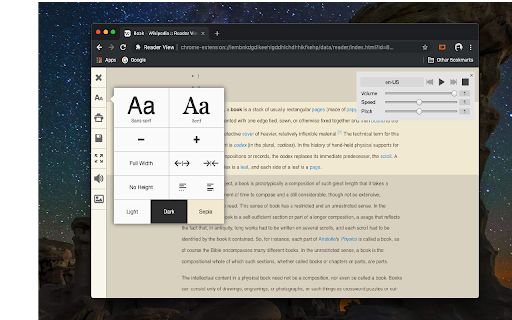
Dark mode or manually choosing any background colour would be better option than default beige colour background. it's too bright when using at low light room.
what's the point of a reader view if you can't even choose basic things like background color? why is there no option for pure white with black text???
Now often fails completely but works again if I uninstall and reinstall.
No idea what's happened to this thing. Since the latest update (I think the one that added a selection of fonts), this extension no longer honors my custom CSS rules. What a shame. Update: Uninstalled and reinstalled to no avail. Uninstalling permanently now and looking for an alternative.
Used to use this for years and now if I have it running and go to Youtube my CPU usage spikes until Brave crashes. Can't tell if this is malicious just know that if it's enabled my CPU goes nuts and causes general system instability.
Doesn't work. No icon appears after installing. No options to change anything in its settings. Useless. (version 7.1.1)
Fails to re-launch after closing it on a page.
SO the reader view itself is good but the tts is not functioning and time i go to a voice the reader view does not play the voice at all this hapeens alot and last for a long time i hope they can fix this problem.
trying to just install this extension crashed my computer and I lost everything I was working on.
Keeps saying it crashed. Works when it wants to.
Cuts off the last several paragraphs of an article when I use Reader View Plus. Maddening to read halfway down and now I must return to the article and fight the ads. Reader View Plus does not work for me. Sad.
Crashed the very moment I tried to make use of it. Every time I try to press the button of Text to Speech option, my Chrome browser crashes and and I have to go to the Extensions section to repair the addon once again. Please, clarify the matter. Thank you in advance.
You *really* think I need an unremovable context menu item in addition to the extension menu item huh? Fine then, I really think you need a one-star review.
"The Extension gallery cannot be scripted" Nothing worked.
Blocks every website that I have used it on.
It never works, even when I reload the page.
this extension has many dublication. best of them this extension. But can't you add a markdown download option? Also at the bottom, fix button is not working. and some letters incompatible with neibour others in words and it looks very ugly and do not look nice when printed. Example: consider "until" word, it shows "unt" part bold and rest "il" is regular. why ? I didn't understand. Also chosen fonts not contain turkish letters, so that it seems like kidnapper notes. Also can you diversify/enrich the sound of speech. It is frequently stop, again and again push play when headers came. You must more develop it.
F9 should activate it. That's the standard we've been using. Yet this seems not to be even available. Instead we have to waste time clicking things with a mouse cursor which takes about 5 times as long as hitting F9. Software designers really need to spend more time in the World of Logic instead of the World of Warcraft and other mindless games they seem to revel in.
Useful but badly designed. It fails in the delivering a clear reading experience because of additional clutter shown and not great typography. It defeats its purpose.
Dark mode is missing. I almost got blind after enabling viewer mode on a website with activated dark mode.
It dont save like markdown visuals in pages. Like if you use the "" quotes"" at quora.com It dont show that element lines besides the quoted text. I want to save the exact reader page, but when you press Save as, it only saves the website pdf page and all its messy elements. so .
Seemed nice, but then on the automatic update it popped open a new tab ostensibly to show me what had changed, but in reality to show a big banner advertisement. Hopefully the author will realize how gross this is and remove the ads. See for yourself: https://add0n.com/chrome-reader-view.html
Options to change BG color, typeface etc. require coding knowledge. want to mess with Chrome build? Go for it. I won't
Other extensions don't work while in readers mode(GTranslate, Highlight search). After opening link in new tab it has no text in it
It would have been great (five stars) were it not for three annoying things (-3 stars): 1. Why on Earth would one give six choices of background color, but none of them (!) being the most common online newspaper standard; white? Being forced to read with a grey background isn't nice. When not voluntary, it feel claustrophobic. 2. Why would one not by default hide the sidebar to the left, and only show it if the user hovers say within 4 % from the left edge of the window? 3. Why would one display the website's url in the text itself? I wanted an extension to have less clutter, not to add things that weren't even on the original page. If these three things would have been good, I would have loved this extension and would have given it five stars.
PLEAS, do not REFESH webpage when click into reader view. that's ANNOYED and consume CPU loads
I am not able to utilize other extensions when using reader view, due to the chrome-extension:// URL. To get around this, I use Simple Mode all the time, which can be selected in Extension Options. However, Simple Mode not recommended in the Extension Options. One issue I noticed is that when using Simple Mode, I am not able to click the extension icon again to toggle back to the normal webpage. Is this why it's not recommended? I don't know. But it's a slight inconvenience, and also I'm not sure why the default behavior goes to a chrome-extension:// URL, which has significant restrictions - particularly the blocking of all extensions on that URL.
Unable to customize shortcuts, which is conflicting with my browser.
I came here looking for an alternative to Omnivore , a read later app that will shut down by this December. That's a very nice alternative that seems to do more than what Omnivore did , especially with the design mode being some sort of a "mini-Microsoft Word" mode . I just wish however to make some recommendations for improvements : )More Rich text format options (Underlining , strikethrough , etc). )More colors for the Highlighter. )More fonts )Adding comment boxes For people who just started to annotate websites and save them as single-file HTML document : It's very capable and will likely satisfy most people's needs.
This extension works well, but looks very similar to the Reading List button in Chrome. I've accidentally hit it many times while trying to add a website to my reading list. The icon should be updated to avoid confusion.
New review (2024) - BUG - TTS system seems to be broken. Voices jitters and cannot read properly as humans and voices do. Problem with all voices. Hey dev, loved the addon improved a lot but then bugs are still there. Right now, I'm talking about the bug of not reading the headline or title of the blog post. The TTS reading starts from the content not the heading. Please look into this. On firefox and librewolf browser, your addon struggles to work. Please also look into this. Older review (2023) - When I started using reader view addon few years ago, it was less buggy and worked flawlessly but now it is buggy and not working as it was intended. The reader view of the page is broken, takes only 50 percent of the text and rest is missing. In TTS mode, it doesn't read the title or bullet points or wherever points exists (for example take any page from site https://www.healthline.com/). Also when using TTS, the popup of the voice, speed and lang. doesn't open up or minimize properly. The lack of fonts out of the box from settings is disappointing. If dev is really updating this addon constantly, please check the problems both for chrome and firefox users. Usable but very problematic. No updates yet for the bugs and issues.
Please allow me to scroll through the page while using your Text-to-Speech feature! It's really annoying it jumps back at every next paragraph!!!! Also please add the ability to open the pages I bookmarked on my PC while using your extention to be then opened on my smartphone. What I mean here is an automatic redirection to the original site instead of the error message I get right now when trying to open them on my mobile.
After installing the extension, a webpage with message "Sorry, you have been blocked You are unable to access webextension.org" opened. It seems this is a malicious extension and it has been blocked by my ad blocker?
It's great when it works, but it keeps crashing within my chosen Brave browser. I've uninstalled and reinstalled twice. Time to try something else.
convert to reader view failed this._unwrapNoscriptImages is not a function
Pretty nice app - except printing cuts off all but page one (on mac)...
dark mood is not so comfortable. add more theme or let us customize the color combination of text and background. i'll give it a 5 then
I think the experience with this extension can be improved. Idk what limitation may have made you decide to load readview on a separate page, but I suggest you create an iframe to load it in, rather than navigating to a whole new page. It will save navigating back and forth between the website I'm reading and the readview page. Plus this will make it more like the firefox and safari readview.
There is a bug in this add-on. URLs at the top of the articles read have a SPACE inserted between the ".com" and the rest of the URL. Not good.
After shutdown, extension stop working. After opening again I have to remove extension and add it again to use it. Everything else in this id very good.
It does not have a deletion mode, where you can delete elements yourself, like another extension called "Just Read". If the developer offers that, I will give this extension another try. For now, it's been removed.
One important feature is missing (which the Firefox counterpart has): When the browser window is really small (in reader mode), the text doesn't sync to that view and parts of the text are offscreen. With Firefox' Readerview the text automatically adjusts to the window size. Also the background should be white, not grey (or at least an option for white).
can you add some features like, justify text, clutter removal while reading (like ublock origin zapper mode), selective printing to pdf... note @yokris.dev : there is an error when we try to print article, the themes like dark/light/sepia appears on only first page of print..
The best reader mode on Chrome. But if an article has multiple pages it cannot merge them. Yokris! Can you please add that feature too?
Works well with loading text, but I noticed that the extension fails to load Wikipedia infoboxes for example: http://prntscr.com/jueyl9 http://prntscr.com/jueyr6
would like an easier way to change default settings
It would be good if there was an option to remove images.
It's fast but it doesn't work on every page. If there isn't enough text on a site, it won't load, which is fine. However, the font can't be enlarged as big as it is in Firefox and it doesn't include article titles, like the reader in Firefox does. It needs a little more work, but I find it functional.
Permissions (7)
Permissions
Details
| Version | 0.8.3 |
| Updated | Oct 29, 2025 |
| Size | 302KiB |
| First Seen | Mar 21, 2026 |
Popular in accessibility



Popular Extensions



