
Quick view for fiverr
v2.2.0 Updated Feb 14, 2026 89.96KiB
Description
In 2026, making the most of Fiverr doesn’t have to be complicated.
Discover the benefits of getting the most out of the Fiverr website by using the Fiverr Quick View Extension! Intended for freelancers and buyers, this extended-effective search functionality combines automatic, simple, and secure instant Gig info display, quick keyword extraction, and local data storage. Incredibly useful for optimizing your Fiverr experience, this tool puts you in control of gig statistics, filtering tools, and buyer data so you can stand out on Fiverr.
Key Features
Local Data Storage: Keep your data stored locally on your system, with no need for external data sources or programs syncing with your data.
Sorting Options: Use the search bar on Fiverr to sort gigs by ratings or quantity, ensuring that the best gigs appear first.
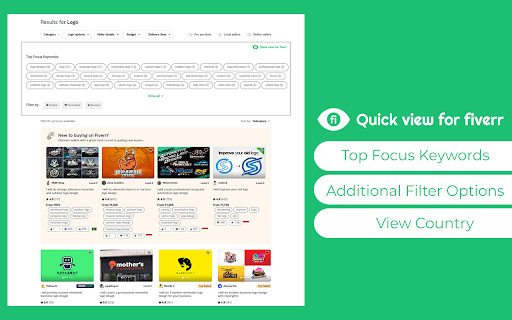
Keyword Extraction: Fiverr keyword extraction helps you find keywords to use in your gig descriptions, boosting your visibility.
Quick Metrics Display: View Fiverr metrics viewer for favorites, orders, ratings, and more in a blink of an eye.
Buyer Insights: Access Gig insights for Fiverr, such as clients' location and feedback data, to interact effectively with buyers.
Customizable popup settings: Toggle each feature on or off to suit your workflow. All preferences are saved locally and persist across sessions
Personalized Communication: Gain easy access to buyer usernames through the interface to better customize tailored messages and improve response quality.
How to Use
Install the Extension: To add Fiverr Quick View Extension, click the “Add to Chrome” button.
Integrate with Fiverr: After installation, run your regular searches and explore freelancers and their gigs on Fiverr.
Access Quick View: For more information, figures such as keyword statistics, favorite gigs, and orders made appear next to the gigs.
Optimize Your Gigs: Optimize Fiverr gigs by incorporating the extracted keywords into your gig descriptions, making them easier to find.
Why Use Fiverr Quick View Extension?
With the Fiverr data insights tool, you can make data-driven decisions to improve your gig performance and communication with buyers, ensuring you stand out and attract more clients on Fiverr.
FAQs
1. Is my data stored securely?
Yes, all your data is stored locally on your device, ensuring complete privacy and security.
2. Can I use this to research competitor gigs?
Absolutely! View gig metrics and extract keywords from competitor listings to refine your own gig strategies.
3. Does this extension work on all Fiverr listings?
The extension integrates with most gig listings and search results on Fiverr, providing valuable insights wherever you browse.
Reviews (2 cached)
★☆☆☆☆2024-06-20
Muhammad Ans
working very slow
★★☆☆☆2024-06-12
Denise M. Calvert II
Its there but it keeps on loading and loading and nothing ever shows up.
Permissions (3)
Permissions
activeTabℹ Can access the current tab when you click the extension notificationsℹ Can show desktop notifications storageℹ Can store data locally in your browser
Details
| Version | 2.2.0 |
| Updated | Feb 14, 2026 |
| Size | 89.96KiB |
| First Seen | Mar 24, 2026 |
Popular in workflow

Adobe Acrobat: PDF edit, convert, sign tools
by Adobe Inc.
330M
★ 4.40
workflow
330M
★ 4.40
workflow

Chrome Remote Desktop
by Chrome Remote Desktop Release Managers
38M
★ 3.14
workflow
38M
★ 3.14
workflow

Microsoft Power Automate
by Microsoft Corporation
10M
★ 1.99
workflow
10M
★ 1.99
workflow

Screencastify - Screen Video Recorder
by castify-ext-dev
9M
★ 3.95
workflow
9M
★ 3.95
workflow

iCloud Bookmarks
by Apple Inc.
7M
★ 3.38
workflow
7M
★ 3.38
workflow
Popular Extensions
Adobe Acrobat: PDF edit, convert, sign tools
by Adobe Inc.
330M
★ 4.40
workflow
330M
★ 4.40
workflow
Chrome Remote Desktop
by Chrome Remote Desktop Release Managers
38M
★ 3.14
workflow
38M
★ 3.14
workflow

Cisco Webex Extension
by cisco.chromestore
24M
★ 2.34
social
24M
★ 2.34
social

Kami for Google Chrome™
by Kami
17M
★ 4.56
education
17M
★ 4.56
education

Read&Write for Google Chrome™
by Texthelp
17M
★ 3.44
accessibility
17M
★ 3.44
accessibility