

Add More Colors to Calendar icon

Add More Colors to Calendar

by Add More Colors for Calendar

v0.7.6 Updated Mar 14, 2026 1.36MiB
CWS
6K
Users
★ 3.37
41 reviews
#2942
of 58.8K
workflow
#874 of 9.1K
Recently updated

Description

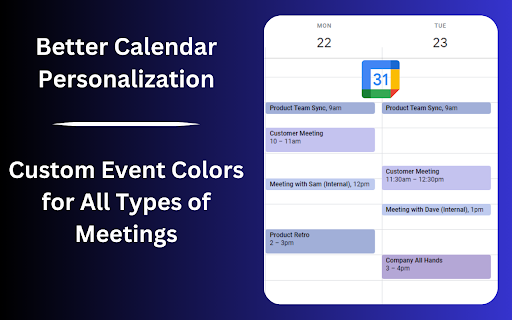
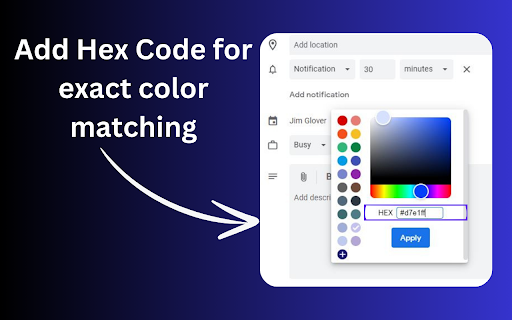
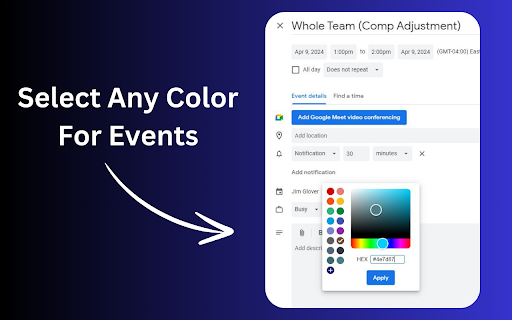
Add More Colors to Calendar gives you the option to create any custom color for your Google Calendar! Finally, More Colors for Google Calendar! Add any color palette you would like with our Google Calendar Color Extension. How to Use: 1. After installing the extension, click the extension tab on the top bar of Chrome and then log in with your Google account to "Add More Colors to Calendar" 2. After logging into the extension, go to your Google Calendar and create an event. 3. In the event popup, you will have the option to change the color of the event. Click the color selector and then click the "+" that appears at the bottom of the default Google Calendar colors. 4. Select any color from the selector then click "Apply". 5. Save your event! Hint: You can also right-click already created Google Calendar events and change the color quicker. HOW TO CANCEL YOUR PRO SUBSCRIPTION 1. Click on the Add More Colors to Calendar logo on the top chrome bar. 2. Click the "Manage Subscription" link 3. Log in to your user account in Stripe 4. Click the "Cancel Subscription" button on the right of the screen HOW TO DELETE A COLOR 1. Click the Extension logo in the top of the Chrome browser 2. Log in if needed 3. Click the "X" beside a color you have selected 4. Delete the color. 5. You can now add a new color to replace the one that was deleted UPDATE 10/20 We have released an update of the extension to work with Chrome's new version FEATURE UPDATE 4/17 We have reduced the price of the Pro version of the extension to $8. We have also implemented a recurring payment model so the price is $4 per month for Add More Colors to Calendar Pro FEATURE UPDATE 3/26 We have added the ability to input your own #hex color to have more accuracy in the color selection process. We would love any feedback on the feature and any suggestions you have for future releases. Are you tired of the limited color options in Google Calendar? Feel like your calendar could use a splash of personality or a more systematic color-coding scheme that truly fits your style or your company's branding? Our Google Chrome extension is here to transform your calendar experience. Introducing the ultimate solution for everyone seeking to add more colors to their Google Calendar. Whether you aim for a more organized calendar, desire more aesthetic appeal, or need your employees' calendars to match your company's colors, this extension is crafted just for you. Why Add More Colors to Your Google Calendar? Google Calendar is a powerful tool for managing your time, organizing your schedule, and keeping track of events and appointments. However, with its default color palette, users often find themselves wishing for more options to customize their calendars. That's where our extension comes into play, offering limitless possibilities to personalize your calendar. Here's how it makes a difference: Enhanced Organization: By allowing for custom color coding, our extension lets you categorize events, tasks, and appointments more effectively. This makes your calendar not just a scheduling tool but a visual representation of how your time is allocated. Aesthetic Appeal: Transform your Google Calendar into a work of art. With custom colors, you can match your calendar's look to your personal style, your desktop theme, or even your mood. Company Branding: For businesses, this extension is a game-changer. Align your employees' calendars with your company's color scheme, reinforcing brand identity and ensuring a uniform appearance in all calendar-related communications. Key Features: Unlimited Color Options: Break free from the default palette and choose any color under the sun. Our user-friendly color picker ensures that you can select precisely the shade you need. Easy to Use: With a simple and intuitive interface, customizing your calendar's colors is a breeze. No technical expertise required! Compatibility: Designed specifically for Google Chrome, this extension integrates seamlessly with Google Calendar, offering a smooth and stable experience. Perfect for Teams: Make your team's calendars a reflection of your company's brand. Our extension supports shared calendars, making it easy to apply a uniform color scheme across your organization. Free to Try: Get started with our extension at no cost. Explore the full range of features and see how it transforms your Google Calendar experience. Transform Your Google Calendar Today Ready to take your Google Calendar from functional to fabulous? With our Chrome extension, adding more colors to your Google Calendar has never been easier. Whether you're looking to improve organization, enhance aesthetic appeal, or align your team's calendars with your company's branding, our extension is the key to unlocking a more personalized and visually appealing calendar experience. Don't settle for a bland and impersonal calendar. Embrace color, embrace creativity, and embrace the full potential of your Google Calendar with our extension. Try it today and see the difference for yourself!
Add More Colors to Calendar screenshot 1Add More Colors to Calendar screenshot 2Add More Colors to Calendar screenshot 3Add More Colors to Calendar screenshot 4

Reviews (18 cached)

★☆☆☆☆2025-10-31
Gas-Pro LLC Bailey

It worked great up until today. I keep getting error code in red Type Error Failed to fetch. I have tried relaunching it, uninstalled it and installed it back. Nothing is working.

★☆☆☆☆2025-09-22
Samantha Johnstone

Would give zero's stars if I could. Doesn't work as expected. Have tried removing this several times but they still charge me.

★☆☆☆☆2025-06-04
Firas Aguel

Having to pay a monthly subscription to use hex codes for colors in a browser extension is crazy

★☆☆☆☆2024-11-05
Susan Weiner

I added the extension and logged into Google. Followed the instructions but there was no "+" sign or other way to access custom colors. Very disappointing.

★☆☆☆☆2024-10-21
Alexander Ronzino

Works for a day and then stops

★☆☆☆☆2024-10-20
Joseph Anderson

Was loving this, but for the past few days it's not working anymore

★☆☆☆☆2024-08-28
Barney Rubble

And here's the error - "please open the extension popup and sign in to add custom colors to events." I already am signed in! Now there's another error - type error failed to fetch. this is on version 6.1. I have now removed it from chrome. the developers website no longer exists

★☆☆☆☆2024-07-25
Ellie Knudsvig

Hey! Don't know why this is happening, but there's an error code every time I try to use this now and I can't access any of the colors I'd chosen. Let me know how you can help please!!

★☆☆☆☆2024-06-04
Kayleigh C

I got this extension after a previous one was not working. However this one is not working for me either. It just keep putting my events in red. Very upsetting.

★☆☆☆☆2024-05-13
Elizabeth Woodcock (Lisa)

I'm also getting error code in red Type Error Failed to fetch. Please fix it.

★★☆☆☆2025-11-05
Laura Bierstedt

I'm also getting the same error code "failed to fetch." Please fix soon!! Had zero problems with this app before, but will have to get a replacement

★★☆☆☆2025-02-01
Tess Dornfeld

Doesn't solve anything - if I want to add color options, I can just create an additional calendar and give it a custom color, and switch events to that calendar as easily as changing an event's color. I wanted this to preserve the sidebar on the left of each event bubble that's in the primary color of the calendar, to easily identify that they're all events of different types on the same calendar. But this doesn't do that, it changes the whole bubble to the custom color, just like changing it to a different calendar in a custom color already does. ETA, second the text color issue too, which is also a problem with Google's custom calendar colors. I just want a light and a dark blue and purple, and the light purple still uses white text, but I can't get either Google or the extension to create a light blue that still has white text. This shouldn't be so hard!

★★☆☆☆2024-10-06
Tara Franklin

I keep getting black and now I have 4 black dots. It will not let me remove them and I have reached my color limit.

★★☆☆☆2024-03-13
Joan Mason

Hello, I keep receiving a prompt to sign in and add my google account when I try to use this. I've signed in multiple times and I'm unable to add colors to the calendar. Please advise.

★★★☆☆2025-03-16
Sarah Fry

can't get this to work, any advice for troubleshooting?

★★★☆☆2024-11-12
Emily L'Esperance

Agree with another reviewer- Love the ability to choose colors, but when I do so it automatically changes the font from white to black, even though I have the color set (Gear icon > Appearance > Color Set) as Modern (with white text). If this were fixed I would continue using the extension. It would also be nice to be able to select custom colors for labels.

★★★☆☆2024-11-04
S T

Nice, but 40 bucks per year or you can only add 3 more colours. Would go for it if it was a one-time payment of 3-6 USD but 40 USD for simply adding a few more colours?

★★★☆☆2024-07-06
Catherine Paek

Adding and removing colors work easily enough, but when it comes to a repeated series of events, it automatically applies the new color to ALL the events without first asking "This event only", "This and following events", or "All events". Therefore I cannot apply a color to only one of the events in the series as needed.

Permissions (3)

Permissions

identity Can use your Google account identity scripting Can inject scripts into web pages storage Can store data locally in your browser

Details

Version 0.7.6
Updated Mar 14, 2026
Size 1.36MiB
First Seen Mar 24, 2026



