Download with JDownloader icon

Download with JDownloader

by InBasic

v0.3.8 Updated Feb 21, 2026 511KiB
CWS
100K
Users
★ 3.89
115 reviews
#348
of 57.8K
workflow
#124 of 8.9K
⚠️Requests 2 sensitive permissions

Description

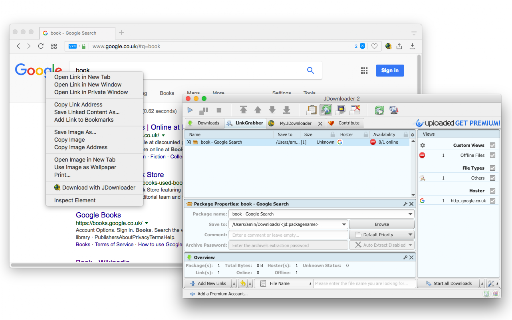
This extension enables connectivity between your browser and JDownloader, a Java-based download manager. The extension offers two modes of operation: 1. It allows you to send downloading jobs directly from the right-click context menu. 2. It can interrupt the built-in download manager and redirect the requests to JDownloader. By default, the interruption mode is inactive. Click the action button (toolbar button) once to activate it. To turn off the interruption mode, click the action button again?the interruption mode can help you when a website does not provide direct download links. Native Integration: For this extension to communicate with JDownloader and execute native commands, a native client is required. The instructions for installing this NodeJS native client are provided when you use the extension for the first time. Additionally, please note that this extension only connects your browser to the JDownloader, so you must have the JDownloader application installed on your operating system for the extension to work. You can review the code of the native client at: https://github.com/belaviyo/native-client/releases. A brief video tutorial on installing and using the native client is available at: https://www.youtube.com/watch?v=vSnZp2wflTc It is important to mention that this extension uses JDownloader's local server to send downloading jobs to the external downloader. The extension can work correctly without installing the native client as long as JDownloader is running in the background. The native client is only necessary to start the downloader when the server is not present. Logs: Version 0.1.6 1. Fixed issue with tab names not being sent to JDownloader. Version 0.1.7 1. Added functionality to download all links with JDownloader.
Download with JDownloader screenshot 1

Reviews (12 cached)

★☆☆☆☆2025-09-04
Niksus Niksusov

It does not work with NAS headless setup and no remote access too.

★☆☆☆☆2025-07-16
Patrick Fürst

Not useble with a download Server

★☆☆☆☆2025-03-25
Arnab Ghosh

useless extension, copy paste link is faster. Not working on YT. IDM does that in one click.

★☆☆☆☆2024-10-14
Priyanshu Raj

Does not respond to HLS or m3u8 streams which IDM and other downloaders, even simple extensions do without any hassle. The interface is intolerably ugggly, the software itself comes bundled with malware. Despite all this they have the audacity to ask for donations when uninstalling! This useless junk shouldn't even exist for the sake of humanity!

★☆☆☆☆2024-03-06
Bo Suo

Does not work at all.

★☆☆☆☆2023-09-24
Subham Biswas

Bricked my browser. Thank you.

★☆☆☆☆2022-09-16
Ben MacTavish

I installed this yesterday, and today, just after I opened chrome it started bombarding "got empty response" notifications, and opened like 1000 new tabs causing the browser to freeze.

★☆☆☆☆2018-12-26
Khairul Anwar

Do not install JDownloader!!! it will install lot of ADWARES/SPYWARE in your PC without asking permission.!!

★☆☆☆☆2018-04-09
John Doe

Agree with the comment above: just a freaking download, why they make it so complicated! I tried to install a stand alone app and my antivirus even blocks it! Piece of junk!

★☆☆☆☆2018-02-23
ArkLight Grimoire

This add-on is way to complicated. It should just be click and download a video. i have to jump through hoops just to get 1 video. just NO

★★☆☆☆2018-08-23
Tombert

Does not work with aspx pages. Says that file is offline.

★★★☆☆2022-07-31
David Rickey

It's confusing to filter stuff on a page to only what you're trying to download. You also have to install a standalone app on your computer. It also randomly downloads whatever the heck it wants from a page you're looking at. I don't know how to make it download _only_ the stuff I tell it to. It's a very powerful tool but the UI is pretty bad--that plus randomly downloading anything it wants without being prompted is pretty rough.

Permissions (8)

Permissions

activeTab Can access the current tab when you click the extension contextMenus Can add items to the right-click menu cookies Can read and modify browser cookies downloads Can manage and monitor downloads nativeMessaging Can communicate with programs on your computer notifications Can show desktop notifications scripting Can inject scripts into web pages storage Can store data locally in your browser

Details

Version 0.3.8
Updated Feb 21, 2026
Size 511KiB
First Seen Mar 24, 2026