Gmail Settings Extender icon

Gmail Settings Extender

by Ahmed Abouelela

v4.7 Updated Oct 20, 2025 1.24MiB
CWS
9K
Users
★ 4.48
62 reviews
#2318
of 67.7K
tools
#435 of 16.9K

Description

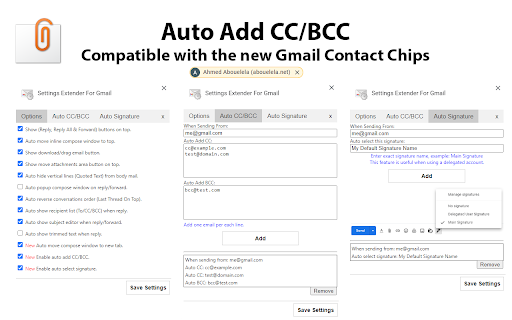
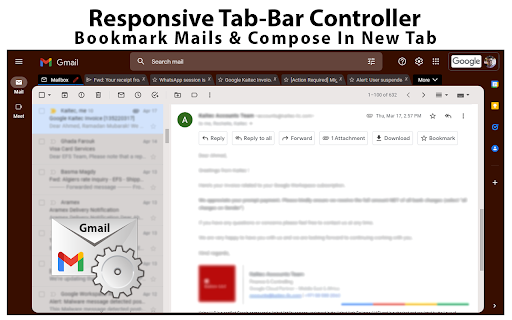
Version 4.7: -Bug fixes. Version 4.6: -Added an option to always show attachments on top of the mail body. Version 4.5: -Fixed the new Google AI assistant is not working on tabbed compose window. -Fixed the compose window is not auto scrolling after adding new line. -Added an option to auto show CC or BCC list separately. Version 4.2, 4.3, 4.4: -Bug fixes, fixed auto add cc/bcc. Version 4.1: -Bug fixes, Enabled compose tab controller. By default, Gmail doesn't allow dragging mails outside the opened window, so you'll not be able to download your mails or transfer them as attachment to another browser window or tab, unless you download them manually from mail menu. Also, you can't drag an attachment from any opened mail and drop it into the compose window as attachment, the same when you need to transfer this attachment to another account opened in another browser window. By using this extension, you'll be able to drag attachments directly to any opened compose window, you'll notice a download mail button which is draggable to your file system, or to compose window, or even to another browser tab, you'll get another button which will move the attachment section to top. To make it easy for you to reply or forward mails, this extension adds action buttons and moves the inline compose view to top. A new tab bar will change the look of Gmail and will allow composing mails in new tabs inside the same window, or add mails as chrome like bookmark tab. Another feature to allow auto adding CC/BCC while composing new mails. For those who are using a delegated Gmail accounts and looking for a way to auto change the signature without being forced to select it manually on each compose or change it from the main settings, this extension adds an option to do it for you, just enter the name of the signature from the main settings and the account you are delegated access to and it will be selected automatically. That's it!. add this extension to your browser now and enjoy. wanted scrolling area.
Gmail Settings Extender screenshot 1Gmail Settings Extender screenshot 2

Reviews (7 cached)

★☆☆☆☆2025-10-28
Justin Mosebach

This is a paid extension (it's not free). It's just a free trial.

★☆☆☆☆2025-08-21
Josh Baer

For the good things this does, it also does some screwy things that make it untenable. It always collapses previous emails, and if you hit reply, it creates a draft that there is no way to delete without also deleting the entire thread. Uninstalled.

★☆☆☆☆2025-05-27
Renzo Ormando

Good but it is not free

★★★☆☆2025-11-03
정현욱[CQ - CHUNG HYUNWOOK] ‍

For the past few days, buttons such as Reply and Forward within the text have not been working.

★★★☆☆2023-07-07
Heidi (WDI HK)

no work

★★★☆☆2023-06-15
Cubee Chung

The button of reply all/forward are not working now. Pls fix it .

★★★☆☆2023-04-03
Facturation & Contact Modloc

First : thank you very much for your works, all the features are excellent ! Good job. However I have an issue : I can't drag and drop file in attchment. Seems the only approuved is PDF ? If I wan't to drag and drop a txt, xls or other file's type I've got the message : "Sorry, the file type is not allowed. You can upload a PDF file instead." How can I fix this ? Because it's very annoying

Permissions (1)

Permissions

storage Can store data locally in your browser

Details

Version 4.7
Updated Oct 20, 2025
Size 1.24MiB
First Seen Mar 24, 2026



