
Description


Reviews (16 cached)
I'm disabling this extension because now it's needs "Read data you copy and paste" access! It looks good and works well, if the extra unnecessary permission is removed, I'd gladly use it agian
The browser warns me that this app will run in the background, start when my computer starts up & will run independent of my browser. why do you need to have this level of access?
Based on Simple Speed Dial but doesn't even offer as much control. Cannot disable search. Cannot disable bookmark selector. Cannot disable options icon. These are all things that the base extension allow. Visual bookmarks is all of the worst parts of Simple Speed Dial and none of the good.
I don't like giving a low rating. But, really -- the shortcuts on the new tab are shortcuts to existing bookmarks and not to the URLs themselves -- you can't delete a shortcut on the tab page without deleting the originating bookmark in your bookmarks folder -- why do i want shortcuts to the folders? and why can't i turn off this "feature"? -- why do i want all of the shortcuts on my bookbar bar repeated on the tab page? i don't get the logic at all. i want the tab page to hold bookmarks that are not immediately available right in front of me but which i use frequently and are *not* on the bookmarks bar. :/ It looks good. it's fairly easy to use. remember not to delete any of the "visual bookmarks" unless you intend to delete the access to the site altogether.
The amount of permission it ask compared to what it is based upon is kinda scary..
I’m not quite sure how to explain the problem clearly, but I wish I could provide a video to better demonstrate the issue. I’m not sure if it’s just me, but the screen continues to load endlessly. Even when I try to return to the normal view, it does not finish loading. When I use it as a browser or in that mode, it loads indefinitely or displays the spinning circle. I have uninstalled and reinstalled the extension, but unfortunately, that did not resolve the issue. I also attempted to adjust the settings, but any changes either revert to default or do not seem to take effect, especially with the background feature. This appears to be a wonderful extension, and I would truly love to use it. However, I am currently encountering what seems to be a bug or glitch. Since I am new to this particular extension, I am not entirely sure how to proceed. Thank you very much for taking the time to read this. I would sincerely appreciate it if this issue could be looked into. Please excuse any mistakes in my English. Because I am unsure whether this issue is due to a bug or something on my end, I feel it would be unfair to leave either a positive or negative review at this time.
Thank you for this excellent and fast visual bookmark extension. I want to move away from FVD Speed Dial, but I MUST have Groups. Aside from having Folders at the Address Bar and accessing each folder as a group of Speed Dials, is there a better way to create groups?
This was my favorite new tab extension on the web store, but it suddenly started giving me the error of "Can not find the folder by id." I uninstalled it once to fix it, and it was fixed for a few hours, but then it started giving me the error again. I'm not going to commit to this if I have to keep uninstalling and reinstalling to fix it. Will be switching to a new extension.
The extension has great potential. I switched from SpeedDial2 because a recent update (unrequested and can't revert back) changed UX for the worse. Pros: 1) search, 2) use a bookmark folder as source, 3) Many customization options, 4) ability to sync Cons: User can't 1) Set logo size in icon/thumb pad (32x32 is too small, can't enlarge, set size, or fill pad), 2) Set size of pads (HxW the reminder would be distance between pads given a set number of columns), 3) Set which pads must use icon and which thumbs in one go (must be done one by one), Additional suggestions: There should be a way to create groups based on subfolders (which would act as "separator" of sections" (perhaps each folder could be turned into an area with different user-settable background color and a label on top for all pads/thumbs belonging to a given folder? That way the various subfolders contained in a "startpage" folder would create different sections with different color background. For instance a folder named "travel" would have pads/thumbs on a light blue background, the folder "finances" would have a gray background for all its pads/thumbs, the folder "social" would have its pads on a green background and so on. Or perhaps an even better approach might be to create tabs with one for each subfolder so that each would have its scrollable "page" with a small title (the folder name in the tab) so that users can swipe left-to-right (with maybe a user-selectable option to swipe right-to-left since some cultures use that order?) or tap/click on tabs to jump from one section to the other (when swiping would take too long to reach it). I hope the feedback will help improve this already very good start page extension ;)
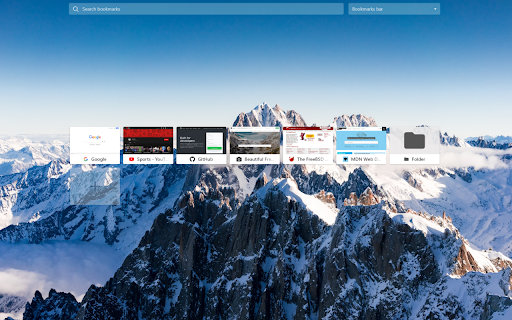
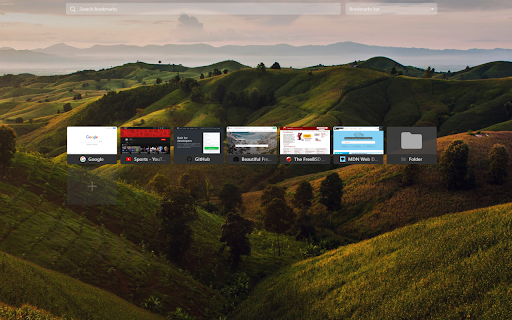
Hello friend. First of all, I want to congratulate you on the idea of creating the Visual bookmarks extension for Chrome. It's a good idea. However, I think it could be improved further. I am UI and UX designer. The experience of using Visual bookmarks can be much more pleasant with minor layout adjustments. I noticed that the layout has a shadow at the top, this influences the background images I want to put in Visual bookmarks. I think it would be much better not to have that effect. Keep it clean and flat. If we talk about UX I think it would be useful to be able to organize the folders we create alphabetically. It would also be interesting to be able to assign icons to each folder, imagine if I have a Photoshop-related folder, this folder can have the icon/image as the folder's cover which I quickly identify. I also noticed that when I set the Panel width to 100% it covers the settings button and the capture_fill button, to get back to normal I had to go to the extensions option and in the 3 dots see that there was an option to enter the settings again. Still in the UX field, something that should never be missing is a help button, instructions and even a quick way to give input on possible errors that users will notice. Returning to the UI, the boxes that represent the folders should be cleaner, have a much finer line and without the gray bar where the folder name is. I think that with these changes you will have many more users using your extension. Change this. Compliments.
IT SEEMS NICE, I have just installed it and it looks interesting. ONE DRAWBACK... is that you can't choose if the extension controls Chrome's "Open New Tab" or not. It would be much better if the user could choose whether they want it or not. I'm still making up my mind if I will use the extension because of that. I might choose to use it, ou maybe I will give it up, because I like my new tabs clean. I don't know. Let's see.
Can you not replace my new tab page? I want to keep my new tab page as it is. For example, can you use the option page, create another page or something like that and provide the same functions of the extension? much appreciated! I have to keep enabling and disabling the extension to use this extension for now
app is very usable easy to organize better. I'm getting the hang of it. hone thing though: does it really have to change my new tabs? I would like to just access the interface through the extension only. (this is just a personal thing since I love my theme)
This would be 5 stars but for some reason it does not work in incognito mode.
Hi, I like the extension, but there is something very annoying regarding the notifications. When I am offline, I constantly get notifications from my MacOS that the extension needs internet. I don't want to turn off Chrome notifications, just because of one extension. Are you able to give us the option to disable all notifications related to that extension or disable them by default. Also I think there should be "generate thumbnails for that folder" so that we don't have to click each time to do a refresh of the images.
Good, but sorting could be easier. I would like to drop into folder etc...
Permissions (10)
Permissions
Details
| Version | 7.4.6 |
| Updated | Mar 3, 2026 |
| Size | 149KiB |
| First Seen | Mar 24, 2026 |
More by ivan_k

Popular in workflow





Popular Extensions


