
✅Highly rated
Description
Click on the extension icon to toggle the functions on or off.
1) Look up when selected
Select Japanese text to look it up.
(Click on the extension icon to select your language.)
2) Quick translation by hovering
Hover over the text to translate.
3) Look up with right-click
Select text → Right-click → Click "Search on JP Dictionary" to look up, analyze, and translate the text.
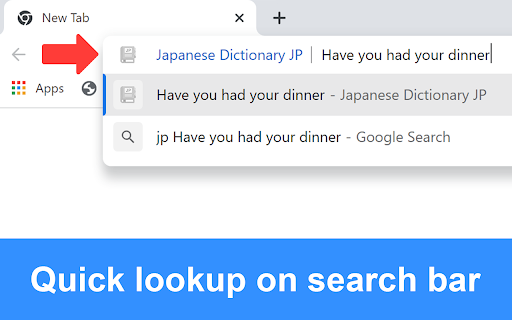
4) Look up on the search bar
In the browser's search bar, type "jp" + space → Enter the word or sentence you want to look up.
Tips:
- Turn off the checkbox when not in use.
- Click on vocabulary or Kanji in the popup to see detailed content and comments.
- Double-click to highlight a word, and triple-click to highlight a sentence.
- Hold down Alt to highlight links.
- If you use Edge, you can use the shortcut Ctrl + Shift + X to copy buttons or blocked parts, then look them up in the search bar (type "jp" + space → paste the copied content) for a quick lookup.
- JP Dictionary can recognize handwritten characters and perform image recognition. Visit jpdictionary.com to use this feature.
Best regards,
JP Dictionary
(JP Jisho/JP 辞書/JP じしょ)
Website: https://jpdictionary.com




Reviews (5 cached)
★★☆☆☆2017-02-28
Rajendra Adhikari
Can read only a small sentence.
★★★☆☆2026-01-09
gaobai tom
hovering not working at all,its confused
★★★☆☆2023-08-31
jairo ramos soares
Please add the option to enable automatic selection when hovering over the text as before. (╥_╥) Anyway, it's a good extension.
★★★☆☆2020-03-29
rachid mehdaoui
genial
★★★☆☆2017-03-01
Timothy Wetterfors
Would like it to be able to speak longer passages. Also good if there was an option to have it speak the text under the right-click menu
Permissions (6)
Permissions
contextMenusℹ Can add items to the right-click menu scriptingℹ Can inject scripts into web pages storageℹ Can store data locally in your browser tabsℹ Can see your open tabs and their URLs ttsℹ Can use text-to-speech webNavigationℹ Can monitor navigation events
Details
| Version | 3.3.1 |
| Updated | Jul 18, 2025 |
| Size | 7.03MiB |
| First Seen | Mar 28, 2026 |
More by Hoàng Hiệp

Từ điển tiếng Nhật JP
by Hoàng Hiệp
10K
★ 4.99
education
10K
★ 4.99
education

JP English Dictionary: English to 200 Languages
by Hoàng Hiệp
4K
★ 4.99
education
4K
★ 4.99
education

Countdown Timer for Each Question
by Hoàng Hiệp
352
★ 4.57
education
352
★ 4.57
education

Exam Topics Helper
by Hoàng Hiệp
40
★ 5.00
tools
40
★ 5.00
tools
Popular in education

Kami for Google Chrome™
by Kami
19M
★ 4.56
education
19M
★ 4.56
education

EndNote Click
by EndNote Click
5M
★ 4.06
education
5M
★ 4.06
education

Promethean® Screen Share
by classflow
4M
★ 2.98
education
4M
★ 2.98
education

Language Reactor
by Dioco
2M
★ 4.20
education
2M
★ 4.20
education

Mote for Google Chrome™
by Mote Technologies, Inc.
2M
★ 4.55
education
2M
★ 4.55
education
Popular Extensions

Adobe Acrobat: PDF edit, convert, sign tools
by Adobe Inc.
331M
★ 4.40
workflow
331M
★ 4.40
workflow

Grammarly: AI Writing Assistant and Grammar Checker App
by Grammarly
42M
★ 4.50
communication
42M
★ 4.50
communication

Chrome Remote Desktop
by Chrome Remote Desktop Release Managers
38M
★ 3.14
workflow
38M
★ 3.14
workflow

Microsoft Single Sign On
by Microsoft
36M
★ 2.27
workflow
36M
★ 2.27
workflow

Cisco Webex Extension
by cisco.chromestore
23M
★ 2.34
social
23M
★ 2.34
social