
⚠️Not updated in over a year
Description
Have you ever run out of time during an exam? This extension helps you stay focused and manage your time effectively while studying, ensuring you stay on track and finish each question on time.
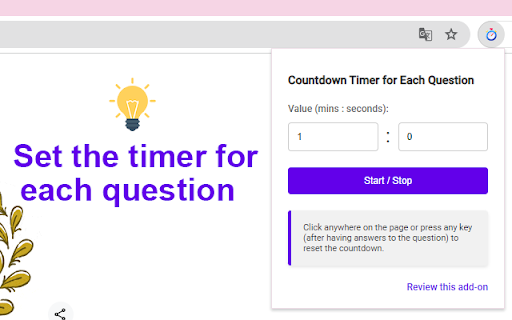
Setting the Timer (one time):
- Click the extension icon to open the popup.
- Enter your desired countdown value in the input field.
Starting and Stopping:
- Click on the extension icon, then click the "Start / Stop" button to start or stop the countdown.
(Pages opened before installing this extension may not work properly, please reload them.)
Resetting the Timer (by clicking anywhere, pressing any key):
- Click anywhere on the page or press any key (after having answers to the question) to reset the countdown.
If you find this extension helpful, please rate it 5 stars.


Reviews
Loading reviews...
Permissions (3)
Permissions
activeTabℹ Can access the current tab when you click the extension scriptingℹ Can inject scripts into web pages storageℹ Can store data locally in your browser
Details
| Version | 1.3 |
| Updated | Aug 2, 2024 |
| Size | 36.0KiB |
| First Seen | Mar 25, 2026 |
More by Hoàng Hiệp

Từ điển tiếng Nhật JP
by Hoàng Hiệp
10K
★ 4.99
education
10K
★ 4.99
education

Japanese Dictionary JP
by Hoàng Hiệp
7K
★ 4.94
education
7K
★ 4.94
education

JP English Dictionary: English to 200 Languages
by Hoàng Hiệp
4K
★ 4.99
education
4K
★ 4.99
education

Exam Topics Helper
by Hoàng Hiệp
40
★ 5.00
tools
40
★ 5.00
tools
Popular in education

Kami for Google Chrome™
by Kami
19M
★ 4.56
education
19M
★ 4.56
education

EndNote Click
by EndNote Click
5M
★ 4.06
education
5M
★ 4.06
education

Promethean® Screen Share
by classflow
4M
★ 2.98
education
4M
★ 2.98
education

Language Reactor
by Dioco
2M
★ 4.20
education
2M
★ 4.20
education

Mote for Google Chrome™
by Mote Technologies, Inc.
2M
★ 4.55
education
2M
★ 4.55
education
Popular Extensions

Adobe Acrobat: PDF edit, convert, sign tools
by Adobe Inc.
331M
★ 4.40
workflow
331M
★ 4.40
workflow

Grammarly: AI Writing Assistant and Grammar Checker App
by Grammarly
42M
★ 4.50
communication
42M
★ 4.50
communication

Chrome Remote Desktop
by Chrome Remote Desktop Release Managers
38M
★ 3.14
workflow
38M
★ 3.14
workflow

Microsoft Single Sign On
by Microsoft
36M
★ 2.27
workflow
36M
★ 2.27
workflow

Cisco Webex Extension
by cisco.chromestore
23M
★ 2.34
social
23M
★ 2.34
social