
⚠️Not updated in over 2 years
Description
Place notes on any page online!
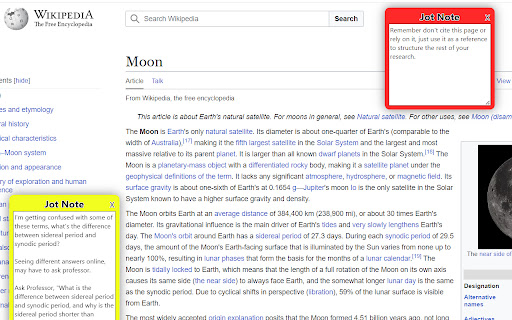
Add Jot to Chrome to quickly create and customize notes while your browsing. Jot allows users to easily create, style, organize, and export notes all with no account required.
Make use of these convenient keyboard shortcuts:
* Create a Jot note: Ctrl+Shift+z
* Hide all Jot notes on the active tab: Ctrl+Shift+h
* Show all Jot notes on the active tab: Ctrl+Shift+s
These actions, as well as pasting a copied note, can also be performed by right-clicking anywhere within a webpage and navigating to "Jot - Browser Notes".
Each Jot note can have its appearance and performance customized. Right click on a Jot note to change its color, add tags to it, change its order relative to other Jot notes, or select how it moves when the tab is resized or scrolled. This menu is also where you can copy a note to easily paste elsewhere. A pasted note will have the same appearance and behavior as the note it was copied from.
Adjust the size of a Jot note by dragging the bottom right corner of its textbox. Edit its title by clicking the note's existing title and typing.
If you pin the Jot extension, selecting the Jot icon in the top right of your browser opens the Jot popup. Here you can add an additional note to the active tab that will only appear in the popup. You can also show, hide, and delete all Jot notes on the page. You can also manage any notes on the page with tags from within the Jot popup.
The Jot notes' options page allows you to select options for your Jot notes, manage all of your created Jot notes in one place, remove all of your note data from the extension, download your notes and import notes previously exported from the Jot notes extension.


Reviews
Loading reviews...
Permissions (6)
Permissions
activeTabℹ Can access the current tab when you click the extension contextMenusℹ Can add items to the right-click menu downloadsℹ Can manage and monitor downloads scriptingℹ Can inject scripts into web pages storageℹ Can store data locally in your browser tabsℹ Can see your open tabs and their URLs
Details
| Version | 0.2 |
| Updated | Jul 20, 2023 |
| Size | 43.26KiB |
| First Seen | Mar 22, 2026 |
Popular in workflow

Adobe Acrobat: PDF edit, convert, sign tools
by Adobe Inc.
330M
★ 4.40
workflow
330M
★ 4.40
workflow

Chrome Remote Desktop
by Chrome Remote Desktop Release Managers
38M
★ 3.14
workflow
38M
★ 3.14
workflow

Microsoft Power Automate
by Microsoft Corporation
10M
★ 1.99
workflow
10M
★ 1.99
workflow

Screencastify - Screen Video Recorder
by castify-ext-dev
9M
★ 3.95
workflow
9M
★ 3.95
workflow

iCloud Bookmarks
by Apple Inc.
7M
★ 3.38
workflow
7M
★ 3.38
workflow
Popular Extensions
Adobe Acrobat: PDF edit, convert, sign tools
by Adobe Inc.
330M
★ 4.40
workflow
330M
★ 4.40
workflow
Chrome Remote Desktop
by Chrome Remote Desktop Release Managers
38M
★ 3.14
workflow
38M
★ 3.14
workflow

Cisco Webex Extension
by cisco.chromestore
24M
★ 2.34
social
24M
★ 2.34
social

Kami for Google Chrome™
by Kami
17M
★ 4.56
education
17M
★ 4.56
education

Read&Write for Google Chrome™
by Texthelp
17M
★ 3.44
accessibility
17M
★ 3.44
accessibility