Converter for PowerPoint icon

Converter for PowerPoint

by Free Software Extensions

v3.0.0 Updated Oct 17, 2023 1.7MiB
CWS
20K
Users
★ 3.81
401 reviews
#723
of 40.2K
workflow
#224 of 5K
⚠️Not updated in over 2 years

Description

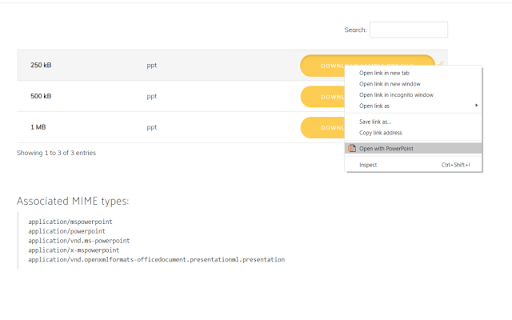
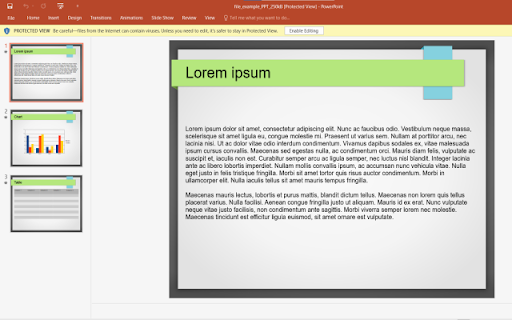
Bring your Presentations which were made with Microsoft Powerpoint with you wherever you go. Want to convert Microsoft Powerpoint presentations so you can view the slides without having to use a desktop software? You can do so now after you install our software extension. To begin using our software extension for powerpoint online, here are the steps you need to do. Ensure you have the Microsoft Powerpoint slides on your computer. Install our software extension "Converter for Powerpoint" Once you install our software, please refresh all your existing Chrome Tabs/close Chrome browser and restart Chrome browser to let the software work for powerpoint. Choose the presentation link/pptx files you wish to convert with powerpoint viewer via the right click context menu button. Its that simple, just use the right click context menu to choose our software when you want to convert a presentation which was made with Microsoft Powerpoint. You can convert your presentations to PNG/JPEG as our software extension will let you choose the presentation file to convert when you right click and use our software option on the context menu. Disclaimer: Please note this extension is NOT made by Microsoft and is made by an independent development team. All copyrights belong to their respective owners. Google doesn’t endorse or sponsor this Chrome extension. This extension is not owned by, it is not licensed by and is not a subsidiary of Microsoft Inc.
Converter for PowerPoint screenshot 1Converter for PowerPoint screenshot 2Converter for PowerPoint screenshot 3Converter for PowerPoint screenshot 4

Reviews (28 cached)

★☆☆☆☆2024-01-04
Mike Jarecki

TypeError: Failed to fetch Doesn't work with my powerpoint file on my HP Chromebook.

★☆☆☆☆2022-01-15
Michael Trytek

Generic rating.

★☆☆☆☆2021-12-18
Nhi Lê

bth

★☆☆☆☆2021-01-30
Leelaram Sahu

I am not really impressed with it beacause it ask rating before we use it so, i really hate it sorry if i am gone too harsh with my words.

★☆☆☆☆2021-01-16
ABCKriti teacher8online

waiting to use it

★☆☆☆☆2021-01-13
Chelsea Taylor Long

Wont open without rating.

★☆☆☆☆2021-01-05
i love harley Quinn its so cute

VERY VERY BAD DON'T DOWLAND

★☆☆☆☆2020-12-16
Natasha Ilich

wont let me in

★☆☆☆☆2020-12-15
alyssa lopez

It just wants me to rate it and wont open the extension do not download this.

★☆☆☆☆2020-12-07
Dominique de la Pena

Its not nworking for me.

★☆☆☆☆2020-12-02
Nawa Raj Awasthi

i tried to open but just asks for rate it

★☆☆☆☆2020-11-29
hss ar

its not working for me

★☆☆☆☆2020-11-23
Desert Rats

Terrible instructions for use. Can't work out how to use it. Awful

★☆☆☆☆2020-10-17
Julie Slipiec

havent tried it yet, and it wont let me log in.

★☆☆☆☆2020-10-13
Niranjan Shetty

Not working at all.

★☆☆☆☆2020-09-15
Efortles Team

Doesn't work at all, don't waste your time on this

★☆☆☆☆2020-09-12
thanhtuyen bui

i low-key hated this app.I tried to open it but it just keeps asking me to have a rating.really annoying

★☆☆☆☆2020-09-08
Priya Gautam

wouldnt open and kept asking for ratings

★☆☆☆☆2020-09-05
Yamilex Espinal

did not open

★★☆☆☆2020-12-23
Anfel achr Dz

fine

★★☆☆☆2020-12-05
daniel Bernatchez

I don t know yet

★★☆☆☆2020-10-14
Hannah B

I don't want to rate it I just want to open my presentation

★★★☆☆2021-01-22
amna nawaz

it was very nice app

★★★☆☆2021-01-13
Steve Cooper

Can't rate before I have used it

★★★☆☆2020-12-21
asma soso

I LOVE

★★★☆☆2020-11-13
qúy hoàng

good

★★★☆☆2020-09-17
Pradipta Baliar Singh

ok

★★★☆☆2020-08-31
Hania Batool

ok

Permissions (1)

Permissions

contextMenus Can add items to the right-click menu

Details

Version 3.0.0
Updated Oct 17, 2023
Size 1.7MiB
First Seen Mar 22, 2026

More by Free Software Extensions

Popular in workflow

Popular Extensions