
Keep Computer Awake (for a While)
v1.0.7 Updated Feb 22, 2023 13.97KiB
⚠️Not updated in over 2 years
Description
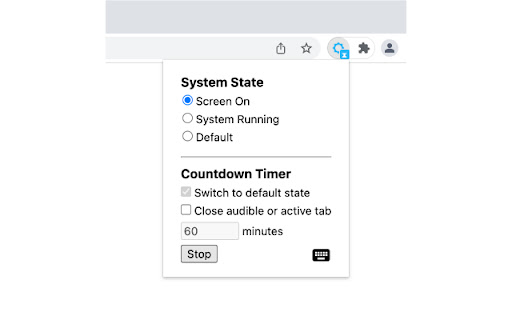
Similar to other "Keep Awake" extensions, the basic function of this extension is to override current system energy-saving setting, and prevent your computer from sleeping or turning off the screen. In addition, this extension provides a countdown timer that can switch to default state and (optionally) close the active tab. For example you can keep your computer running for a while, then let it go to sleep. It also supports keyboard shortcuts to change the state.
Click the extension icon, you can switch between three states:
● Keep screen on: The computer does not go to sleep, and the screen keeps on. For example, when you do a presentation.
● Keep system running: The computer does not go to sleep, but the screen can be turned off. For example, when you upload or download files, the screen can be turned off, but need to keep the system running.
● System default state: Cancel the above two states. Whether to go to sleep or turn off the screen depends on the energy-saving setting of your operating system.
This extension provides a countdown timer. You can use it:
1. Switch to default state. For example, when a program is being executed, it may take some time to complete. In this situation, you can set the state to keep system running, and switch to default state an hour later.
2. Set a timer to close the tab that is playing a podcast or video when you go to bed. This may help you fall asleep better.
Note: if you turn your computer to sleep manually (e.g. close the laptop lid), or quit the browser completely, this extension can't keep your computer running.
Reviews (3 cached)
★☆☆☆☆2023-02-22
J J
Update: Feb 20,2024. It's not awaking from sleep. It's done this now several times. Had Keep Awake for many many years until I realized that my monitor sometimes wouldn't turn back on after it went to sleep or just off, I even changed my HDMI cable and it still did it, so I downloaded Keep Computer Awake and it works w/o any problems now.
★★☆☆☆2026-03-07
Luca Gentile (Cyclorbit)
I set up a timer, but nothing happened
★★★☆☆2023-12-23
Asaph Cheng Yao
Works for my Windows 11 laptop but not for my Windows 10 laptop.
Permissions (4)
Permissions
alarmsℹ Can schedule periodic background tasks backgroundpower storageℹ Can store data locally in your browser
Details
| Version | 1.0.7 |
| Updated | Feb 22, 2023 |
| Size | 13.97KiB |
| First Seen | Mar 23, 2026 |
More by Jackie(Guokai) Han


Popular in workflow

Adobe Acrobat: PDF edit, convert, sign tools
by Adobe Inc.
330M
★ 4.40
workflow
330M
★ 4.40
workflow

Chrome Remote Desktop
by Chrome Remote Desktop Release Managers
38M
★ 3.14
workflow
38M
★ 3.14
workflow

Microsoft Power Automate
by Microsoft Corporation
10M
★ 1.99
workflow
10M
★ 1.99
workflow

Screencastify - Screen Video Recorder
by castify-ext-dev
9M
★ 3.95
workflow
9M
★ 3.95
workflow

Mendeley Web Importer
by Mendeley
3M
★ 2.25
workflow
3M
★ 2.25
workflow
Popular Extensions
Adobe Acrobat: PDF edit, convert, sign tools
by Adobe Inc.
330M
★ 4.40
workflow
330M
★ 4.40
workflow
Chrome Remote Desktop
by Chrome Remote Desktop Release Managers
38M
★ 3.14
workflow
38M
★ 3.14
workflow

Cisco Webex Extension
by cisco.chromestore
24M
★ 2.34
social
24M
★ 2.34
social

Kami for Google Chrome™
by Kami
17M
★ 4.56
education
17M
★ 4.56
education

Read&Write for Google Chrome™
by Texthelp
17M
★ 3.44
accessibility
17M
★ 3.44
accessibility