Image Converter: Save as JPG/PNG/WEBP/GIF/BMP/AVIF/HEIF icon

Image Converter: Save as JPG/PNG/WEBP/GIF/BMP/AVIF/HEIF

by timmerse-group

v0.0.2 Updated Oct 9, 2024 2.01MiB
CWS
2K
Users
★ 3.22
18 reviews
#3107
of 49.1K
tools
#623 of 12.2K
⚠️Not updated in over a year

Description

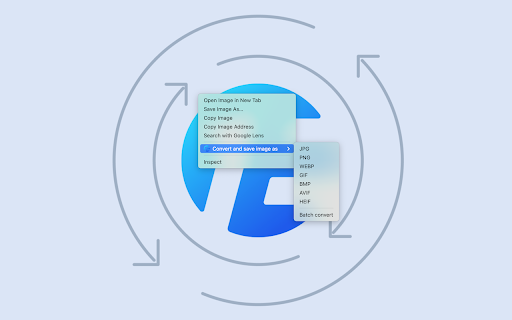
Enhance your image handling capabilities with our convenient right-click menu for images. This feature allows you to effortlessly convert images to various formats, including JPG, PNG, WEBP, GIF, BMP, AVIF, or HEIF, and save them directly to your computer. For more control over your conversions, simply click the extension icon in the toolbar. Here, you can fine-tune the output size and quality of your images before conversion. By default, the original size and highest image quality are maintained. Developed by EdgeOne.ai, this application offers a quick and free online solution for image format conversion. For your privacy and security, all processed images are automatically deleted after a few hours. Need to streamline your workflow? If you're interested in automatically converting website images via API or optimizing your website's performance, we're here to help. Reach out to us at https://edgeone.ai/contact for personalized solutions tailored to your needs.
Image Converter: Save as JPG/PNG/WEBP/GIF/BMP/AVIF/HEIF screenshot 1Image Converter: Save as JPG/PNG/WEBP/GIF/BMP/AVIF/HEIF screenshot 2

Reviews (4 cached)

★☆☆☆☆2025-12-22
Fairly Vinyl (Fi)

Doesn't work. The target file successfully uploads, gets converted, then we're prompted to check our download folder, but we're redirected to an XML error page with the converted file nowhere to be seen. A shame since this converter seems perfect with all relevant file types in one.

★☆☆☆☆2025-12-15
Ray Vun

Seems to have stopped working. It was fine before, worked perfectly, especially when converting webp to gif, but now it just says the conversion is complete and then instead of showing the pop up window to save, it refreshes the tab and sends you to some xml error page saying access denied

★☆☆☆☆2025-12-14
Terry Canaan

Doesn't work at all.

★★★☆☆2024-12-18
tipigi

It works, but just like every other webp converter, it does not open your last-used folder. Instead, it automatically goes to the downloads folder. Why can't any of these extensions open the last-used folder? It's a pain when downloading multiple pictures.

Permissions (3)

Permissions

contextMenus Can add items to the right-click menu notifications Can show desktop notifications storage Can store data locally in your browser

Details

Version 0.0.2
Updated Oct 9, 2024
Size 2.01MiB
First Seen Mar 23, 2026