
Easy Screenshot - a Web Clipper icon

Easy Screenshot - a Web Clipper

by chYer

v0.5.2 Updated Nov 3, 2025 50.85KiB
CWS
20K
Users
★ 4.19
74 reviews
#867
of 49.1K
workflow
#267 of 6.1K
⚠️Requests 1 sensitive permission

Description

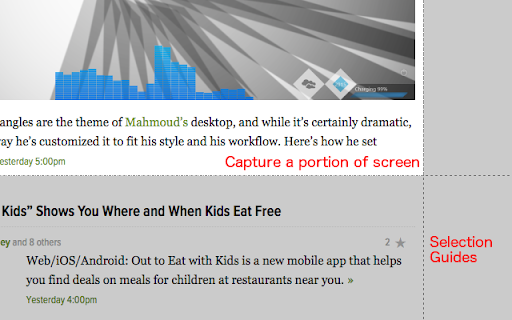
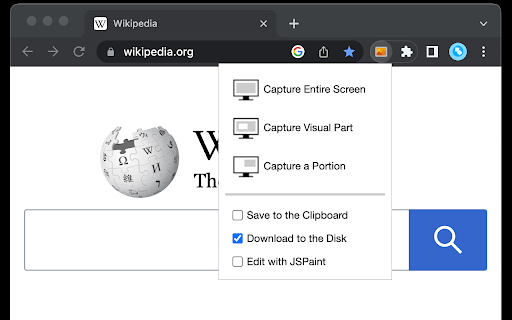
You can capture screenshots from the active tab with just two clicks. It provides multiple options for capturing specific portions of the page, the visual viewport, or even the entire page if it extends beyond the screen with both vertical and horizontal scroll bars. The captured image can be saved to the default download directory, copied to the clipboard, or opened in an online paint editor. The extension currently integrates JSPaint, a web-based replica of MS Paint, which offers offline functionality, allowing you to edit your images without an internet connection. The extension adds a toolbar button to the browser's action area. Clicking on this button opens a popup window with three options: 1. Capture the Entire Screen (3 methods. Works even if the page contains fixed-position elements) 2. Capture Visual Part 3. Capture a Portion Supported formats: PNG, JPEG, Avif, and WebP These options are also accessible via the right-click context menu on any page, providing easy access to the screenshot functionality. Here are some additional notes about the extension: 1. When selecting the "Capture Entire Screen" option, and the page size exceeds the window size, the extension will automatically scroll through the entire page to capture different sections and merge them into a single image. This process may take a few seconds to complete. 2. The resolution of the captured image depends on the screen resolution. For instance, if you have a 4K display, such as a Retina display, the image resolution will be at least four times higher than a regular display. 3. To ensure compatibility across various devices, the extension saves all captured screenshots in the widely supported PNG format, which offers high-quality lossless images. 4. The extension does NOT add watermarks to the captured images. 5. If you prefer to customize the format of the filenames for downloaded images, you can visit the options page and utilize the "filename mask" option to make the desired changes.
Easy Screenshot - a Web Clipper screenshot 1Easy Screenshot - a Web Clipper screenshot 2

Reviews (13 cached)

★☆☆☆☆2021-08-14
Gerard van Reekum

Used to love it, but it seems they f*d it up now (and reading the other ratings not for the first time)... doesn't work on Chrome version below 88 anymore.

★☆☆☆☆2018-07-26
City 348

Does not work, especially the selected portion because you can't really select it. When you try, the page won't scroll up and down therefore making it impossible to select the are you want. TEST YOUR CODE BEFORE AND STOP WASTING OUR TIME!

★☆☆☆☆2018-06-06
Max Machado

doesn't capture portions of a screen, can't copy to clipboard

★☆☆☆☆2018-03-09
Stan Dimitrov

There's no features! Only simple save a image, uninstall!

★☆☆☆☆2018-01-17
Wendy Sheppard

Won't save a portion, won't work on multiple screens. Terrible. Uninstalled!

★☆☆☆☆2017-12-05
C D

Won't save a portion, won't even send a bug report! After jumping through hoops to get all the info, "error, send email" - NO! not more hoops. Uninstalled.

★☆☆☆☆2015-11-08
Gary Kim

No obvious way to uninstall.

★☆☆☆☆2015-05-07
AJ

Crashes every time I try to use it.

★★☆☆☆2025-10-07
Вероника Г

Why the heck del button bulk deletes everything and yet Ctrl Z doesn't reverse the whole thing

★★★☆☆2024-02-22
David N.

Uninstalling. I liked it before the update mainly because of the minimum permissions. I don't need other options or improvements, they just need more permissions.

★★★☆☆2021-09-02
pururut

It stopped working in late August

★★★☆☆2017-03-24
Eduardo Dallmann

suggestion: png transparent

★★★☆☆2016-09-04
I am Dew

The Chrome version is inferior to the Firefox version. The Firefox version has the third option and for me the best option, which is to capture entire page. They're also different in how to work. The extension name and the icon are the same, but the quality is not.

Permissions (7)

Permissions

activeTab Can access the current tab when you click the extension contextMenus Can add items to the right-click menu debugger Can use Chrome's debugging protocol on other tabs downloads Can manage and monitor downloads notifications Can show desktop notifications scripting Can inject scripts into web pages storage Can store data locally in your browser

Details

Version 0.5.2
Updated Nov 3, 2025
Size 50.85KiB
First Seen Mar 23, 2026


