
Description
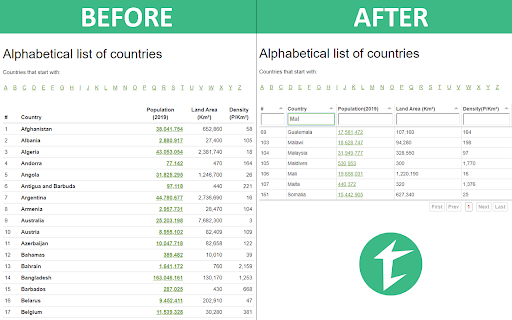
Do you work with websites featuring lots of HTML tables? Need to quickly filter, sort, page, copy or export data without touching the website code? Tabulazer turns any standard HTML table into a powerful interactive table (powered by Tabulator).
You can “tabulaze” tables to get:
➤ Real-time column sorting (ascending/descending)
➤ Column filters (per-column filtering)
➤ Quick filter (global search across all columns, optional)
➤ Paging + rows-per-page selector (10 / 25 / 50 / 100 / 250 / 500)
➤ Resizable columns (mouse-driven)
➤ Column chooser (show/hide columns, optional)
➤ Remember layout per page (persist filters/sorting/columns for the same URL, optional)
➤ Visual modes: compact mode, zebra rows, font size scaling
➤ Export & copy tools (from the context menu):
Copy Table to Clipboard: CSV / XLSX / XML
Download Table as: CSV / XLSX / XML
Export scope: (current view) or (all rows)
Highly recommended if you deal with big tables and need to quickly extract relevant data.
NEW UI (SIDE PANEL)
Tabulazer now uses a modern Side Panel interface (instead of the old popup), so you can keep controls visible while browsing.
From the Side Panel you can:
➤ Pick table (overlay picker)
➤ Toggle the last table
➤ Activate all / Deactivate all
➤ See a list of detected tables and toggle each one
➤ Select an active table (scroll + highlight)
➤ Manage settings (filters/sorting/paging/visuals)
CONFIGURATION SETTINGS
Open the Side Panel to access settings, including:
➤ Force table width to 100%
➤ Enable sorting
➤ Enable column filters
➤ Enable paging + choose rows per page
➤ Enable quick filter
➤ Enable column chooser
➤ Remember layout for this page (on/off)
➤ Compact mode / Zebra rows / Font size
USAGE INFO
Right-click anywhere on a page and use the Tabulazer context menu:
➤ Pick Table (overlay picker)
➤ Toggle Table (toggles the table you right-clicked; if used outside a table it falls back to Pick Table)
The transformation is done using Tabulator (https://tabulator.info/), a great table management JS library by Oli Folkerd.
➤ Tabulazer official page: https://www.ryadel.com/en/tabulazer-chrome-extension-filter-sort-html-table-tables/
➤ Fork me on GitHub: https://github.com/Darkseal/tabulazer
Reviews (1 cached)
★☆☆☆☆2024-03-27
Patrik Blue
Doesn't work. Donthing happens when clicking table and choosing Tabulazer (yes it is a <table>)
Permissions (5)
Permissions
activeTabℹ Can access the current tab when you click the extension contextMenusℹ Can add items to the right-click menu scriptingℹ Can inject scripts into web pages sidePanel storageℹ Can store data locally in your browser
Details
| Version | 1.1.0 |
| Updated | Feb 5, 2026 |
| Size | 2.13MiB |
| First Seen | Mar 23, 2026 |
Popular in workflow

Adobe Acrobat: PDF edit, convert, sign tools
by Adobe Inc.
330M
★ 4.40
workflow
330M
★ 4.40
workflow

Chrome Remote Desktop
by Chrome Remote Desktop Release Managers
38M
★ 3.14
workflow
38M
★ 3.14
workflow

Microsoft Power Automate
by Microsoft Corporation
10M
★ 1.99
workflow
10M
★ 1.99
workflow

Screencastify - Screen Video Recorder
by castify-ext-dev
9M
★ 3.95
workflow
9M
★ 3.95
workflow

Mendeley Web Importer
by Mendeley
3M
★ 2.25
workflow
3M
★ 2.25
workflow
Popular Extensions
Adobe Acrobat: PDF edit, convert, sign tools
by Adobe Inc.
330M
★ 4.40
workflow
330M
★ 4.40
workflow
Chrome Remote Desktop
by Chrome Remote Desktop Release Managers
38M
★ 3.14
workflow
38M
★ 3.14
workflow

Cisco Webex Extension
by cisco.chromestore
24M
★ 2.34
social
24M
★ 2.34
social

Kami for Google Chrome™
by Kami
17M
★ 4.56
education
17M
★ 4.56
education

Read&Write for Google Chrome™
by Texthelp
17M
★ 3.44
accessibility
17M
★ 3.44
accessibility