
⚠️Not updated in over 2 years
Description
Maximize your website's SEO potential with SEO Analytics, the Chrome extension designed to provide comprehensive, real-time SEO insights with just a click. Perfect for SEO professionals, digital marketers, and web developers, this tool is your personal SEO consultant that fits right into your browser.
Why SEO Analytics?
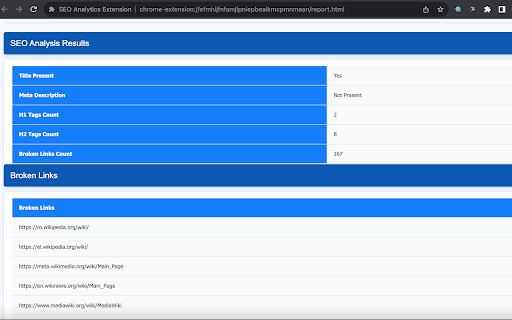
Instant SEO Audits: Analyze any webpage for SEO elements like title tags, meta descriptions, header tags, and broken links in seconds.
User-Friendly Interface: A simple, intuitive interface means you can get the SEO data you need without any hassle.
On-Page Insights: Understand how your or competitors' websites utilize SEO elements to rank on search engines.
Broken Link Detector: Identify and fix broken links to improve user experience and site health.
No Data Collection: Your privacy is paramount. SEO Analytics runs locally on your browser and never collects or stores your data.
Features at a Glance:
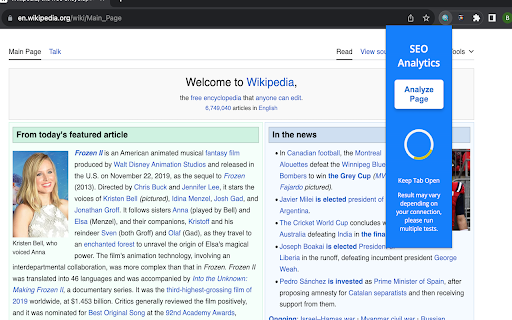
One-Click Analysis: Get a snapshot of essential SEO metrics with a single click while you browse.
Detailed Reports: Dive into detailed SEO reports that break down key on-page factors, empowering you to make data-driven decisions.
Collapsible Sections: Focus on what matters most with collapsible sections for each report category.
Printable Reports: Need a hard copy? Generate printer-friendly reports for offline analysis or meetings.
Responsive Design: Whether you're on a desktop or tablet, SEO Analytics maintains a seamless experience.
Getting Started is Easy:
Install the Extension: Add SEO Analytics to Chrome from the Chrome Web Store with one click.
Navigate to a Webpage: Open the page you want to analyze.
Click 'Analyze Page': Use the extension icon to start the analysis and view your report.
Review and Action: Get insights into SEO optimizations and make informed decisions for your website.
Privacy by Design:
We believe in offering powerful tools without compromising your privacy. SEO Analytics doesn't collect personal data, ensuring your browsing habits and information remain private.
Support and Feedback:
Your feedback fuels our growth.
SEO Analytics is more than an extension; it's a critical tool for anyone serious about SEO. Enhance your web presence, outrank competitors, and drive organic traffic with SEO Analytics — your smart solution to staying ahead in the digital space.
This description is well under the 16,000-character limit and succinctly covers what the extension does, its benefits, and why users should consider installing it. Adapt as needed to fit the exact capabilities and advantages of your SEO Analytics extension.
Reviews
Loading reviews...
Permissions (2)
Permissions
activeTabℹ Can access the current tab when you click the extension scriptingℹ Can inject scripts into web pages
Details
| Version | 1.0 |
| Updated | Nov 27, 2023 |
| Size | 1.09MiB |
| First Seen | Mar 22, 2026 |
More by Beftools

CustomSearch Extension
by Beftools
258
★ 4.17
tools
258
★ 4.17
tools

ClipNotes
by Beftools
16
★ 0.00
tools
16
★ 0.00
tools

Ash Job Application Tracker
by Beftools
13
★ 5.00
tools
13
★ 5.00
tools

Dark Mode Toggle
by Beftools
6
★ 0.00
tools
6
★ 0.00
tools

Job Application Assistant
by Beftools
5
★ 5.00
tools
5
★ 5.00
tools
Popular in tools

Browsec VPN - Free VPN for Chrome
by Browsec
7M
★ 4.44
tools
7M
★ 4.44
tools

Microsoft Bing Homepage & Search for Chrome
by Microsoft Corporation
4M
★ 3.72
tools
4M
★ 3.72
tools

Monica: All-In-One AI Assist & Smartest AI Agent
by Monica Team
3M
★ 4.89
tools
3M
★ 4.89
tools

Ad Blocker: Stands AdBlocker
by Stands
3M
★ 4.79
tools
3M
★ 4.79
tools

Google Dictionary (by Google)
by dictionary-extension-dev
3M
★ 4.36
tools
3M
★ 4.36
tools
Popular Extensions

Adobe Acrobat: PDF edit, convert, sign tools
by Adobe Inc.
330M
★ 4.40
workflow
330M
★ 4.40
workflow

Chrome Remote Desktop
by Chrome Remote Desktop Release Managers
38M
★ 3.14
workflow
38M
★ 3.14
workflow

Cisco Webex Extension
by cisco.chromestore
24M
★ 2.34
social
24M
★ 2.34
social

Kami for Google Chrome™
by Kami
17M
★ 4.56
education
17M
★ 4.56
education

Read&Write for Google Chrome™
by Texthelp
17M
★ 3.44
accessibility
17M
★ 3.44
accessibility