
⚠️Not updated in over a year ⚠️Below average rating
Description
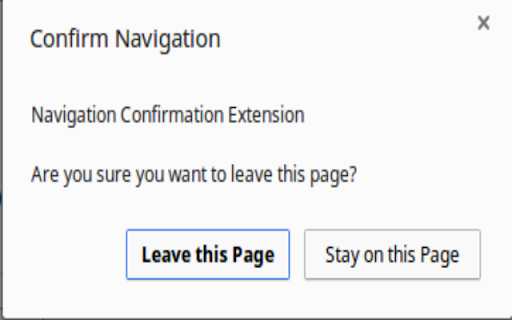
Click the icon to create a popup when you attempt to navigate to another page or reload the current one. The check mark indicates that you will be asked confirmation on the current tab. The red x indicates that you will not be asked to confirm leaving the page. Click the icon to toggle on and off. There is also an option to confirm when closing the window.
Reviews
Loading reviews...
Permissions (4)
Permissions
activeTabℹ Can access the current tab when you click the extension notificationsℹ Can show desktop notifications scriptingℹ Can inject scripts into web pages storageℹ Can store data locally in your browser
Details
| Version | 3.2.3.1 |
| Updated | Mar 16, 2025 |
| Size | 18.88KiB |
| First Seen | Mar 22, 2026 |
More by Daniel Herr

Popular in functionality

Go Back With Backspace
by gobackwithbackspace
300K
★ 3.16
functionality
300K
★ 3.16
functionality

Google Search Maps Button
by Publisher54321
200K
★ 4.81
functionality
200K
★ 4.81
functionality

Disable AI Overview | Turn Off AI Overview
by hideaioverviews
100K
★ 4.06
functionality
100K
★ 4.06
functionality

IPvFoo
by Paul Marks
100K
★ 4.82
functionality
100K
★ 4.82
functionality

GNTD: Glass New Tab Dashboard
by akram.ismayilov13
100K
★ 4.23
functionality
100K
★ 4.23
functionality
Popular Extensions

Adobe Acrobat: PDF edit, convert, sign tools
by Adobe Inc.
330M
★ 4.40
workflow
330M
★ 4.40
workflow

Chrome Remote Desktop
by Chrome Remote Desktop Release Managers
38M
★ 3.14
workflow
38M
★ 3.14
workflow

Cisco Webex Extension
by cisco.chromestore
24M
★ 2.34
social
24M
★ 2.34
social

Kami for Google Chrome™
by Kami
17M
★ 4.56
education
17M
★ 4.56
education

Read&Write for Google Chrome™
by Texthelp
17M
★ 3.44
accessibility
17M
★ 3.44
accessibility