Shade Calendar – Time Blocking for Google Calendar icon

Shade Calendar – Time Blocking for Google Calendar

by Shade Calendar

v1.17.0 Updated Jun 13, 2025 910KiB
CWS
5K
Users
β˜… 4.36
28 reviews
#3442
of 64.3K
workflow
#994 of 9.9K

Description

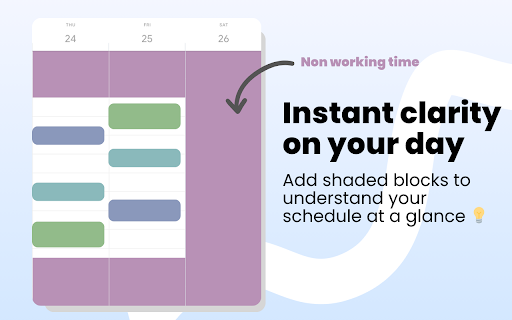
πŸ“† Shade Calendar – Color-Code Time Blocks in Google Calendar β€’ Make your Google Calendar more visual and intuitive. β€’ Shade specific time blocks in Google Calendar to organise your day, highlight events, and separate work, personal, or custom schedules. πŸ’‘ Features β€’ Color-code time blocks in Google Calendar’s day, week, and 4-day views β€’ Visually block out time for work hours, personal time, childcare, exercise, or focus sessions β€’ Create your own weekly schedule with flexible, recurring time shading β€’ Works seamlessly with multiple calendars, including personal and shared setups β€’ Helps with time blocking, calendar planning, and visual scheduling 🧭 How to Use β€’ Click the extension icon to open the time block editor β€’ Choose which hours to shade and select a color β€’ Set a unique time block schedule for each day of the week β€’ View your new visual layout directly inside Google Calendar 🎯 Who This Is For This extension is perfect if you: β€’ Practice time blocking β€’ Use Google Calendar for both work and personal life β€’ Want to separate tasks visually (e.g. meetings vs deep work) β€’ Need better visual cues for commitments like workouts, childcare, or study time β˜• Support The Extension β€’ If Shade Calendar helps you stay organized, you can support future updates here: https://buymeacoffee.com/madeleinesmithsoftware ⚠️ Disclaimer β€’ Shade Calendar is an independent tool and is not affiliated with Google or the Google Calendar brand.
Shade Calendar – Time Blocking for Google Calendar screenshot 1Shade Calendar – Time Blocking for Google Calendar screenshot 2Shade Calendar – Time Blocking for Google Calendar screenshot 3Shade Calendar – Time Blocking for Google Calendar screenshot 4Shade Calendar – Time Blocking for Google Calendar screenshot 5

Reviews (5 cached)

β˜…β˜†β˜†β˜†β˜†2024-09-20
FR

why pink?

β˜…β˜…β˜†β˜†β˜†2026-01-17
Sheri Matthews

I can't figure out how to make this work, there's no instructions, I've installed the extension and when I open my google calendar I click on the extension and set the hours but nothing at all happens?

β˜…β˜…β˜†β˜†β˜†2022-12-08
Nicole Slaton

Great concept but it does not work well. I have my hours set from 8a-4p and it shades out until 9am and reshades starting at 5:30pm.. I also have no working hours entered for Sunday, shouldn't that entire day be shaded out?

β˜…β˜…β˜…β˜†β˜†2025-10-30
David Naylor

It's great but the obvious flaw is that the shading completely shades out the grid of the non-work hours. It needs an opacity option for the shading, or the choice to leave the time grid intact, or to recolour it in the non-work period so we can use the non-work period easily too.

β˜…β˜…β˜…β˜†β˜†2023-03-07
rippledmind

ok.. but still 5 days... what about part time or contract work? possibly put -- in the space so I can select which days and hours... otherwise I have to say 8am and finish at 801am

Permissions (1)

Permissions

storageβ„Ή Can store data locally in your browser

Details

Version 1.17.0
Updated Jun 13, 2025
Size 910KiB
First Seen Mar 25, 2026