
⚠️Requests 1 sensitive permission
Description
Say, Pi turns your conversations with ChatGPT, Pi, and Claude into smooth, voice‑driven experiences, and brings high‑quality voice typing to any website.
Just tap the call button, speak like you would to a person, and get lifelike spoken replies. Plus, dictate text into any input field across the web with the same accuracy you love.
Perfect for multitasking, accessibility, or anyone who thinks better out loud.
NEW IN v1.10.0 — “Say, Pi for ChatGPT” (Save Standard Voice)
- Bring back the feel of ChatGPT’s Standard Voice Mode (SVM) with a patient, predictable, hands‑free experience.
- Drop‑in on chatgpt.com: a call button appears in the ChatGPT composer; start/stop just like SVM.
- Automatic Read Aloud: when enabled, we press ChatGPT’s native “read aloud” once per response—no double audio.
- Designed for the #SaveStandardVoice moment: warmth, presence, and dependable pacing.
FREE PLAN – TRY INSTANTLY, NO ACCOUNT NEEDED
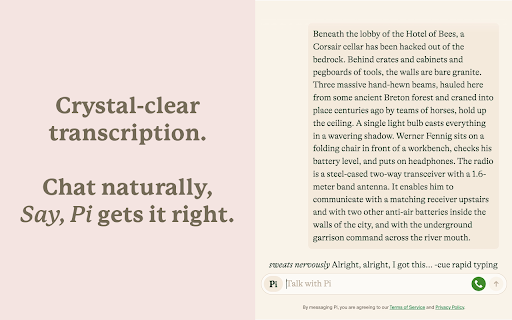
- Voice Chat with AI: Talk to ChatGPT, Pi, and Claude with Whisper‑powered voice recognition that knows when you're done speaking.
- Universal Voice Typing: Dictate into any text field or email on any website – just right-click and select "Start dictation with Say, Pi."
- Accurate & Fast: Enjoy high-accuracy speech-to-text, even with accents and background noise.
- Hear Natural Voices: Warm, lifelike replies in supported modes.
- Flexible Layouts: Use full-screen immersive mode or standard chat view.
- Dark Mode Support: Eye-friendly design that blends in with Pi's interface.
- Works Everywhere: Mac, Windows, Linux, Android, iOS – all covered.
SAY, PI PREMIUM – UNLOCK THE FULL EXPERIENCE
Your voice, your language, your AI – across all your devices and websites.
- ChatGPT, Claude & Pi Support: Seamless switching between top AI assistants.
- Universal Dictation: Professional-grade voice typing for emails, documents, and forms anywhere on the web.
- Lifelike Replies in 32+ Languages: Powered by ElevenLabs, crafted to sound natural in your language.
- Bigger Usage Limits: More talking time, more listening time, more dictation.
- One Account, Everywhere: Premium follows you across platforms and browsers.
See pricing at: https://saypi.ai/pricing
WHY THOUSANDS LOVE SAY, PI
- Boost Your Workflow: Take notes, write emails, ideate, or draft while keeping your hands free.
- Speak Any Language: Multilingual support with smooth mid-conversation switching.
- Built for Accessibility: Designed with inclusivity in mind – great for users with motor or visual challenges.
- Rated ★ 4.9/5 by 2,000+ Users: Trusted by a growing global community.
- Privacy First: Your voice data is secure and never misused. See our policy at: https://saypi.ai/legal/privacy
GET STARTED IN SECONDS
1. Install the extension.
2. For AI chat: Open chatgpt.com, pi.ai, or claude.ai and click the call button.
3. For voice typing: From any text field, press the floating "Say, Pi" icon or right-click and select "Start dictation with Say, Pi."
4. Speak naturally. That's it.
Start talking to AI and typing with your voice the natural way—install Say, Pi and experience the future of conversation and productivity.


Reviews
Loading reviews...
Permissions (8)
Permissions
alarmsℹ Can schedule periodic background tasks audio contextMenusℹ Can add items to the right-click menu cookiesℹ Can read and modify browser cookies identityℹ Can use your Google account identity offscreen storageℹ Can store data locally in your browser tabsℹ Can see your open tabs and their URLs
Details
| Version | 1.10.7 |
| Updated | Jan 5, 2026 |
| Size | 17.72MiB |
| First Seen | Mar 24, 2026 |
Popular in tools

Browsec VPN - Free VPN for Chrome
by Browsec
7M
★ 4.44
tools
7M
★ 4.44
tools

Microsoft Bing Homepage & Search for Chrome
by Microsoft Corporation
4M
★ 3.72
tools
4M
★ 3.72
tools

Monica: All-In-One AI Assist & Smartest AI Agent
by Monica Team
3M
★ 4.89
tools
3M
★ 4.89
tools

Ad Blocker: Stands AdBlocker
by Stands
3M
★ 4.79
tools
3M
★ 4.79
tools

Google Dictionary (by Google)
by dictionary-extension-dev
3M
★ 4.36
tools
3M
★ 4.36
tools
Popular Extensions

Adobe Acrobat: PDF edit, convert, sign tools
by Adobe Inc.
330M
★ 4.40
workflow
330M
★ 4.40
workflow

Chrome Remote Desktop
by Chrome Remote Desktop Release Managers
38M
★ 3.14
workflow
38M
★ 3.14
workflow

Cisco Webex Extension
by cisco.chromestore
24M
★ 2.34
social
24M
★ 2.34
social

Kami for Google Chrome™
by Kami
17M
★ 4.56
education
17M
★ 4.56
education

Read&Write for Google Chrome™
by Texthelp
17M
★ 3.44
accessibility
17M
★ 3.44
accessibility