
Noam - ChatGPT translate assistant & Deep Translation
by Noam Team
v1.0.4 Updated May 17, 2024 6.18MiB
⚠️Not updated in over a year ⚠️Requests 1 sensitive permission
Description
💡 Noam - ChatGPT translate assistant & Deep Translation, the best AI translation plugin, intelligently recognizes web page content, allowing you to immerse yourself in web content. It supports multilingual contrastive translation, and supports word selection, images, PDFs, video subtitles, and more for translation, offering an immersive translation experience. Compatible with all web websites.
🧑💻 Usage scenarios:
Noam's capabilities are very powerful and can use AI translation to help you better understand foreign content. The usage scenarios are very broad, such as reading foreign news, learning foreign languages, browsing foreign websites, and reviewing foreign literature, etc. Whether you want to enhance your language skills or quickly understand foreign content, it can provide efficient and convenient help.
🚀 Quick Start Guide:
1️⃣ When browsing a foreign webpage, simply click the Translate Current Site button to get AI-powered immersive translation results.
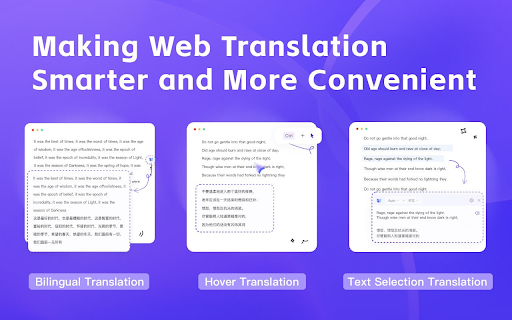
2️⃣ In the browser, hover the mouse or hover + shortcut keys to experience the immersive translation effect.
3️⃣ Automatically detects the original language and translates it into the target language with one click, saving time and effort for an immersive reading experience.
4️⃣ The plugin includes a built-in AI dictionary feature for quick word lookup anytime, anywhere.
💻 Feature Summary:
🔥 Uses intelligent content area recognition for translation without changing the original web page content format, keeps the original language, adds translation contrast, simplifies the reading interaction difficulty, and experiences immersive reading.
🔥 Supports PDF document uploads for bilingual contrastive translation without changing the document content, enjoying PDF immersive reading.
🔥 Efficient mouse hover interaction; just hover your mouse over any foreign paragraph on the webpage to get bilingual contrastive translation at that spot.
🔥 Supports one-click translation of image content.
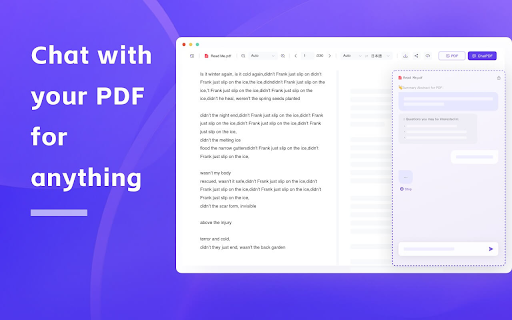
🔥 Supports ChatPDF, using the latest AI technology for dialogue with document content, summarizing, and outlining to improve document reading efficiency.
🔥 Built-in AI dictionary for easy and convenient word lookup anytime, anywhere.
❓ FAQs:
Q: How to turn on/off the translation service?
A: Click the plugin icon on the right side of the webpage to toggle on/off.
Q: What is the plugin's capability based on?
A: The plugin's capability is based on AI large models, which are more powerful than machine translation and more contextually accurate, saying goodbye to obscure foreign readings.
Q: About permissions
A: The plugin reads and changes your website data, so it requires corresponding browser permissions. Please allow Noam Translation to obtain the necessary permissions. Rest assured, this permission is only used for providing translation services and not for other purposes.
📩 Contact Information:
If you encounter any problems during product use or have suggestions for product improvement or feature suggestions or want to give feedback to the product manager, you can send an email to: contact@noam.tools or visit the official website for customer service: https://noam.tools
If our plugin has been helpful to you, please leave us a five-star rating. Your encouragement will be our entire motivation to continue striving. If you encounter any issues during use, feel free to leave a message or contact us. 🤝


Reviews
Loading reviews...
Permissions (6)
Permissions
contextMenusℹ Can add items to the right-click menu scriptingℹ Can inject scripts into web pages storageℹ Can store data locally in your browser ttsℹ Can use text-to-speech unlimitedStorage webRequestℹ Can observe and analyze network traffic
Details
| Version | 1.0.4 |
| Updated | May 17, 2024 |
| Size | 6.18MiB |
| First Seen | Mar 24, 2026 |
Popular in tools

Browsec VPN - Free VPN for Chrome
by Browsec
7M
★ 4.44
tools
7M
★ 4.44
tools

Microsoft Bing Homepage & Search for Chrome
by Microsoft Corporation
4M
★ 3.72
tools
4M
★ 3.72
tools

Monica: All-In-One AI Assist & Smartest AI Agent
by Monica Team
3M
★ 4.89
tools
3M
★ 4.89
tools

Ad Blocker: Stands AdBlocker
by Stands
3M
★ 4.79
tools
3M
★ 4.79
tools

Google Dictionary (by Google)
by dictionary-extension-dev
3M
★ 4.36
tools
3M
★ 4.36
tools
Popular Extensions

Adobe Acrobat: PDF edit, convert, sign tools
by Adobe Inc.
330M
★ 4.40
workflow
330M
★ 4.40
workflow

Chrome Remote Desktop
by Chrome Remote Desktop Release Managers
38M
★ 3.14
workflow
38M
★ 3.14
workflow

Cisco Webex Extension
by cisco.chromestore
24M
★ 2.34
social
24M
★ 2.34
social

Kami for Google Chrome™
by Kami
17M
★ 4.56
education
17M
★ 4.56
education

Read&Write for Google Chrome™
by Texthelp
17M
★ 3.44
accessibility
17M
★ 3.44
accessibility