
⚠️Not updated in over 2 years
Description
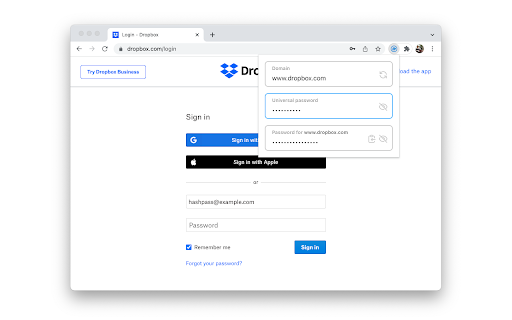
Hashpass is a password manager which doesn't store any passwords. Instead, it generates passwords on the fly using a cryptographic hash function of the domain of the website you're visiting and a single universal password that you memorize. This gives you (a) the security of having a unique password for each website, (b) the convenience of only having to memorize one password, and (c) the comfort of knowing that neither you nor any third party can lose or leak your passwords.
Suppose your universal password is "correcthorsebatterystaple", and you want to sign up for or log into example.com. Hashpass combines your universal password with the website domain as follows: "example.com/correcthorsebatterystaple". It then computes the SHA-256 hash of that string. It hashes it again and again, 2^16 times in total. Finally, it outputs the first 96 bits of the result, encoded as 16 characters in Base64. For this example, the final output is "CqYHklMMg9/GTL0g". That's your password for example.com.
Once installed, you can find the Hashpass button next to your address bar or in the extensions dropdown. By default, you can also open Hashpass with Ctrl+Shift+P (Cmd+Shift+P on macOS).
Reviews
Loading reviews...
Permissions (2)
Permissions
activeTabℹ Can access the current tab when you click the extension scriptingℹ Can inject scripts into web pages
Details
| Version | 2.1.7 |
| Updated | Jan 8, 2024 |
| Size | 222KiB |
| First Seen | Mar 24, 2026 |
Popular in tools

Browsec VPN - Free VPN for Chrome
by Browsec
7M
★ 4.44
tools
7M
★ 4.44
tools

Microsoft Bing Homepage & Search for Chrome
by Microsoft Corporation
4M
★ 3.72
tools
4M
★ 3.72
tools

Monica: All-In-One AI Assist & Smartest AI Agent
by Monica Team
3M
★ 4.89
tools
3M
★ 4.89
tools

Ad Blocker: Stands AdBlocker
by Stands
3M
★ 4.79
tools
3M
★ 4.79
tools

Google Dictionary (by Google)
by dictionary-extension-dev
3M
★ 4.36
tools
3M
★ 4.36
tools
Popular Extensions

Adobe Acrobat: PDF edit, convert, sign tools
by Adobe Inc.
330M
★ 4.40
workflow
330M
★ 4.40
workflow

Chrome Remote Desktop
by Chrome Remote Desktop Release Managers
38M
★ 3.14
workflow
38M
★ 3.14
workflow

Cisco Webex Extension
by cisco.chromestore
24M
★ 2.34
social
24M
★ 2.34
social

Kami for Google Chrome™
by Kami
17M
★ 4.56
education
17M
★ 4.56
education

Read&Write for Google Chrome™
by Texthelp
17M
★ 3.44
accessibility
17M
★ 3.44
accessibility