
⚠️Not updated in over 2 years
Description
To help you access your favorite websites much faster, "Speed Dial World" is an add-on.
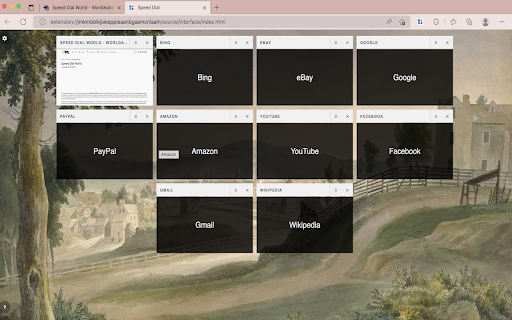
On any page, simply right-click and then pick Add to Speed Dial. You may also right-click on the toolbar button and choose Add to Speed Dial from there. A screenshot of the website will be added to the speed dial page. To access your speed dial, click on the toolbar symbol. Within the UI of speed dial, there is a settings sidebar that allows you to change certain aesthetic preferences. There are several background pictures included (open sidebar for alternate options). Please keep in mind that all preferences are auto-saved in memory.
Note 1: When you first install the plugin, few websites are added to your speed dial automatically from your history (most visited sites). These websites do not have a screenshot.
Note 2: A user might drag and drop any of the speed dial UI's cells to a new position. Simply drag and drop the cell to your preferred location; all cells will be reordered automatically, and you'll be able to store them to memory.
Note 3: The "Speed Dial World" add-on does not alter the appearance of the new tab in your browser. It just creates a stand-alone page using Speed Dial UI.
Note 4: To add desired pages to the speed dial, use the keyboard command (Alt + Shift + A).
Note 5: To add the current tab or, if you want, all tabs to your speed dial, go to the extension's context menu and select "Add this tab or all tabs to my speed dial." If you choose all tabs, the extension will require broad host access.
Reviews
Loading reviews...
Permissions (2)
Permissions
contextMenusℹ Can add items to the right-click menu storageℹ Can store data locally in your browser
Details
| Version | 0.1 |
| Updated | Jun 26, 2022 |
| Size | 15.53MiB |
| First Seen | Mar 24, 2026 |
More by Curt Norval

Popular in workflow

Adobe Acrobat: PDF edit, convert, sign tools
by Adobe Inc.
330M
★ 4.40
workflow
330M
★ 4.40
workflow

Chrome Remote Desktop
by Chrome Remote Desktop Release Managers
38M
★ 3.14
workflow
38M
★ 3.14
workflow

Microsoft Power Automate
by Microsoft Corporation
10M
★ 1.99
workflow
10M
★ 1.99
workflow

Screencastify - Screen Video Recorder
by castify-ext-dev
9M
★ 3.95
workflow
9M
★ 3.95
workflow

iCloud Bookmarks
by Apple Inc.
7M
★ 3.38
workflow
7M
★ 3.38
workflow
Popular Extensions
Adobe Acrobat: PDF edit, convert, sign tools
by Adobe Inc.
330M
★ 4.40
workflow
330M
★ 4.40
workflow
Chrome Remote Desktop
by Chrome Remote Desktop Release Managers
38M
★ 3.14
workflow
38M
★ 3.14
workflow

Cisco Webex Extension
by cisco.chromestore
24M
★ 2.34
social
24M
★ 2.34
social

Kami for Google Chrome™
by Kami
17M
★ 4.56
education
17M
★ 4.56
education

Read&Write for Google Chrome™
by Texthelp
17M
★ 3.44
accessibility
17M
★ 3.44
accessibility