
⚠️Not updated in over 2 years
Description
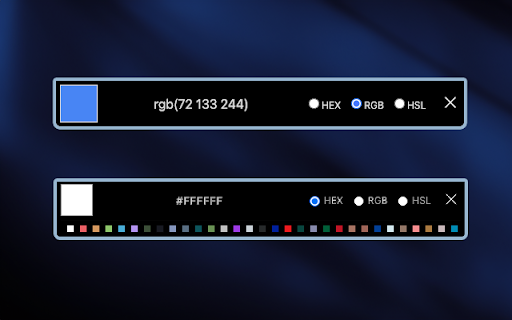
MZ Color Picker Chrome extension allows you to capture colors directly from your browser's web pages. It simplifies the process of color selection. With a single click, you can effortlessly sample any color you encounter while browsing the web. Whether you stumble upon a visually stunning website, inspiring artwork, or a beautifully designed interface, this extension lets you instantly identify and extract the exact hues that catch your eye.
Features: 🎨
1. Intuitive Interface: select colors directly from the Chrome extension icon. There are no annoying pop-ups or additional windows to contend with.
2. Color Formats: the extension supports Hex, RGB, and HSL color formats.
3. Copy to Clipboard: users can copy the selected color code to their clipboard with a single click.
4. Secure and Privacy-Focused 🛡️: privacy is a top priority. The extension does not track or store user data, ensuring a secure and private browsing experience.
5. Color History: The extension keeps a history of recently picked colors, making it convenient for users to revisit and reuse their selected colors without the need for repeated sampling.
How to Use: 📔
1. Start by installing the extension from the Chrome Web Store.
2. After installation, you should see the extension's icon in the Chrome toolbar, typically located in the top-right corner of your browser. It might look like a puzzle piece, a gear, or another icon, depending on your browser version and theme.
3. Click on it and pin the MZ Color Picker extension to the top bar.
4. Click on the MZ Color Picker extension icon to pick colors.
Reviews
Loading reviews...
Permissions (3)
Permissions
activeTabℹ Can access the current tab when you click the extension storageℹ Can store data locally in your browser tabsℹ Can see your open tabs and their URLs
Details
| Version | 1.0.2 |
| Updated | Oct 12, 2023 |
| Size | 358KiB |
| First Seen | Mar 25, 2026 |
More by jsoceandiver



Popular in developer

TouchEn PC보안 확장
by 라온시큐어
8M
★ 1.33
developer
8M
★ 1.33
developer

React Developer Tools
by Meta
5M
★ 3.95
developer
5M
★ 3.95
developer

WhatFont
by Chengyin Liu
3M
★ 4.01
developer
3M
★ 4.01
developer

Take Webpage Screenshots Entirely - FireShot
by Evgeny Vokilsus
3M
★ 4.79
developer
3M
★ 4.79
developer

Lighthouse
by lighthouse-extension-owners
1M
★ 4.42
developer
1M
★ 4.42
developer
Popular Extensions

Adobe Acrobat: PDF edit, convert, sign tools
by Adobe Inc.
331M
★ 4.40
workflow
331M
★ 4.40
workflow

Grammarly: AI Writing Assistant and Grammar Checker App
by Grammarly
42M
★ 4.50
communication
42M
★ 4.50
communication

Chrome Remote Desktop
by Chrome Remote Desktop Release Managers
38M
★ 3.14
workflow
38M
★ 3.14
workflow

Microsoft Single Sign On
by Microsoft
36M
★ 2.27
workflow
36M
★ 2.27
workflow

Cisco Webex Extension
by cisco.chromestore
23M
★ 2.34
social
23M
★ 2.34
social