
⚠️Not updated in over 2 years
Description
Features ⭐
1. Enable/Disable JavaScript for Specific Websites: users can toggle JavaScript on or off for individual websites with a single click.
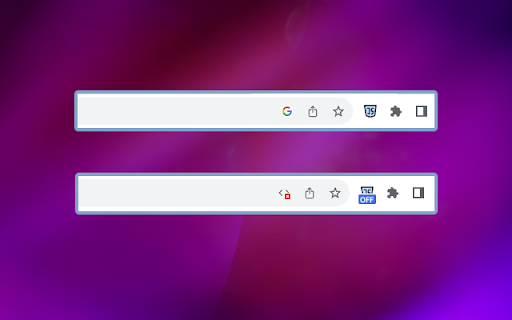
2. 'OFF' Badge for Disabled Websites 📌: the extension adds a visual indicator in the form of an 'OFF' badge to websites where JavaScript has been disabled.
3. Real-time Updates: the extension ensures real-time updates, instantly applying changes in JavaScript settings without requiring users to refresh the page.
4. Secure and Privacy-Focused 🛡️: privacy is a top priority. The extension does not track or store user data, ensuring a secure and private browsing experience.
5. Keyboard Shortcuts ⌨️: Alt+1 keyboard shortcuts for enabling/disabling JavaScript to enhance accessibility.
How to Use: 📔
1. Start by installing the extension from the Chrome Web Store.
2. After installation, you should see the extension's icon in the Chrome toolbar, typically located in the top-right corner of your browser. It might look like a puzzle piece, a gear, or another icon, depending on your browser version and theme.
3. Click on it and pin the MZ Disable JavaScript extension to the top bar.
4. Click on the MZ Disable JavaScript extension icon to enable/disable JavaScript for specific website.
Reviews (1 cached)
★☆☆☆☆2024-12-31
Linda Darlene Hillerbrandt
This might work for casual users, but for developers/power users it fails on the sites that need it most. Tested with a popular torrent site that is notorious for using JavaScript (the requirement to allow JavaScript) to get around both Ad Blockers as well 100% negating he basic chrome features that combined should not only block all popups, background windows opening, and intrusive/adult ads. Tested by blocking every setting except JavaScript, turning on this extension & giving it full permissions, and turning off all other adblockers. Instantly the site knew I was using a JavaScript manipulating extension. Tested additional times with varying combinations of top rated ad blockers & this extension combined. No change.
Permissions (3)
Permissions
activeTabℹ Can access the current tab when you click the extension contentSettingsℹ Can change content settings like JavaScript and cookies per-site tabsℹ Can see your open tabs and their URLs
Details
| Version | 1.0.2 |
| Updated | Oct 11, 2023 |
| Size | 504KiB |
| First Seen | Mar 21, 2026 |
Popular in developer

Lighthouse
by lighthouse-extension-owners
1M
★ 4.42
developer
1M
★ 4.42
developer

Контур.Плагин
by kontur.extension
1M
★ 3.11
developer
1M
★ 3.11
developer

Similarweb - Website Traffic & SEO Checker
by Similarweb
1M
★ 4.66
developer
1M
★ 4.66
developer

Clear Cache
by Little Void LLC (Ben Bojko)
1M
★ 4.45
developer
1M
★ 4.45
developer

SEO META in 1 CLICK
by Bilal Hadri
900K
★ 4.87
developer
900K
★ 4.87
developer
Popular Extensions

Adobe Acrobat: PDF edit, convert, sign tools
by Adobe Inc.
330M
★ 4.40
workflow
330M
★ 4.40
workflow

Chrome Remote Desktop
by Chrome Remote Desktop Release Managers
38M
★ 3.14
workflow
38M
★ 3.14
workflow

Cisco Webex Extension
by cisco.chromestore
24M
★ 2.34
social
24M
★ 2.34
social

Kami for Google Chrome™
by Kami
17M
★ 4.56
education
17M
★ 4.56
education

Read&Write for Google Chrome™
by Texthelp
17M
★ 3.44
accessibility
17M
★ 3.44
accessibility