
⚠️Not updated in over 2 years
Description
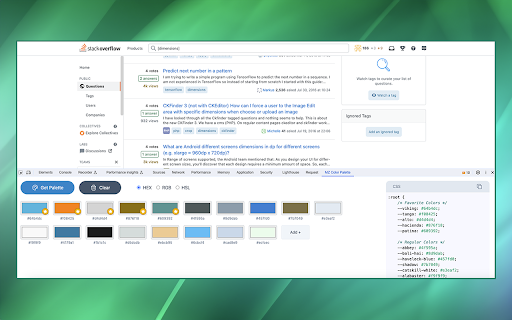
MZ Color Palette allows you to analyze and extract the color palette of the visible area within any open tab. Whether you're a web developer aiming to match a website's color scheme or a designer seeking inspiration from the visual elements of different web pages, the MZ Color Palette extension simplifies the process and provides the tools you need to work efficiently and creatively.
FEATURES: ⭐
1. Color Extraction: The extension can extract colors from the visible area of any web page, providing insight into the website's color scheme.
2. Color Format Support: It supports HEX, RGB, and HSL color types, allowing you to work with colors in your preferred format.
3. CSS Color Variables: Generate CSS with color variables for the extracted colors, making it easy to integrate them into your projects with a professional and consistent look.
4. Color Storage: All extracted colors are conveniently stored within the extension, ensuring that you have a comprehensive record of the palettes you've encountered and created.
5. Favorite Colors: The extension has a favorite colors support system, enabling you to mark and organize colors that inspire you or that you plan to use frequently.
6. Secure and Privacy-Focused 🛡️: privacy is a top priority. The extension does not track or store user data, ensuring a secure and private browsing experience.
How to Use: 📔
1. Installation: Start by installing the MZ Color Palette Chrome Extension from the Chrome Web Store. Simply search for the extension and click "Add to Chrome."
2. Accessing the Extension: After installation, open your Chrome browser and navigate to a web page you'd like to analyze for its color palette.
3. Open Developer Tools: To access the extension's functionality, open Chrome's Developer Tools. You can do this by right-clicking anywhere on the web page and selecting "Inspect" or by pressing Ctrl+Shift+I (or Cmd+Option+I on Mac).
4. Extension Tab: In the Developer Tools panel, you'll notice a new tab added by the extension. Click on the tab labeled "MZ Color Palette".
Reviews
Loading reviews...
Permissions (1)
Permissions
storageℹ Can store data locally in your browser
Details
| Version | 1.0.0 |
| Updated | Oct 16, 2023 |
| Size | 2.78MiB |
| First Seen | Mar 28, 2026 |
More by jsoceandiver



Popular in developer

TouchEn PC보안 확장
by 라온시큐어
8M
★ 1.33
developer
8M
★ 1.33
developer

React Developer Tools
by Meta
5M
★ 3.95
developer
5M
★ 3.95
developer

WhatFont
by Chengyin Liu
3M
★ 4.01
developer
3M
★ 4.01
developer

Lighthouse
by lighthouse-extension-owners
1M
★ 4.42
developer
1M
★ 4.42
developer

Контур.Плагин
by kontur.extension
1M
★ 3.11
developer
1M
★ 3.11
developer
Popular Extensions

Adobe Acrobat: PDF edit, convert, sign tools
by Adobe Inc.
331M
★ 4.40
workflow
331M
★ 4.40
workflow

Grammarly: AI Writing Assistant and Grammar Checker App
by Grammarly
42M
★ 4.50
communication
42M
★ 4.50
communication

Chrome Remote Desktop
by Chrome Remote Desktop Release Managers
38M
★ 3.14
workflow
38M
★ 3.14
workflow

Microsoft Single Sign On
by Microsoft
36M
★ 2.27
workflow
36M
★ 2.27
workflow

Cisco Webex Extension
by cisco.chromestore
23M
★ 2.34
social
23M
★ 2.34
social