Print Perfect AI Text Editor
v1.2.0 Updated May 24, 2024 34.04KiB
⚠️Not updated in over a year
Description
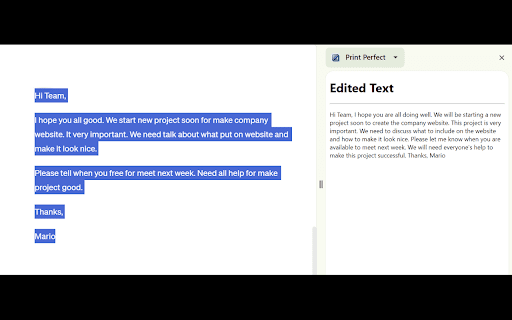
Print Perfect is powered by Open AI and uses semantic correction to make your text sound like it was written by a native English speaker. Simply highlight and right click the text you want to edit. Next, click the "Print Perfect" button and watch your edited text appear in the side panel. It's super easy to use and perfect for emails, website development, e-commerce listings, and so much more!
Updates:
1.1.0:
- Made the text in the side panel larger.
- Added a survey tab popup for user feedback.
- Tweaked the Open AI prompt to create better answers.
Reviews
Loading reviews...
Permissions (4)
Permissions
contextMenusℹ Can add items to the right-click menu sidePanel storageℹ Can store data locally in your browser tabsℹ Can see your open tabs and their URLs
Details
| Version | 1.2.0 |
| Updated | May 24, 2024 |
| Size | 34.04KiB |
| First Seen | Mar 26, 2026 |
Popular in tools

Browsec VPN - Free VPN for Chrome
by Browsec
7M
★ 4.44
tools
7M
★ 4.44
tools

AnyDoc Translator - Translate Web and PDF
by www.wps.com
7M
★ 4.59
tools
7M
★ 4.59
tools

Microsoft Bing Homepage & Search for Chrome
by Microsoft Corporation
4M
★ 3.72
tools
4M
★ 3.72
tools

IE Tab
by Blackfish Software
4M
★ 4.31
tools
4M
★ 4.31
tools

Monica: All-In-One AI Assist & Smartest AI Agent
by Monica Team
3M
★ 4.89
tools
3M
★ 4.89
tools
Popular Extensions

Adobe Acrobat: PDF edit, convert, sign tools
by Adobe Inc.
330M
★ 4.40
workflow
330M
★ 4.40
workflow

Chrome Remote Desktop
by Chrome Remote Desktop Release Managers
38M
★ 3.14
workflow
38M
★ 3.14
workflow

Cisco Webex Extension
by cisco.chromestore
24M
★ 2.34
social
24M
★ 2.34
social

Kami for Google Chrome™
by Kami
17M
★ 4.56
education
17M
★ 4.56
education

Read&Write for Google Chrome™
by Texthelp
17M
★ 3.44
accessibility
17M
★ 3.44
accessibility