
⚠️Not updated in over 2 years
Description
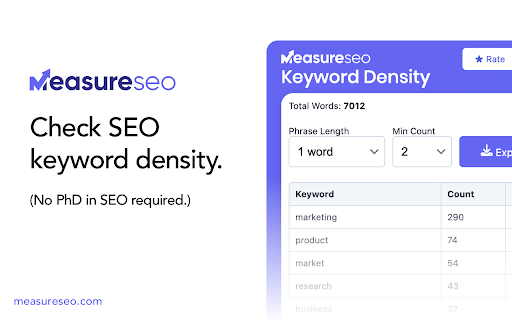
Easy to use SEO keyword density checker that shows the most frequently used keywords by count and density of any web page.
We’re excited to release new features based on customer feedback and support questions. Here’s a few of them…
🆕 What's new
- We've improved extraction support for pages in different languages that do not use English letters, such as Greek, Russian, Chinese, etc. This is still being refined so please provide feedback if there's a language specific issue that comes up.
- Improved UTF-8 character recognition
✅ Features
- Adjust the phrase length of keywords displayed in the keywords table
- Set a minimum count of words to display in the table.
- Export keywords you find on the page as a CSV
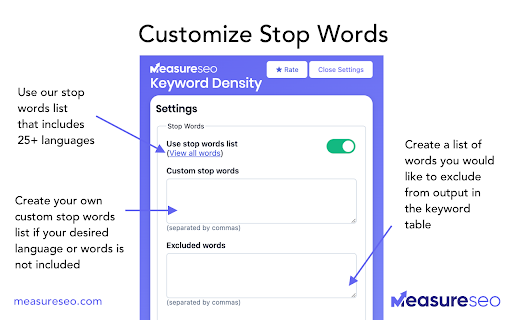
- Multilingual stop words added with stop words in 25+ languages. View the complete list of languages here: https://www.measureseo.com/stop-words-list/
- Custom stop words: add your own stop words list (comma separated)
- Excluded words: add words you don’t want to appear in the keyword table (comma separated)
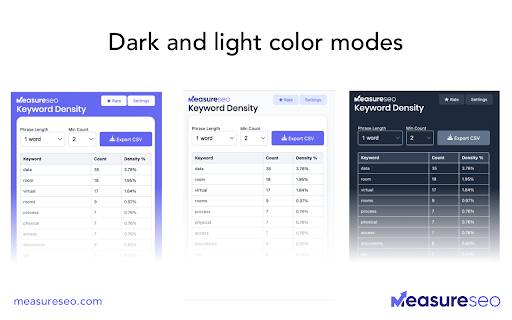
- Multiple color modes.
- Total words for the web page are displayed above the keywords tables.
- List of all keywords used on a page (Note: "stop words" are removed from analysis by default)
- Count of how many times each keyword appears on the page
- Percentage breakdown of how many times that keyword appears relative to the total number of words used on the page.
✨ Tips & tricks
- Recommended min word count setting is 2 words. Why? If a word does not occur on a page frequently, it’s probably not an important key word for the page. If a word occurs multiple times, that’s a positive indicator that it’s important.
- The easiest pages to analyze tend to be blog posts and landing pages.
- Forums, web apps like Facebook, etc, tend to be harder to analyze as most of their content is rendered with Javascript. If you encounter a site with too much Javascript, you can add some of the Javascript phrases/tags you see to the “excluded words” table to help hide it from the keywords table.
💬 Help & Support
https://docs.google.com/forms/d/e/1FAIpQLSe1tk5euOdUtKWJtwV1r2G2rL_dxvu_LlXYKiFp3ycQbjbupw/viewform
==================
In most cases it's best for SEO to keep each keyword used to under 3% of the total word count. Google and other search engines have started penalizing excessive and unnatural use of keywords to avoid keyword stuffing and other practices that encourage poor content.
This free tool is brought to you by:
MeasureSEO.com

Reviews (2 cached)
★☆☆☆☆2025-03-12
Zaraq Shahzad
poor in terms of accuracy, I've tried in Google Docs and it sucks
★☆☆☆☆2022-04-17
Sorin Albu
can't add stop words, it's a mess
Permissions (4)
Permissions
activeTabℹ Can access the current tab when you click the extension scriptingℹ Can inject scripts into web pages storageℹ Can store data locally in your browser tabsℹ Can see your open tabs and their URLs
Details
| Version | 1.60 |
| Updated | Dec 17, 2023 |
| Size | 68.45KiB |
| First Seen | Mar 22, 2026 |
More by Jesse Jones

Popular in tools

Monica: All-In-One AI Assist & Smartest AI Agent
by Monica Team
3M
★ 4.89
tools
3M
★ 4.89
tools

Ad Blocker: Stands AdBlocker
by Stands
3M
★ 4.79
tools
3M
★ 4.79
tools

Google Dictionary (by Google)
by dictionary-extension-dev
3M
★ 4.36
tools
3M
★ 4.36
tools

WPS浏览器助手:文档在线阅读编辑
by 金山PDF
2M
★ 2.90
tools
2M
★ 2.90
tools

Pie Adblock - A Powerful Free Ad Blocker
by Pie Extensions
2M
★ 4.90
tools
2M
★ 4.90
tools
Popular Extensions

Adobe Acrobat: PDF edit, convert, sign tools
by Adobe Inc.
330M
★ 4.40
workflow
330M
★ 4.40
workflow

Chrome Remote Desktop
by Chrome Remote Desktop Release Managers
38M
★ 3.14
workflow
38M
★ 3.14
workflow

Cisco Webex Extension
by cisco.chromestore
24M
★ 2.34
social
24M
★ 2.34
social

Kami for Google Chrome™
by Kami
17M
★ 4.56
education
17M
★ 4.56
education

Read&Write for Google Chrome™
by Texthelp
17M
★ 3.44
accessibility
17M
★ 3.44
accessibility