
Snapseed for Pc,Windows and Mac (Free Download)
v1.1 Updated Feb 29, 2024 462KiB
⚠️Not updated in over 2 years ⚠️Below average rating
Description
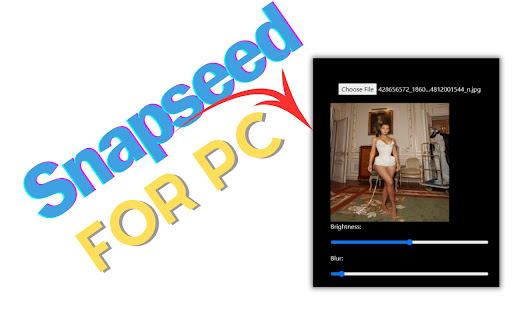
Snapseed for PC, Windows, and Mac offers easy-to-use editing features like brightness adjustment, blur effects, and custom dimensions. Simply upload your image, apply effects, and download your edited masterpiece. This simple extension brings Snapchat's fun editing capabilities to your desktop.
✅ Snapseed Extension Features
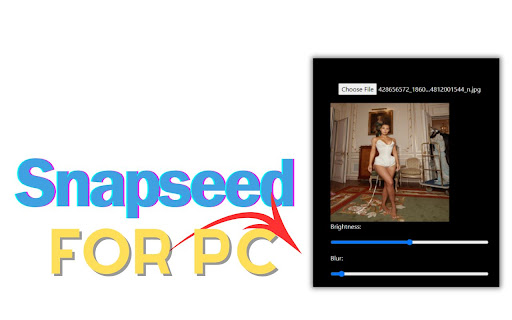
✔️Choose File: Upon uploading any image file here, you will discover options for editing the image.
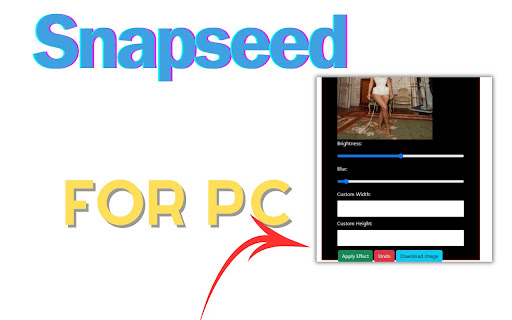
✔️Effect: After the image is uploaded, you can modify various aspects such as Brightness, Blur, custom width, and Custom Height of the image from this platform. Upon completing the image editing process, clicking on 'Apply Effect' will save the changes. Subsequently, upon clicking 'Download', the edited image will be downloaded. Clicking 'Undo' will revert the image to its previous state."
✔️Easy To use
✔️Simple Extension
✅ How To Use Snapseed on PC?
Step 1: Start by adding this extension to your Chrome browser by clicking "Add to Chrome."
Step 2: Next, click on the Extension icon.
Step 3: You will see:
"Choose File"
"Effect"
"Apply Effect"
"Undo"
"Download"
Step 4: Choose File,Here image is uploaded, you have the option to adjust several parameters including Brightness, Blur, custom width, and custom height directly within this platform. Upon finishing the editing process, selecting 'Apply Effect' will confirm the changes. Subsequently, clicking 'Download' will save the edited image. If needed, selecting 'Undo' will revert the image to its original state.
Step 5: Enjoy a safer browsing experience!
✅ Disclaimer:
Please note that "Snapseed for PC, Windows, and Mac" Chrome Extension is an independent product and is not associated, affiliated, or endorsed by the Snapseed Android app or its developers. We respect intellectual property rights and make no claim to any copyrights associated with the Snapseed Android app.
Reviews (2 cached)
★☆☆☆☆2025-03-13
Ash Zen
it can only increase or decrease brightness
★★☆☆☆2025-09-05
Myron Edwards
It Only Let's You Increase or Descrease Saturation!!! and The Blur Effect is Blah!!!
Details
| Version | 1.1 |
| Updated | Feb 29, 2024 |
| Size | 462KiB |
| First Seen | Mar 21, 2026 |
More by hellosuhel2334

Popular in communication

Loom – Screen Recorder & Screen Capture
by Loom
8M
★ 4.58
communication
8M
★ 4.58
communication

ScreenPal - Screen Recorder & Video Editor
by ScreenPal (formerly Screencast-O-Matic)
100K
★ 4.31
communication
100K
★ 4.31
communication

Reminders for Google Calendar™
by SMS Reminder for Google Calendar™
50K
★ 3.64
communication
50K
★ 3.64
communication

HTML Editor for Gmail by cloudHQ
by cloudHQ
40K
★ 4.06
communication
40K
★ 4.06
communication

Tab Translate
by Tab Translate
20K
★ 4.58
communication
20K
★ 4.58
communication
Popular Extensions

Adobe Acrobat: PDF edit, convert, sign tools
by Adobe Inc.
330M
★ 4.40
workflow
330M
★ 4.40
workflow

Chrome Remote Desktop
by Chrome Remote Desktop Release Managers
38M
★ 3.14
workflow
38M
★ 3.14
workflow

Cisco Webex Extension
by cisco.chromestore
24M
★ 2.34
social
24M
★ 2.34
social

Kami for Google Chrome™
by Kami
17M
★ 4.56
education
17M
★ 4.56
education

Read&Write for Google Chrome™
by Texthelp
17M
★ 3.44
accessibility
17M
★ 3.44
accessibility