
⚠️Not updated in over 2 years
Description
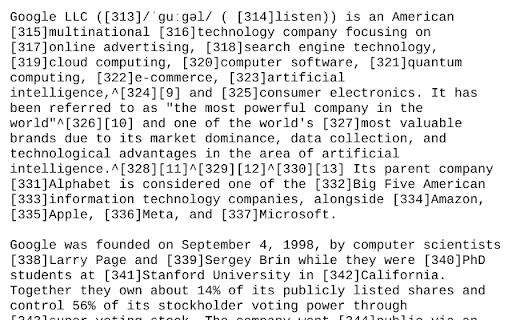
Simple open source extension to view the current web-page or the selected link rendered as text using the w3.org html2txt webpage.
This enables you to quickly view a web-page rendered as text along with a list of the urls from the web-page. This saves manually going to https://www.w3.org/services/html2txt and manually entering the url you want to view as text.
Three ways to use:
- Open link in the w3.org html2txt web-page: Right hand click on a link and select "View link as txt".
- Open the URL of the current tab in the w3.org html2txt web-page: Right hand click on a blank area of the current web-page and select "View page as txt".
- Open the URL of the current tab in the w3.org html2txt web-page: Click on the "View webpage as TXT" icon in the extension toolbar.
Source code available from https://github.com/clove3am/chrome-html-to-txt

Reviews
Loading reviews...
Permissions (2)
Permissions
activeTabℹ Can access the current tab when you click the extension contextMenusℹ Can add items to the right-click menu
Details
| Version | 1.0 |
| Updated | Jun 24, 2023 |
| Size | 6.25KiB |
| First Seen | Mar 21, 2026 |
Popular in workflow

Adobe Acrobat: PDF edit, convert, sign tools
by Adobe Inc.
330M
★ 4.40
workflow
330M
★ 4.40
workflow

Chrome Remote Desktop
by Chrome Remote Desktop Release Managers
38M
★ 3.14
workflow
38M
★ 3.14
workflow

Microsoft Power Automate
by Microsoft Corporation
10M
★ 1.99
workflow
10M
★ 1.99
workflow

Screencastify - Screen Video Recorder
by castify-ext-dev
9M
★ 3.95
workflow
9M
★ 3.95
workflow

Mendeley Web Importer
by Mendeley
3M
★ 2.25
workflow
3M
★ 2.25
workflow
Popular Extensions
Adobe Acrobat: PDF edit, convert, sign tools
by Adobe Inc.
330M
★ 4.40
workflow
330M
★ 4.40
workflow
Chrome Remote Desktop
by Chrome Remote Desktop Release Managers
38M
★ 3.14
workflow
38M
★ 3.14
workflow

Cisco Webex Extension
by cisco.chromestore
24M
★ 2.34
social
24M
★ 2.34
social

Kami for Google Chrome™
by Kami
17M
★ 4.56
education
17M
★ 4.56
education

Read&Write for Google Chrome™
by Texthelp
17M
★ 3.44
accessibility
17M
★ 3.44
accessibility