
Description
# Deepseek AI Analyzer Pro
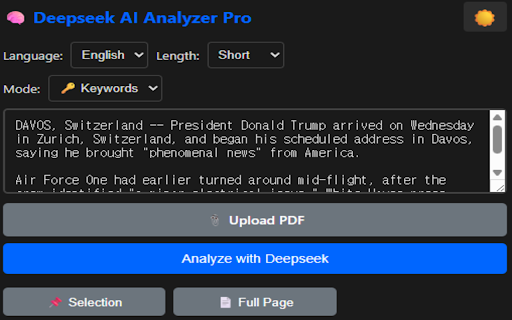
Transform how you analyze investment reports and financial news with the power of local AI.
## 🚀 Key Features
**Multiple Analysis Modes:**
- 📊 Investment Report Summary - Extract target price, ratings, and key points
- 📰 News Translation & Summary - Get English summaries with investor takeaways
- 🔑 Keyword Extraction - Pull out 8-12 key terms instantly
- 🌐 Translation - Full text translation without summarization
- 🔄 Multi-Report Comparison - Compare multiple analyst reports side-by-side
- 💬 Context-Aware Q&A - Ask follow-up questions about your documents
**Productivity Boosters:**
- ⚡ Real-time streaming responses (see results as they generate)
- 📌 Auto-capture selected text from any webpage
- 📋 One-click copy to clipboard
- ⭐ Bookmark important analyses
- 📊 Export results to CSV
- 📝 Save custom prompt templates
- 🌙 Dark mode for comfortable late-night work
**Privacy-First Design:**
- 🔒 100% local processing - your data never leaves your computer
- 🖥️ Runs on Ollama with Deepseek-R1 model
- 🚫 No cloud API, no data collection, no subscription fees
**Multilingual Support:**
Output in English, 日本語, 中文, or 한국어
## 📋 Requirements
1. [Ollama](https://ollama.com) installed locally
2. Deepseek-R1 model: `ollama pull deepseek-r1:7b`
3. Ollama server running: `ollama serve`
4. Set OLLAMA_ORIGINS environment variable (see setup guide)
## 🎯 Perfect For
- Individual investors analyzing brokerage reports
- Traders scanning multiple news sources
- Researchers processing large documents
- Anyone needing fast, private AI analysis
## 🔧 Setup Guide
1. Install Ollama from ollama.com
2. Open terminal/command prompt
3. Run: `ollama pull deepseek-r1:7b`
4. Set environment: `OLLAMA_ORIGINS=*`
5. Start server: `ollama serve`
6. Open extension and start analyzing!
## 🆓 Completely Free
No API keys, no subscriptions, no hidden costs. Just install Ollama and go.
## 🔗 Links
- GitHub: [Your repo URL]
- Documentation: [Your docs URL]
- Report Issues: [Your issues URL]
---
**Note:** This extension requires a local Ollama installation. Internet connection is NOT required for analysis (only for initial model download).


Reviews
Loading reviews...
Permissions (4)
Permissions
activeTabℹ Can access the current tab when you click the extension contextMenusℹ Can add items to the right-click menu scriptingℹ Can inject scripts into web pages storageℹ Can store data locally in your browser
Details
| Version | 2.1.0 |
| Updated | Jan 27, 2026 |
| Size | 30.95KiB |
| First Seen | Mar 22, 2026 |
Popular in tools

Microsoft Bing Homepage & Search for Chrome
by Microsoft Corporation
4M
★ 3.72
tools
4M
★ 3.72
tools

Monica: All-In-One AI Assist & Smartest AI Agent
by Monica Team
3M
★ 4.89
tools
3M
★ 4.89
tools

Ad Blocker: Stands AdBlocker
by Stands
3M
★ 4.79
tools
3M
★ 4.79
tools

Google Dictionary (by Google)
by dictionary-extension-dev
3M
★ 4.36
tools
3M
★ 4.36
tools

WPS浏览器助手:文档在线阅读编辑
by 金山PDF
2M
★ 2.90
tools
2M
★ 2.90
tools
Popular Extensions

Adobe Acrobat: PDF edit, convert, sign tools
by Adobe Inc.
330M
★ 4.40
workflow
330M
★ 4.40
workflow

Chrome Remote Desktop
by Chrome Remote Desktop Release Managers
38M
★ 3.14
workflow
38M
★ 3.14
workflow

Cisco Webex Extension
by cisco.chromestore
24M
★ 2.34
social
24M
★ 2.34
social

Kami for Google Chrome™
by Kami
17M
★ 4.56
education
17M
★ 4.56
education

Read&Write for Google Chrome™
by Texthelp
17M
★ 3.44
accessibility
17M
★ 3.44
accessibility